Runna’s own Apple Watch app is the better way to follow its plans, because it is the only route that speaks pace coaching in your ear. Apple’s Workouts app can run the same Runna sessions on Apple’s familiar screens, but the voice goes, and you get Apple’s standard alerts instead. Either way, the finished run goes back to Runna and is matched to the planned session.
Runna is the training plan app owned by Strava. It builds a plan from your goal, current fitness and the days you can run, then puts each session on the watch. An interval session runs step by step on the wrist, with the warm-up, reps, recoveries and cool-down each carrying their own pace target.
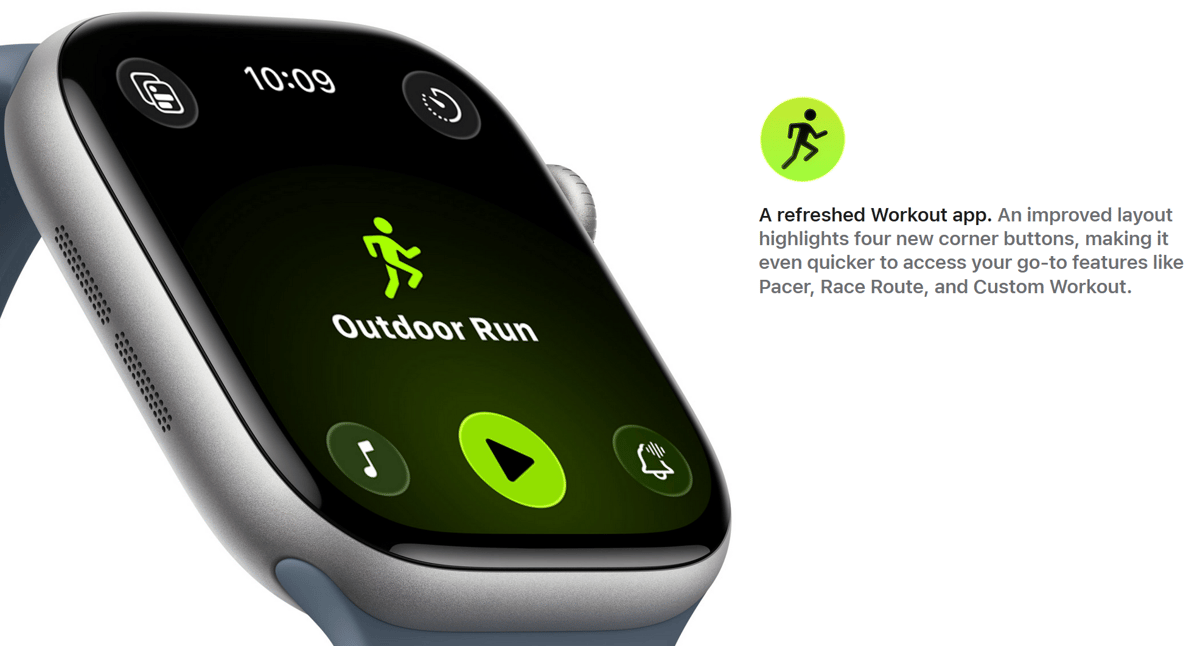
Which Apple Watch works with Runna
The Runna watch app needs Series 4 or later on watchOS 10.6.2 or newer, according to Runna’s Apple Watch guide. Starting Runna sessions from Apple’s Workouts app needs iOS 18.3 and watchOS 10 or later. Since iOS 26, Series 4 and the first-generation SE can no longer use that Workouts route, although the Runna app still runs on them, and Workouts syncing can also stop on a Series 5 that is still on watchOS 10. The best Apple Watch for sport guide covers which current model suits a runner, and the Apple Watch hub has the wider coverage.
Premium subscribers get the next two weeks of scheduled runs on the watch, refreshed every Sunday, while a free trial includes the first week. The Is Runna free? guide covers what the trials include and what Premium costs.
How to set up Runna on Apple Watch
- In the Runna app on the iPhone, open Profile, then Connected Apps & Devices, then Connect Watch, and choose Apple Watch.
- Accept the permission requests, especially Location and Health.
- In Apple’s Watch app on the iPhone, scroll to Runna and tap Install. The app takes a minute or two to appear on the watch.
- Check that Location Services is on and that every Health permission for Runna is switched on, including Running Speed, which the pace readings depend on.
- Turn off Cover to Mute in the Watch app’s Sounds & Haptics settings, because a covered screen otherwise silences the voice coaching.
Distance units on the watch follow the setting in the Runna app, so switch between kilometres and miles there.
What Runna does on the watch
Structured workouts and pace targets
The watch moves through each step of a session by itself and buzzes at every change, so there is no workout to memorise. A pace target screen shows whether you are running faster or slower than the target for the current rep, and it stays on screen for the whole structured session. With Double Tap to End Lap turned on in Runna’s settings, a pinch ends a step early. On Apple Watch Ultra, the Action Button does the same once you set it to open Runna in the watch’s Action Button settings.
Audio coaching
Runna’s voice tells you to speed up or slow down against the pace target, reads out lap splits and announces each new step. You choose how often it speaks in the phone app, through the feedback distance setting. The cues play from whichever device started the run, so for a phone-free run with music, connect headphones to the watch only and start both the run and the music from the watch. With headphones connected to both the watch and the phone, the cues may not play at all.
Live data
The watch shows pace, distance, time, heart rate, cadence, elevation and calories. Runners who join Runna Labs can add, remove and reorder those data screens on the watch.
After the run
The finished run saves to Apple Health and Apple Fitness and reaches Runna within a few minutes, where it sits against the planned session with splits and a comparison with each target. Runna can pass it on to Strava, and Runna recommends connecting only Runna to Strava, rather than Apple Health or the watch as well, so the run does not arrive twice. Runs started in the Runna watch app do not earn Apple’s awards, such as a fastest 5K medal.
Runna app vs Apple Workouts
Runna also sends scheduled sessions to Apple’s own Workouts app through Apple’s WorkoutKit. That suits a runner who prefers Apple’s screens, and the run still syncs back to Runna. You lose Runna’s spoken coaching, though, and you need to turn on the Apple Health and Apple Watch sync settings in Runna, plus give Runna permission to write workouts and routes to Apple Health.
| Feature | Runna watch app | Apple Workouts |
|---|---|---|
| Structured sessions step by step | Yes | Yes |
| Pace targets | Yes | Yes |
| Runna voice coaching | Yes | No |
| Apple’s workout screens | No | Yes |
| Apple awards for the run | No | Yes |
| Run syncs back to Runna | Yes | Yes |
Quick answers
Do you need your iPhone to run with Runna on Apple Watch?
No, not for outdoor runs. The Runna watch app starts and records a scheduled run using the watch’s own GPS, and the run syncs once the watch reconnects to the phone. Treadmill runs and plan changes still start on the iPhone.
Why does Runna not show heart rate on my Apple Watch?
A missing heart rate or pace reading usually means a Health permission is off. Turn on every toggle for Runna in the Health settings on both the watch and the iPhone, including Running Speed.
Can you use Runna on Apple Watch on a treadmill?
Yes. Start the treadmill run from the Runna app on the iPhone, and it mirrors to the watch, which then shows heart rate only.
Do Runna strength workouts sync to Apple Watch?
No. Only runs sync to the watch and back to your plan. Strength sessions stay in the Runna app, and strength, cycling, hikes, or walks recorded on the watch don’t count toward the plan.
Does Runna audio coaching work with Apple Workouts?
No. Runna’s spoken pace coaching only plays when the run is started in the Runna watch app. Apple’s Workouts app gives Apple’s standard alerts instead.
Limits of Runna on Apple Watch
- Only runs count towards the plan. Strength and mobility sessions stay in the phone app.
- Treadmill runs must start on the iPhone, and the mirrored watch screen then shows heart rate only.
- Voice coaching depends on where your headphones are connected, as described above.
- Wrist heart rate on any watch is least reliable during short, fast reps, which wrist heart rate accuracy explains. A chest strap fixes it, and the heart rate hub covers the options.
- GPS pace jumps around among tall buildings, so city-centre intervals read less steadily than the same session in a park. The GPS accuracy hub covers why.
Is Runna on Apple Watch worth using?
For a runner already following a Runna plan, the watch app takes the phone out of the run, and the voice keeps each rep on target without a glance at the wrist. A runner who only wants to log runs gets nothing from Runna that Apple’s free Workouts app already does. The adaptive pacing is what the subscription pays for, and Is Runna AI? explains how those targets change as you train, while Runna vs Strava covers whether you need to pay for a plan at all.
Last Updated on 12 November 2026 by tfk the5krunner
Small things I always use
- Garmin 90-degree charging adapter: Charges your Garmin with any USB-C cable. Essential when travelling. I use one.
- Body Glide: The blue anti-chafing stick swimmers and runners carry. I use it.
- Speedo earplugs: Fewer ear infections and no cold-water dizziness. I use them.
- Dryrobe Advance: My winter changing robe for open-water swims. I use one. A cheaper option is the AONYIYI changing robe.
- Maurten: Race fuel that stays easy on the stomach. I use them.
- Beet It Sport nitrate shots: Beetroot shots I take in the days before a race. I use them.
- Garmin charging puck: The quickest way to top up before a session. I use one.
- Injinji: Toe socks that stop rubbing, so you run more. I use them.
- Ultimate toe protectors: Stop black toenails on long runs. They work. I use them.
- Compressport R2 v2 calf sleeves: My calf sleeves of choice. I use them.
- Cellucor C4: My pre-workout before hard sessions.
- TPU tubes: Schwalbe Aerothan, Tubolito and Pirelli SmarTube. Light, tiny spares. I use all three.
- G8 insoles: Adjustable arches, perfect position. I use them.
- Cycplus Cube: A 97g electric pump that gets a road tyre rideable in two minutes. I carry one. 5% off with code THE5KRUNNER.
Health, recovery and sleep
- Kineon MOVE+: Red and infrared light for sore knees, Achilles and other joints after hard training. I use it.
- FreeStyle Libre 3 Plus: Shows how my blood sugar responds to diet. Occasional use.
- hDrop: Measures my sweat loss in summer and indoors. I use it.
- Fourth Frontier Zone: Checks my heart under load in hard sessions.
- Oura Ring 5: My partner’s recovery tracker of choice.
- Eight Sleep: A cooling mattress cover my partner and I use nightly.
Watches and sensors
- Polar H10: My daily driver for waking HRV.
- Polar Verity Sense: My backup arm-worn HR sensor.
- Nomad bedside charger: Charges my iPhone and Apple Watch overnight. I use it, and many of their bands.
- Train.Red: The best muscle oxygen sensor I’ve used. Occasional use.
- Tymewear: Accurate heart rate and reliable ventilatory zones. I use it to pace endurance rides over an hour.
- Garmin Forerunner 970: A pro-grade triathlon watch. I use this.
- Apple Watch Ultra 4: My daily smartwatch. No phone needed on rides.
On the bike
- Continental GP5000 for everyday riding, and Aero 111 on the front for special occasions. I use both.
- Helmets: Specialized S-Works Evade 3 for road riding, and Rudy Project Wing for TT-style races. I use both.
- Ravemen FR300: A front light that mounts under your Garmin or Wahoo. I use one.
- Ravemen FR1000: The light and the computer mount in one unit, so nothing else goes on the bars. Better than mine.
- Ravemen FR1500SE: 1,500 lumens hanging under your Garmin, for proper night rides.
- Ravemen FR1100SE: 1,100 lumens under your Garmin, and up to 46 hours on slow flash.
- Ravemen FR500: A brighter FR300 with the same mount.
- Wahoo TRACKR Radar: I use it on one bike and Varia on the other. They perform the same.
- Garmin Varia RTL515: Radar that warns you of cars from behind. I use this model.
- Wahoo ELEMNT Roam 3: The bike computer that’s easy to use. I use mine on most rides.
- Favero Assioma Pro RS2: Accurate power pedals that swap easily between bikes. I use this model.
Home and indoor training
- NPE Runn: Makes my basic treadmill smart, sending more accurate speed and distance to my watch and Zwift. I use it.
- Google Wifi: Keeps Zwift connected in my pain cave. I use it.
- Apple TV 4K: Zwift on the big screen. I use two.
- Google Nest Doorbell (wired, 2nd gen): My video doorbell, running in both Google Home and Apple Home via Starling. I use it.
Reader-Powered Content
This content is not sponsored. It’s mostly me behind the labour of love, which is this site, and I appreciate everyone who supports it.
Support the site: Follow (free, fewer ads) · Subscribe (paid, ad-free) · Buy Me A Coffee
Written by real people, with AI assistance. Fact-checked and verified for originality. See the Editorial Policy. FTC: Affiliate Disclosure — some links pay commission. As an Amazon Associate, I earn from qualifying purchases.
tfk is the founder and author of the5krunner, an independent endurance sports technology publication. With 20 years of hands-on testing of GPS watches and wearables, and competing in triathlons at an international age-group level, tfk provides in-depth expert analysis of fitness technology for serious athletes and endurance sport competitors. See the gear tfk uses. ID
