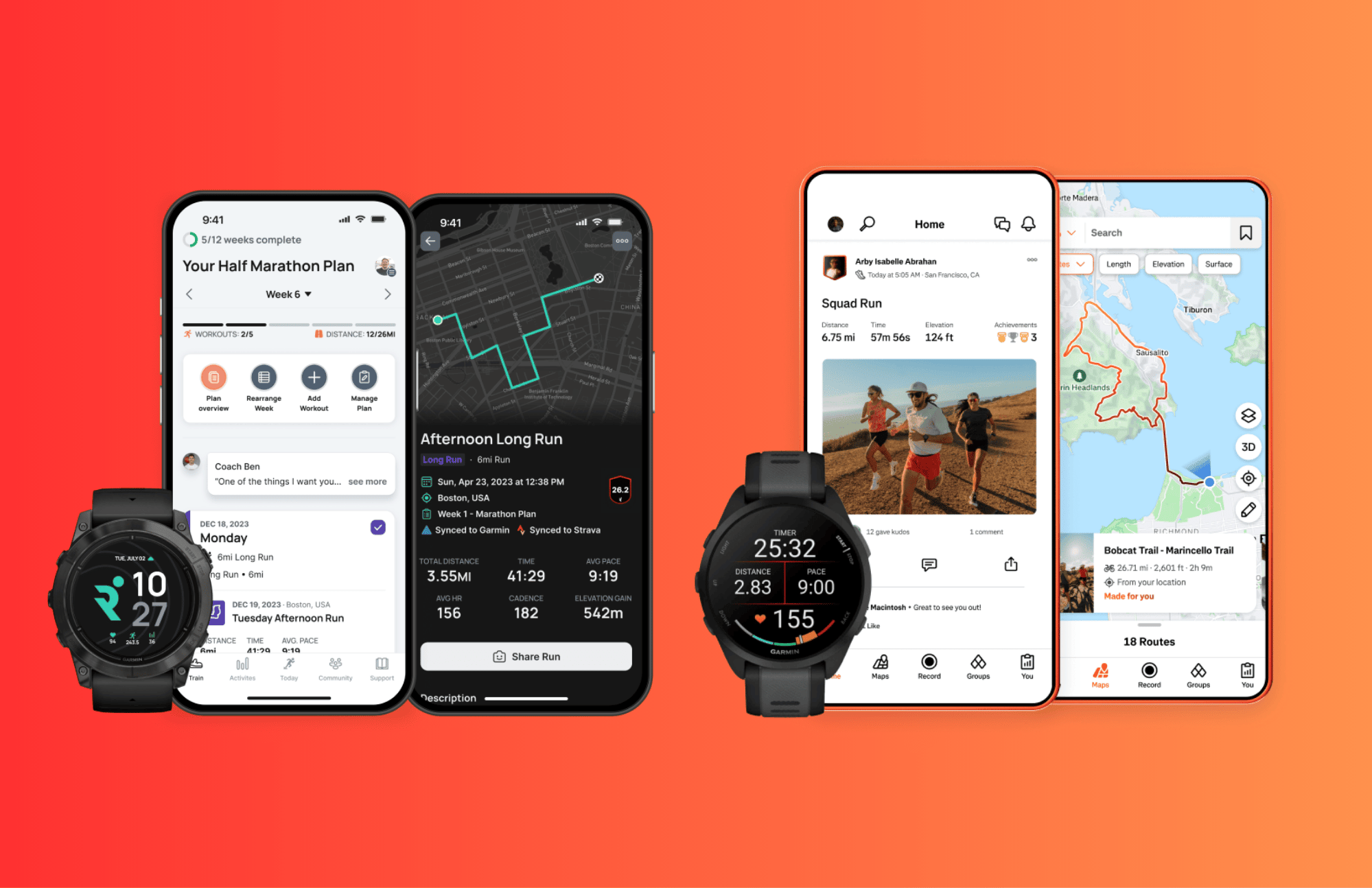
Finishing a run is one thing; knowing what to do next is another. A 5K runner might complete the same distance several times a week without knowing whether to increase the pace, add an easy run or allow more time for recovery. Running apps can help answer these questions, but they do not all serve the same purpose.
Runna and Strava approach running from different angles, and Strava has owned Runna since April 2025. Runna builds structured training plans, while Strava records activities, reviews performance, finds routes and connects runners with each other. Both work with an Apple Watch or a Garmin watch. Whether you need both depends on whether you want guidance before a run, a record after it, or both.
Runna vs Strava at a glance
Runna tells you what to run before you lace up, and Strava shows what you did once the run is over.
| Feature | Runna | Strava |
|---|---|---|
| Primary purpose | Structured running training | Activity tracking and social fitness |
| Training guidance | Personalised plans and guided workouts | Training insights, particularly with a subscription |
| Activity history | Completed workouts and training progress | Running and other activity records |
| Community | Running-focused community features | Followers, clubs, kudos and challenges |
| Best suited for | Runners who want a plan to follow | Runners who want to track, explore and share |
What Runna does better for runners who need a plan
Runna suits runners who want to be told how to train, rather than only recording each run.
From your first 5K to a faster finish
When setting up a training programme, runners enter their current fitness level, preferred race distance and available training days. Runna uses this information to generate a schedule that combines easy runs, harder interval sessions and recovery days.
For example, someone preparing for their first continuous 5K needs a manageable, gradual progression. An experienced runner trying to improve their 5K time may need targeted speed work to improve their pace. Both need a structured plan, which an activity log does not provide.
Knowing what to run next
A planned workout removes the daily guesswork about how far or how fast to run, so there is less temptation to overdo it on the spot. Runna’s plans also adjust when daily life gets in the way, moving sessions and updating paces.
Whether Runna is worth paying for comes down to how much you value that structure. A plan is still a guide, and listening to your body comes first when you feel unusually tired or unwell.
What Strava does better than a training plan app
Strava organises activity history so runners can see what they have already done and how they are progressing.
More than a record of your runs
Strava records distance, pace, elevation and route, and adds route discovery, segment comparisons and performance analysis. Segments let you compare today’s effort with every previous run on the same stretch of road.
Strava records cycling, hiking and many other sports, so multisport athletes keep everything in one place. Basic tracking is free, and the deeper analysis requires a Strava subscription.
The social side of running
Followers, clubs, challenges and kudos give runners a reason to head out, because friends will see the run.
The same feed can backfire. Public leaderboards and pace comparisons push some runners to go faster on days meant for easy or recovery running.
Runna vs Strava for training, tracking and motivation
Which app is better for improving your 5K time?
Runna is better for a faster 5K, because it sets the intervals and pace targets that build speed. Strava shows whether the training is working, through past activities and segment times.
Neither app makes you faster on its own. Progress still depends on consistent training, enough recovery and a plan that suits your current ability.
Which app is better for building a running habit?
Runna builds the habit before the run, because each day has a set session and there is nothing to decide. Strava builds it afterwards, with a growing activity history and encouragement from friends.
Which app is more useful for beginners?
Beginners who want clear instructions and a gradual build-up will get more from Runna. Those who simply want to start running and log each session will find Strava’s free version enough.
Can you use Runna and Strava together?
The two apps have shared an owner since 2025 and connect directly.
Let Runna guide the workout and Strava record it
The usual set-up is to follow the day’s Runna session on a phone or a compatible watch, then let the finished run sync to Strava, where friends and clubs see it. Runna links to Strava under Connected Apps in the Runna profile. If both Runna and the watch upload the same run, Strava can end up with a duplicate, so let only one of them send it.
Do you need to pay for both apps?
Strava’s free version covers recording, the feed, clubs and kudos. Runna is free for the first week of any plan, then costs £99.99 or $119.99 a year. A Strava subscription adds route planning and deeper analysis for $79.99 a year in the US.
Runners who want both can buy the Strava + Runna bundle, a joint subscription that costs £119.99 a year in the UK and $149.99 in the US. Strava sells it annually only, through its app or website. It costs about $50 less than paying for both separately and $30 more than Runna on its own. Bundle buyers need to connect their Strava account in Runna, otherwise Runna still shows them as a free user.
Who should use Runna, Strava or both?
Choose Runna if:
- You are training for a specific race distance.
- You prefer a set schedule to daily guesswork.
- Pace guidance and planned recovery are priorities.
- You struggle to keep easy runs at an easy pace.
- You want structured strength and mobility routines.
- You regularly switch between outdoor and treadmill running.
Choose Strava if:
- Recording statistics and reviewing activity history are your main goals.
- You value community features and running clubs.
- You want to track multiple sports and discover routes.
- Segment times and leaderboards motivate you.
- You want to track shoe mileage.
- You use its location-sharing features for safety.
Use both if:
- You want structured workouts alongside a social activity feed.
- You find managing data across two apps straightforward.
- The £119.99 or $149.99 bundle fits your budget.
- Both private progress tracking and public accountability motivate you.
- You want to integrate your training with a compatible Garmin or Apple Watch setup.
- You want both training plans and historical activity analysis.
Do you actually need both?
Most runners only need to pay for one app, and the Strava vs Runna decision comes down to what you want help with. A runner who doesn’t know what to run should start with Runna; one who wants a record and a community should start with Strava’s free version. Runna plus free Strava covers most runners who want a plan, and the bundle makes sense only for those who also use Strava’s paid analysis and route tools.
Quick answers
Does Strava own Runna?
Yes. Strava bought Runna in April 2025. The two apps still run separately, and one annual subscription now covers both.
How much is the Strava and Runna bundle?
The bundle costs £119.99 or $149.99 a year and is sold annually only, through the Strava app or website. That is about $50 less than buying both annual plans separately and $30 more than Runna on its own.
Why does Runna show me as a free user on the bundle?
Runna unlocks Premium only after the Strava account that holds the bundle is connected under Connected Apps in the Runna profile.
Is Runna free with Strava?
No. A standard Strava subscription does not include Runna Premium. Runna comes with Strava only in the Strava + Runna bundle, which costs £119.99 or $149.99 a year.
How much did Strava pay for Runna?
Strava has not disclosed what it paid. It announced the deal in April 2025, and Runna still runs as a separate app with its own subscription.
Last Updated on 28 October 2026 by tfk the5krunner
Small things I always use
- Garmin 90-degree charging adapter: Charges your Garmin from any USB-C cable. Essential when travelling. I use one.
- Body Glide: The blue anti-chafe stick swimmers and runners carry. I use it.
- Speedo earplugs: Fewer ear infections and no cold-water dizziness. I use them.
- Dryrobe Advance: My winter changing robe for open-water swims. I use one. A cheaper option is the AONYIYI changing robe.
- Maurten: Race fuel that stays easy on the stomach. I use them.
- Beet It Sport nitrate shots: Beetroot shots I take in the days before a race. I use them.
- Garmin charging puck: The quickest way to top up before a session. I use one.
- Injinji: Toe socks that stop rubbing, so you run more. I use them.
- Ultimate toe protectors: Stop black toenails on long runs. They work. I use them.
- Compressport R2 v2 calf sleeves: My calf sleeves of choice. I use them.
- Cellucor C4: My pre-workout before hard sessions.
- TPU tubes: Schwalbe Aerothan, Tubolito and Pirelli SmarTube. Light, tiny spares. I use all three.
- G8 insoles: Adjustable insoles that are good. I use them.
- Cycplus Cube: A 97g electric pump that gets a road tyre rideable in two minutes. I carry one. 5% off with code THE5KRUNNER.
Watches and sensors
- Polar H10: My daily driver for waking HRV.
- Polar Verity Sense: My backup arm-worn HR sensor.
- Nomad bedside charger: Charges my iPhone and Apple Watch overnight. I use it, and many of their bands.
- Train.Red: The best muscle oxygen sensor I’ve used.
- Tymewear: Accurate heart rate and reliable ventilatory zones. I use it to pace endurance rides over an hour.
- Garmin Forerunner 970: A pro-grade triathlon watch. I use this.
- Apple Watch Ultra 4: My daily smartwatch. No phone needed on rides.
- Garmin Fenix 9 Pro: I’ve just bought one.
On the bike
- Continental GP5000 for everyday riding, and Aero 111 on the front for special occasions.
- Helmets: Specialized S-Works Evade 3 for road riding, and Rudy Project Wing for TT-style races. I use both.
- Ravemen FR300: A front light that mounts under your Garmin or Wahoo. I use one.
- Wahoo TRACKR Radar: I use it on one bike and Varia on the other. They perform the same.
- Garmin Varia RTL515: Radar that warns you of cars from behind. I use this model.
- Wahoo ELEMNT Roam 3: The bike computer that’s easy to use. I use mine on most rides.
- Favero Assioma Pro RS2: Accurate power pedals that swap easily between bikes. I use this model.
Home and indoor training
- NPE Runn: Makes my basic treadmill smart, sending more accurate speed and distance to my watch and Zwift. I use it.
- Google Wifi: Keeps Zwift connected in my pain cave. I use it.
- Apple TV 4K: Zwift on the big screen. I use two.
- Google Nest Doorbell (wired, 2nd gen): My video doorbell, running in both Google Home and Apple Home. I use it.
Health, recovery and sleep
- FreeStyle Libre 3 Plus: Shows how my blood sugar responds to diet.
- hDrop: Measures my sweat loss in summer and indoors.
- Fourth Frontier Zone: Checks my heart under load in hard sessions.
- Oura Ring 5: My partner’s recovery tracker of choice.
- Eight Sleep: A cooling mattress cover my partner and I use nightly.
Reader-Powered Content

This content is not sponsored. It’s mostly me behind the labour of love, which is this site, and I appreciate everyone who supports it.
Support the site: Follow (free, fewer ads) · Subscribe (paid, ad-free) · Buy Me A Coffee
Written by real people, with AI assistance. Fact-checked and verified for originality. See the Editorial Policy. FTC: Affiliate Disclosure — some links pay commission. As an Amazon Associate, I earn from qualifying purchases.

Shradha Puri is a tech writer covering fem tech, wearables, consumer technology and AI-powered gadgets. With a background in marketing and editorial strategy, her work focuses on how emerging technology is influencing health, fitness and everyday consumer experiences. She closely follows the tech space, with a particular interest in sleep, recovery and health tracking wearables.
