Garmin eTrex Touch – A Comprehensive Buyer’s Guide
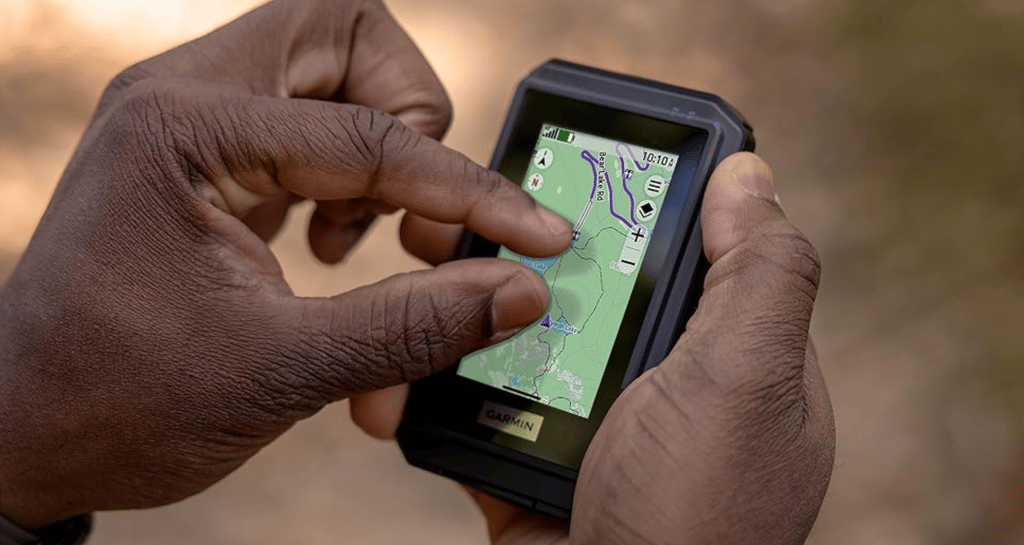
Garmin’s next-generation eTrex Touch is a rugged GPS handheld navigator, introduced on September 30, 2025. It revives the fading Touch series, adding a vivid colour touchscreen and significantly better mapping.
Garmin designed this for outdoor adventurers, occasional hikers, cyclists, and geocachers. Unlike a watch or bike computer, the eTrex Touch is designed to clip to a belt or rucksack when you’re not holding it. Handy! Literally!
The eTrex Touch is also a dedicated navigation device that delivers super-accurate positioning and long battery life. Its rugged format protects it from knocks and bumps, and it keeps your smartphone safe in your backpack.
Another Garmin First to bear in mind is that it comes pre-loaded with quality Garmin maps and the option to subscribe to more specialised ones (e.g., with contours). Garmin also bundles its free Explore and Connect apps, which help with route creation and analysing your trip afterwards—both automatically link and sync to the eTrex Touch.
eTrex Touch squarely sits at the centre of the Goldilocks Zone across Garmin's extensive Outdoor Ecosystem
Summary
eTrex Touch nicely meshes into Garmin’s extensive outdoor ecosystem. The overall experience is about more than just a handheld. You also get a vast number of on-device activity and mapping features, plus great recapping and reviewing features after the workout on Garmin Connect; from there, you link your endeavours back to Strava, Komoot or wherever. It’s the real deal. The complete deal.
Pros
- Free regional maps
- Open and expansive ecosystem
- Superior battery life
- Very good display
- Intuitive Colour Touchscreen: Easy map interaction (swipe and zoom).
- Preloaded Mapping: Immediate access to routable TopoActive maps.
- Superior Accuracy: Multi-band GNSS support ensures high positional accuracy.
- Extreme Durability: IP67 water rating and MIL-STD-810 impact resistance.
Cons
- Map contours need MAPS+ subscription
- Touchscreen-only interaction
- No solar
- Shorter Max Battery Life: The 650-hour expedition mode is less than the eTrex SE’s 1,000 hours.
- Outdoor Maps+ Subscription: Premium content like satellite imagery requires a separate paid subscription.
- Higher Price Point: MSRP is significantly higher than the eTrex SE and Solar models.
Display and Usability (The Touchscreen Experience)
The touchscreen works like your smartphone so that you can scroll, swipe, pan, and pinch-zoom to your heart’s content. You can also access more advanced features and options, similar to your smartphone, by swiping down to open the settings menu.
Importantly, sports-grade touchscreens now generally handle rain much better than in years gone by. That is a good thing, since there are no buttons.
The 3″ colour display is pretty large by most standards, and with a 240x400px resolution, you will always get a sharp image. The tech used is transflective TFT, a very techy phrase meaning it uses a backlight in dark conditions but reflects light and the display image back in the day, saving energy.
Garmin has considered the overall usability of this eTrex, with accessories for mounting on a bike and fastening to a lanyard or carabiner.
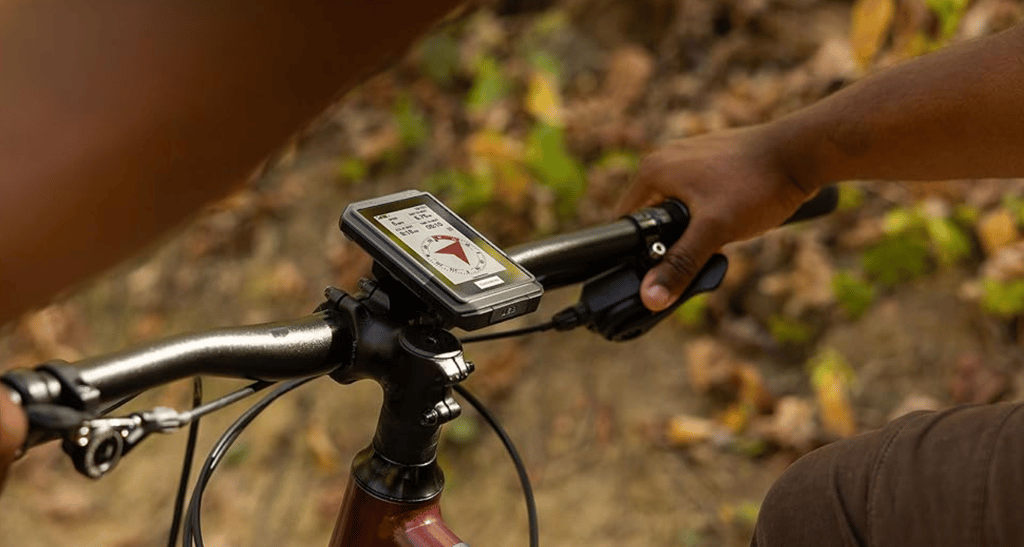
The size is great – it’s pocket-sized. We all love pockets. If you want something slim and lightweight (150 g/5.3 oz), this is a good call.
When using it for your activities. You will typically already have a personalised profile for each type; your cycling profile would differ from your hiking profile. Each includes your preferred metrics, maps, charts, and pointers, all chosen from a list too long to include here. If that sounds complicated, don’t worry, there are sensible defaults for each. (Creating or customising a profile is a little tricky, but doable in 5-10 minutes).
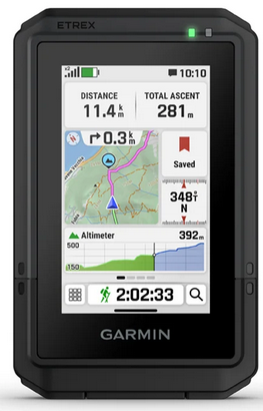
Here’s an example of a sensible screen layout, showing total time walked, distance walked, the route ahead, ascent, and heading direction. The small map tile on the left indicates the route ahead in pink, and the elevation plot beneath the map shows there is still some climbing left to the top of the hill! Remember, each activity profile can have multiple pages; you swipe between them.
Mapping, Navigation, and Software Features
Before buying an eTrex Touch, it helps to understand what the pre-loaded mapping features can and can’t do. The bottom line is that it includes the features most people need, so you can skip this section if you are ‘most people’.
More Jargon – you get free TopoActive maps.
TopoActive Maps are Garmin’s version of the free OpenStreetMap data. Garmin adds a basic representation of the terrain, including roads, trails, and points of interest, but not specific details like footpath classifications and contour lines. These are especially suited to hiking and cycling-like activities, and the vital addition that Garmin has made that’s relatively unusual is that the maps are ‘smart’…meaning they are routable. This means the maps are more than pictures; if you want to create a route or re-route when you get lost, the eTrex has the intelligence you need to get back on track. This is an unusual and important distinction from other brands’ maps, which are just a picture with a route line overlaid; if you get lost with them, your only options are to retrace your steps or navigate to a bearing.
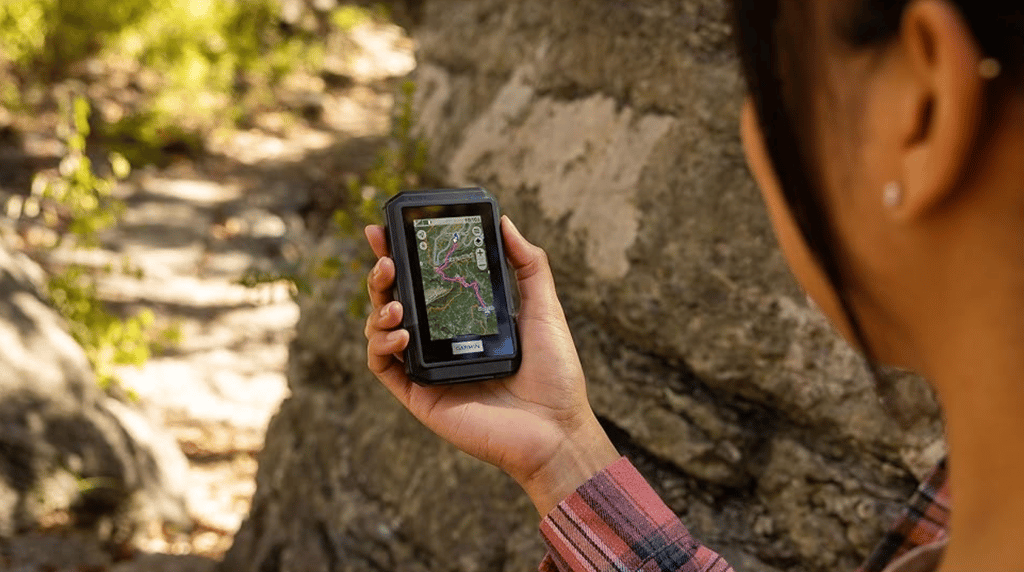
I’ll point out a couple more goodies. Garmin has an extensive database of millions of completed routes from all over the world. This database offers popularity-based choices, so you can follow the same paths most people use. It’s not guaranteed to be the perfect route, but there’s a very good chance it will be.
Then there’s round-trip routing. This is a longstanding Garmin feature, but still a bit buggy, as I found this Summer. You say how far you want to go and in which rough direction (N, S, E, or W), and then Garmin routes for you. This is handy when you’re staying somewhere new and want to explore without the hassle of researching and curating routes back to the same base point for your week’s stay.
Finally, there’s the dreaded ascent planning, too. When you follow a route, Garmin identifies the climbs and presents each as an individual ascent. You can see all the metrics you want to—ascent to go, grade to go, and so on. Maybe when 1,000m of vertical ascent remains, it’s best not to know!
Nowadays, every product has a subscription offer, and eTrex Touch is no exception. You can opt for the Outdoor Maps+ subscription for ongoing access to premium content, such as high-detail elevation contours, high-resolution satellite imagery, land boundaries, and wildlife areas. However, for regular use, you don’t need it. Don’t subscribe unless you know you need it; cheaper (free) non-Garmin alternatives are out there if you do a bit of Googling.
Geocaching is fully supported, and if you connect it to a smartphone, Garmin updates the caches live. You also get the usual hints, history, and notes.
The eTrex touch has neat features for sharing saved locations and courses between devices or with friends. For example, you can easily pass a route to your Garmin watch or a friend’s Garmin handheld or bike computer. This happens directly between devices, not via the internet, so you can do it off-grid.
Performance, Durability, and Accuracy Metrics
Garmin boasts some pretty impressive battery performance stats. You get 130 hours of per-second, high-quality GPS recording, and you can boost that to 650 hours in expedition mode. Although that mode records position updates much less frequently, it works fine at walking speed.
650 hours! Was that a typo? A: No!
Q: How does Garmin do this when my smartphone battery lasts less than a day? Is there a catch?
A: No catch! eTrex Touch is an optimised navigation device. It has a relatively big battery, and, as we said above, its screen has a special energy-saving construction that phones don’t have. It also has the latest energy-efficient GPS.
GNSS/GPS is a major battery drain; Garmin uses the latest satellite location chips from Synaptics. I’ve been testing these all year, and they are super accurate. They are market-leading, in fact. Garmin grabs positions from America’s GPS satellites, the EU’s Galileo and Russia’s GLONASS (together, they are referred to as GNSS). With so many satellites available, it’s no wonder it delivers great accuracy.
It gets better. Some of those satellites send two dual-frequency GNSS signals, and Garmin interrogates their timings to determine if, for example, the signal has bounced off a canyon wall; if so, that satellite’s data is inaccurate and is discarded. Then it gets even better. That special dual-frequency mode uses more battery, so Garmin intelligently disables it with SatIQ when normal reception conditions don’t require it.
eTrex has your ABCs covered – Altimeter, Barometer, compass
Is the elevation accurate?
Garmin’s elevation stats are generally accurate but are presented and stored differently, with pros and cons in each scenario.
How elevation works in Garmin-World
If you follow a route, Garmin uses any elevation data stored in the route only to display elevation charts and ascent. There is no guarantee this is accurate, but it is good enough for the chart. The places you get your routes from, like Strava or Komoot, will typically get elevation data from models that give an elevation for every latitude/longitude point, which is determined from satellite data. This data can be inaccurate near cliffs and sometimes under tree cover.
However, the situation is different when you are not following a route, or even when you are, but you’re looking at live elevation data on screen (e.g., elevation not on a chart). Garmin determines your elevation using a set of priorities, with the most reliable first: recent manual calibration, map (DEM) data, connected phone DEM, and finally GPS.
The eTrex relies on precise barometric changes to determine elevation during your activity. Cross-referencing with GPS and map data periodically corrects this for weather-related drift.
I rate many of the eTrex’s other technical performance characteristics highly. The case is certified to an IP67 water rating and meets MIL-STD-810 impact-resistance specifications. It has many onboard capabilities, including cable (USB-C), WiFi, Bluetooth Low Energy (BLE), and ANT+ for different kinds of communication to sensors, for uploading activities, and for downloading map updates.
Finally, 32 GB of storage is enough for regional maps and more.
Comparison: eTrex Touch vs Its Siblings
While the new eTrex Touch beats its predecessors in almost every respect, it’s also more expensive.
At twice the list price of the eTrex Solar (2023), that’s worth considering.
The new model simply looks better and more modern. Inside, it has more up-to-date components, and its screen is better. Oh, and the maps—that’s an obvious benefit. Although the battery life is slightly lower than the Solar model because it powers a more feature-rich device, it is still excellent. This table nicely compares the three key models.
| Feature | eTrex Touch (2025) | eTrex SE (2023) | eTrex Solar (2023) |
|---|---|---|---|
| Display | 3-inch colour touchscreen (swipe/zoom) | 2.2-inch monochrome (button-only) | 2.2-inch monochrome (button-only) |
| Preloaded Maps | Yes (TopoActive, routable) | None (basic tracking only) | None (relies on app for maps) |
| Standard Battery | Up to 130 hours (Rechargeable Li-ion) | Up to 168 hours (2x AAA batteries) | Up to 200 hours (Rechargeable Li-ion) |
| Key Advantage | Detailed visual navigation and mapping | Highest expedition mode battery life (1,000 hrs) | Unlimited battery with solar exposure |
| MSRP (USD) | $449.99 | $199.99 (on sale: $149) | $249.99 |
Comparison Analysis
- vs eTrex SE: The Touch is a significant boost for anyone needing visual navigation (maps and zoom), which the SE lacks. $250 is a significant premium, but it gives you usability, a key feature.
- vs eTrex Solar: Again, the Solar model lacks map usability; the only reasons to get Solar are to save money and support very long expeditions.
Pricing and Availability
At launch, Garmin has focused on delivering availability in the USA and UK, with EUR and the rest of the world to follow. Devices are available at Garmin.com, REI.com and some Amazon locales – all are linked below
- United States MSRP: $449.99 USD (includes North American TopoActive maps)
- International Pricing: Detail how the price varies by region due to taxes and exchange rates:
- United Kingdom (GBP): £389.99 (includes TopoActive Europe maps).
- Eurozone (EUR): €449.
- Canada (CAD): C$599.
- Australia (AUD): A$749.
Thoughts on eTrex Touch
This reinvigoration of the eTrex handheld line is super-interesting.
Garmin uses hardware similar to its bike computers, and its software now seems to share standard features across many models. So features like ClimbPro are reused for ascent planning when hiking, even though originally designed for cycling. This standardisation across Garmin’s entire range means bugs are fixed, and new features are added faster. A win-win.
For me, the standout addition at the $450 price point is MAPS. That’s an expensive but significant level, as no current-generation Garmin outdoor watch with maps has a list price below $500. This may partly explain why the Garmin Instinct 3 Series lacks maps—Garmin wants you to buy the maps you need with an eTrex and then convince you to buy a partner watch like the Instinct 3 AMOLED later. Maybe!
Take Out – Benefits, Drawbacks, and Verdict
eTrex Touch squarely sits at the centre of the Goldilocks Zone across Garmin’s extensive Outdoor Ecosystem
The eTrex Touch meshes nicely with Garmin’s extensive outdoor ecosystem. The overall experience is about more than just a handheld. You also get a wide range of on-device activity and mapping features, plus great post-workout recapping and review tools in Garmin Connect; from there, you link your endeavours to Strava, Komoot, or wherever. It’s the real deal. The complete deal.
The accessories are well thought through to address the practicalities of attaching to a belt buckle or rucksack, and the physical form factor is just right: excellent visibility, a decent size, and a durable case. Other than the price, that touchscreen is perhaps the only minor downside. It’s one of the better touchscreens, but you will find occasions when water, dirt, or sweat make it a tad harder to use than a button.
In other reviews, I gently mocked Garmin for omitting Maps from its Instinct Outdoors watches—an uber-basic oversight. Now, the eTrex Touch has added maps back as a necessary and welcome addition. People navigating need maps—at least that’s what I think! Maybe I’m old-fashioned.
| Benefits (Pros) | Drawbacks (Cons/Considerations) |
|---|---|
| Intuitive Colour Touchscreen: Easy map interaction (swipe and zoom). | Shorter Max Battery Life: The 650-hour expedition mode is less than the eTrex SE’s 1,000 hours. |
| Preloaded Mapping: Immediate access to routable TopoActive maps. | Higher Price Point: MSRP is significantly higher than the eTrex SE and Solar models. |
| Superior Accuracy: Multi-band GNSS support ensures high positional accuracy. | Outdoor Maps+ Subscription: Premium content like satellite imagery requires a separate paid subscription. |
| Extreme Durability: IP67 water rating and MIL-STD-810 impact resistance. |
The eTrex Touch covers virtually every outdoor adventure, especially for those who prioritise a rich navigation and routing ecosystem. It has the advanced features to help you support and enjoy your activities to the max.
I’d get one if you want a handheld GPS.

Other Resources
- Buy a Garmin eTrex Touch at a choice of retailer locations
- Official Product Page for Garmin eTrex Touch
- Official Garmin Press Release
- Beyond the Basics Video Explainer
- Garmin eTrex Touch Official Manual
Last Updated on 9 October 2026 by tfk the5krunner
Small things I always use
- Garmin 90-degree charging adapter: Charges your Garmin from any USB-C cable. Essential when travelling. I use one.
- Body Glide: The blue anti-chafe stick swimmers and runners carry. I use it.
- Speedo earplugs: Fewer ear infections and no cold-water dizziness. I use them.
- Dryrobe Advance: My winter changing robe for open-water swims. I use one. A cheaper option is the AONYIYI changing robe.
- Maurten: Race fuel that stays easy on the stomach. I use them.
- Beet It Sport nitrate shots: Beetroot shots I take in the days before a race. I use them.
- Garmin charging puck: The quickest way to top up before a session. I use one.
- Injinji: Toe socks that stop rubbing, so you run more. I use them.
- Ultimate toe protectors: Stop black toenails on long runs. They work. I use them.
- Compressport R2 v2 calf sleeves: My calf sleeves of choice. I use them.
- Cellucor C4: My pre-workout before hard sessions.
- TPU tubes: Schwalbe Aerothan, Tubolito and Pirelli SmarTube. Light, tiny spares. I use all three.
- G8 insoles: Adjustable insoles that are good. I use them.
- Cycplus Cube: A 97g electric pump that gets a road tyre rideable in two minutes. I carry one. 5% off with code THE5KRUNNER.
Watches and sensors
- Polar H10: My daily driver for waking HRV.
- Polar Verity Sense: My backup arm-worn HR sensor.
- Nomad bedside charger: Charges my iPhone and Apple Watch overnight. I use it, and many of their bands.
- Train.Red: The best muscle oxygen sensor I’ve used.
- Tymewear: Accurate heart rate and reliable ventilatory zones. I use it to pace endurance rides over an hour.
- Garmin Forerunner 970: A pro-grade triathlon watch. I use this.
- Apple Watch Ultra 4: My daily smartwatch. No phone needed on rides.
- Garmin Fenix 9 Pro: I’ve just bought one.
On the bike
- Continental GP5000 for everyday riding, and Aero 111 on the front for special occasions.
- Helmets: Specialized S-Works Evade 3 for road riding, and Rudy Project Wing for TT-style races. I use both.
- Ravemen FR300: A front light that mounts under your Garmin or Wahoo. I use one.
- Wahoo TRACKR Radar: I use it on one bike and Varia on the other. They perform the same.
- Garmin Varia RTL515: Radar that warns you of cars from behind. I use this model.
- Wahoo ELEMNT Roam 3: The bike computer that’s easy to use. I use mine on most rides.
- Favero Assioma Pro RS2: Accurate power pedals that swap easily between bikes. I use this model.
Home and indoor training
- NPE Runn: Makes my basic treadmill smart, sending more accurate speed and distance to my watch and Zwift. I use it.
- Google Wifi: Keeps Zwift connected in my pain cave. I use it.
- Apple TV 4K: Zwift on the big screen. I use two.
- Google Nest Doorbell (wired, 2nd gen): My video doorbell, running in both Google Home and Apple Home. I use it.
Health, recovery and sleep
- FreeStyle Libre 3 Plus: Shows how my blood sugar responds to diet.
- hDrop: Measures my sweat loss in summer and indoors.
- Fourth Frontier Zone: Checks my heart under load in hard sessions.
- Oura Ring 5: My partner’s recovery tracker of choice.
- Eight Sleep: A cooling mattress cover my partner and I use nightly.
Reader-Powered Content

This content is not sponsored. It’s mostly me behind the labour of love, which is this site, and I appreciate everyone who supports it.
Support the site: Follow (free, fewer ads) · Subscribe (paid, ad-free) · Buy Me A Coffee
Written by real people, with AI assistance. Fact-checked and verified for originality. See the Editorial Policy. FTC: Affiliate Disclosure — some links pay commission. As an Amazon Associate, I earn from qualifying purchases.

tfk is the founder and author of the5krunner, an independent endurance sports technology publication. With 20 years of hands-on testing of GPS watches and wearables, and competing in triathlons at an international age-group level, tfk provides in-depth expert analysis of fitness technology for serious athletes and endurance sport competitors. See the gear tfk uses. ID

Where can I found more details on ‘Ascent Planner’. Searching for it only gives me the ‘ClimbPro’.
I’m considering this device for long distance cycling and like to know what’s ahead
sorry Bram. Grammarly had a double espresso last night and was let loose on this post. I’ve given it a good telling off. It’s ClimbPro
i was using a Garmin Oregon for hiking and cycling for many years but it was getting behind in features and battery life. Also started using only a garmin fenix / epix for hiking and recently got an edge 840 for bike touring. Any idea which edge cycling features will I loose by using the etrex in a cycling profile / activity ?
try this: https://tinyurl.com/3pu4cm46
its the more advanced performance phyiology features you lose, plus others
Hi, sorry for bothering with another question about ClimbPro. You mentioned it for walking/hiking, is it available in a cycling mode too?
Thank you.
yes!!
it was originally designed for cycling
Review barely touches on geocaching. I bought one of these and ran into problems on day one. Loading it with any files of significant size causes the unit to enter a “Refreshing Geocaches” screen that never ended (at least for me with a 3+ minute wait). Unit froze several times when trying to get things set up. Very frustrating and I ended up returning it after a day when tech support couldn’t provide a solution. I’ve had several Garmin GPS units over the years and they’ve always been flaky. They’re lucky to have a monopoly on the handheld market. A little competition would be good for them to fix their software.