Amazfit has released a software update for eight of its watches, adding several useful changes for swimmers, indoor rowers and other athletes. The update adds manual rest tracking for Pool Swimming, a new Always Locked touchscreen mode, faster workout setup through Athlete Defaults, and FTMS support for compatible rowing machines such as the Concept2 RowErg.
The update covers the Balance Ultra, Balance 3, Cheetah 2 Ultra, Cheetah 2 Pro, T-Rex Ultra 2, T-Rex 3 Pro in 44mm and 48mm sizes, T-Rex 3, and Active 3 Premium.
Not every watch gets every feature. Always Locked is not available on the T-Rex 3, while Athlete Defaults is limited to the Cheetah 2 Ultra, Cheetah 2 Pro, Balance Ultra and Balance 3.
FTMS brings rowing machines into the workout
The biggest change for indoor rowers is the addition of FTMS support to the Rowing Machine workout profile. The watch can now connect to rowing machines that broadcast the Bluetooth FTMS standard, including the Concept2 RowErg.
Once connected, the watch can receive power and distance data directly from the rowing machine. This means the information can be recorded as part of the watch workout rather than staying only on the rowing machine’s console.
The distance calibration screen also supports both metric and imperial units.
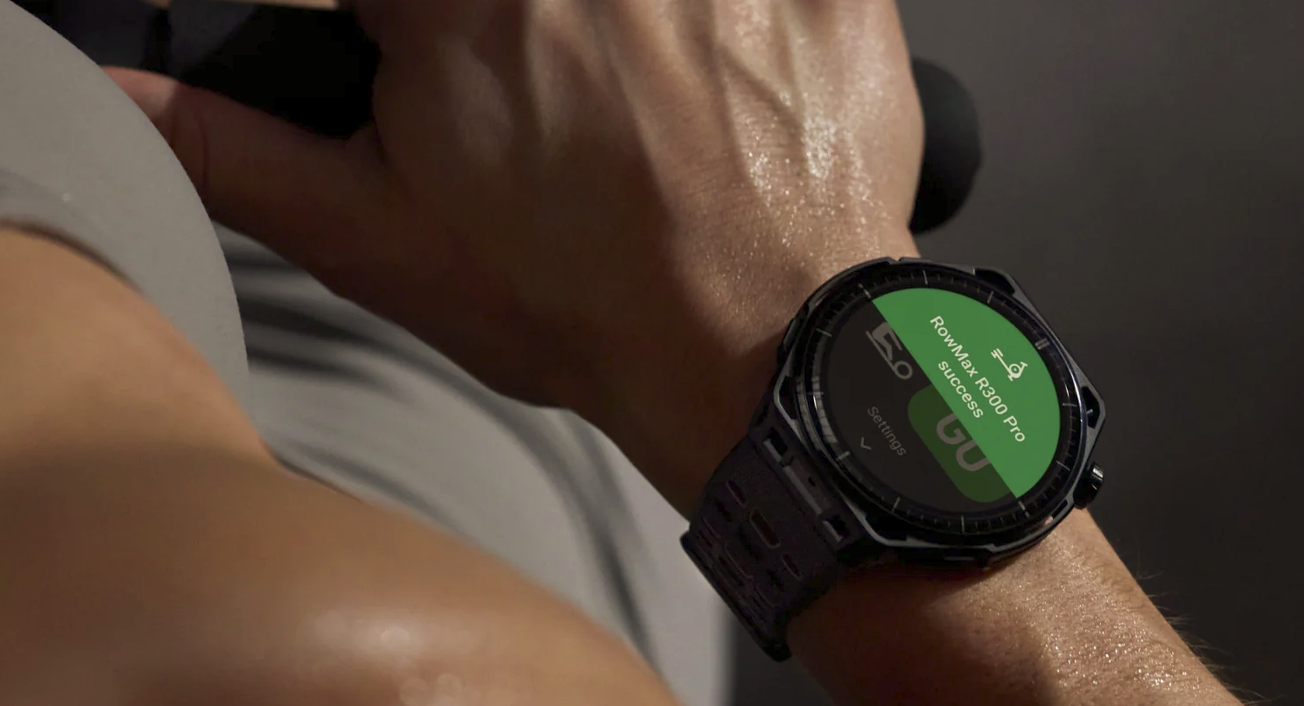
Amazfit’s update notes point out that compatibility can vary between rowing machines and firmware versions. In other words, a rowing machine that supports FTMS may not necessarily provide every available metric.
Manual Rest gives swimmers more control
The Pool Swimming update is also useful for anyone who regularly stops during a swim session. Manual Rest lets you mark the start of a rest period yourself instead of relying on the watch to work out when you have stopped swimming.
The watch records swimming and rest as separate parts of the workout. It also breaks the swimming sections down by stroke, giving you a clearer record of how the session was structured.
You can find Manual Rest under Pool Swimming, Settings, Workout Settings, Back button settings, and Manual Rest.
Always Locked stops accidental screen touches
Always Locked keeps the touchscreen locked for the entire workout. This should make the watch easier to use when you are training in wet conditions or wearing gloves, and it should prevent accidental touches caused by sweat, rain or clothing.
The physical buttons continue to work while the screen is locked, so you can still control the workout. The T-Rex 3 does not support Always Locked.
You can find the option under Settings, Workout Settings, Touch Lock, and Always Lock within a workout mode.
Athlete Defaults makes workout setup quicker
Athlete Defaults is designed for people who use the same settings for most of their workouts. Instead of changing those settings before every session, you can apply them automatically.
The feature turns on Workout Do Not Disturb, turns off workout alerts and sets GPS to maximum precision.
Athlete Defaults is available on the Cheetah 2 Ultra, Cheetah 2 Pro, Balance Ultra and Balance 3. You can configure it in the Zepp App under Device Page, Device Settings, Workout Settings, and Default Athlete Mode.
There are a few smaller changes too
The update also makes a few smaller improvements. Route Preview now lets you pan and zoom the map before and during a workout, while map zooming has been refined to make the experience smoother. Amazfit has also simplified alarm setup.
- Route Preview now lets you pan and zoom the map before and during a workout.
- Map zooming has been improved for a smoother and more responsive view.
- Alarm setup has been simplified, making alarms quicker to create and manage.
For indoor rowers, however, FTMS support is likely to be the most important part of the update. Garmin‘s Row Indoor activity has paired natively with the Concept2 PM5 over ANT+ FE-C since the Fenix 6, giving power and stroke data. Garmin has no native Bluetooth FTMS support, and ANT+ certification for new devices ended in June 2025. Thus, a rowing erg that only broadcasts FTMS needs a third-party Connect IQ data field to reach a Garmin watch.
Amazfit’s Rowing Machine profile reads FTMS, the likely future standard, natively.
Quick answers
Which Amazfit watches get the new software update?
The Balance Ultra, Balance 3, Cheetah 2 Ultra, Cheetah 2 Pro, T-Rex Ultra 2, T-Rex 3 Pro, T-Rex 3 and Active 3 Premium. Feature availability varies by device.
Does the Amazfit FTMS update work with the Concept2 RowErg?
Yes. The Rowing Machine profile can connect to rowing machines that support Bluetooth FTMS, including the Concept2 RowErg. The watch can then display power and distance. Compatibility can still vary by rowing machine model and firmware.
Is Always Locked mode available on every device in this update?
No. Always Locked is not available on the Amazfit T-Rex 3. It is available on the other seven watches covered by the update.
What does Athlete Defaults change automatically?
Athlete Defaults turns on Workout Do Not Disturb, turns off workout alerts and sets GPS to maximum precision. The feature is limited to the Cheetah 2 Ultra, Cheetah 2 Pro, Balance Ultra and Balance 3.
Last Updated on 11 August 2026 by the5krunner
My favourite kit and nutrition
- Garmin Fenix 9 Pro — I’ve just bought one.
- Injinji – Runners protect your toes. Avoid discomfort and minor injury. Run more. Run faster. I use them.
- Garmin 90-degree charging adapter — A small keyring adapter you can use anywhere. Essential when away. I use one.
- Garmin charging puck — the fastest and most reliable way to top up your Garmin before a session. I use one.
- Ravemen FR300 — Front light that mounts directly under your Garmin or Wahoo head unit. Keeps your bars clean and your beam pointed where it matters. I use one.
- Body Glide – The blue anti-chafe stick that all swimmers and many runners use. I use it.
- Maurten — The race nutrition trusted by elite athletes. Gels and drink mixes engineered to be easy on the stomach. I use them.
- Garmin Varia RTL515 — A radar rear light that alerts you to vehicles approaching from behind. Pairs with your Edge or Wahoo. I use this model.
- Favero Assioma Pro RS2 — The power-meter pedals most serious cyclists choose. Accurate, easy to move between bikes. I use this model.
- Garmin Forerunner 970 — A serious choice for a pro-grade triathlon watch. I use this.
- Polar H10 — My daily driver for accurate, waking HRV readings.
- Wahoo ELEMNT Roam 3 — The bike computer that has the feature Garmin lacks: usability. I use mine on most rides.
Reader-Powered Content

This content is not sponsored. It’s mostly me behind the labour of love, which is this site, and I appreciate everyone who supports it.
Support the site: Follow (free, fewer ads) · Subscribe (paid, ad-free) · Buy Me A Coffee ❤️
All articles are written by real people, fact-checked, and verified for originality. See the Editorial Policy. FTC: Affiliate Disclosure — some links pay commission. As an Amazon Associate, I earn from qualifying purchases.

tfk is the founder and author of the5krunner, an independent endurance sports technology publication. With 20 years of hands-on testing of GPS watches and wearables, and competing in triathlons at an international age-group level, tfk provides in-depth expert analysis of fitness technology for serious athletes and endurance sport competitors. ID

“Garmin does not offer native FTMS support for rowing machines on its watches. Garmin users can instead use third-party Connect IQ data fields to connect to compatible rowing machines.”…WRONG. Garmin has been connecting nicely with C2 rowers forever. The PM5 allows for an easy pairing with compatible Garmin devices! You get power, distance and strokes.
My understanding is that it uses ANT+ FE-C which didn’t have much support with other rowers / sport watches and is now deprecated.
changes made, ty
You are right, it does…but I only use C2 rowers, so I can’t speak for other models. However, it works flawlessly with the C2