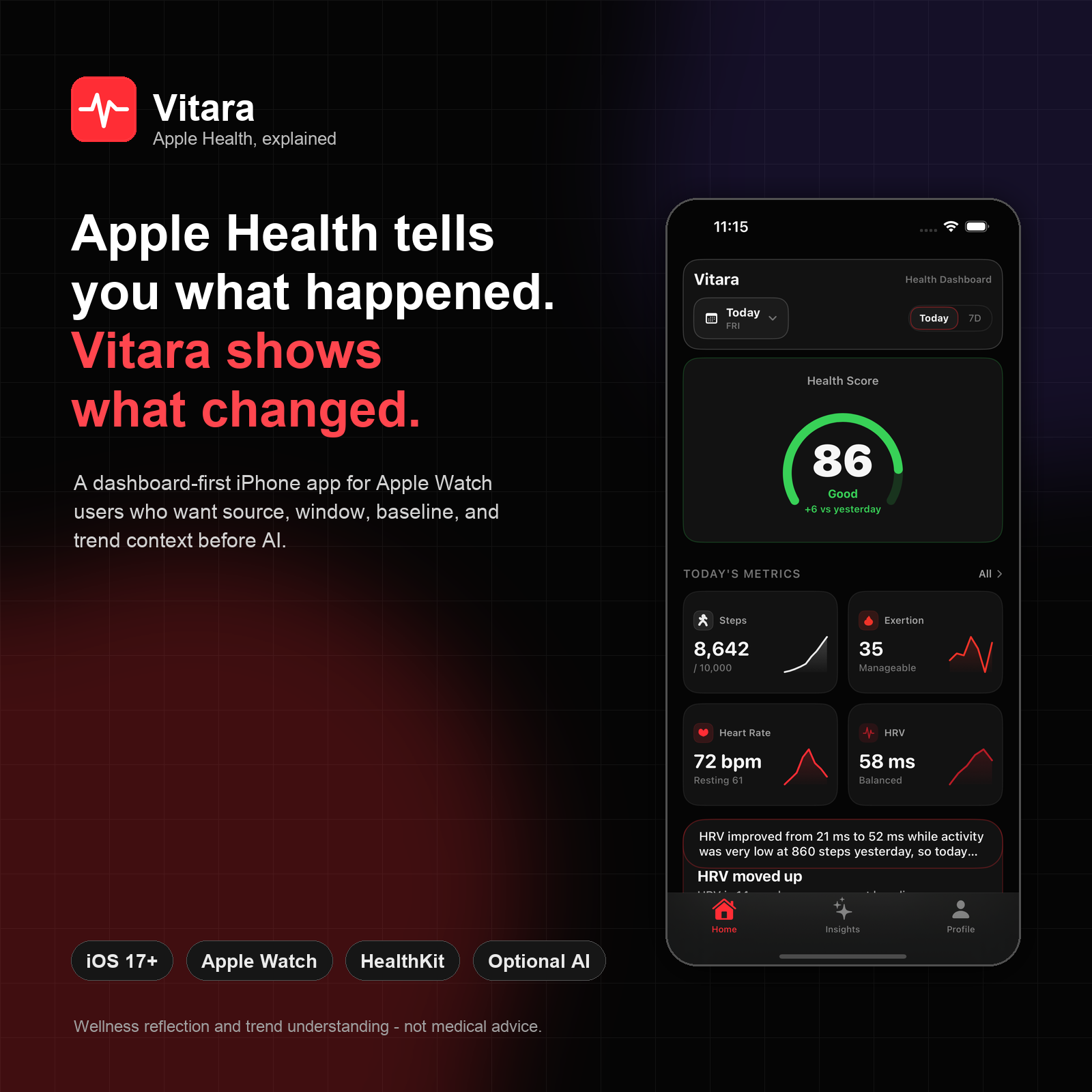
Apple Health is excellent at collecting data. Apple Watch can fill it with steps, heart rate, HRV, sleep, activity, workouts, blood oxygen, respiratory rate, and more. The awkward part comes later: opening the app and trying to work out what actually changed.
That is the problem Vitara is built around. It is not trying to replace Apple Health, a sports watch platform, or a coach. It is a dashboard-first iPhone app for Apple Watch users who want a faster way to understand recent changes across their Apple Health data, then optionally ask for a deeper explanation.
The short version: Vitara shows what changed in Apple Health before asking AI to explain what it might mean.
Why another Apple Health dashboard?
Many Apple Watch users already have the data. What they do not always have is a readable first pass.
Apple Health is powerful as a data store, but it can feel like a set of separate charts. Sleep is in one place, HRV is in another, workouts sit somewhere else, and recovery signals often require manual comparison. If HRV moved, was that because the measurement window changed, because training load changed, because yesterday was unusually inactive, or because a different source wrote the sample?
That matters because health and fitness apps can make a number feel more precise than it really is. HRV is the obvious example. A number from Apple Health, Oura, WHOOP, Garmin, or another app may carry the same label, but the source, method, and window can be different. A sleep-only RMSSD recovery signal is not the same as a broader Apple Health HRV sample. If the UI hides that context, the explanation becomes less trustworthy.
Vitara’s approach is to make the boring context visible first: source, time window, recent baseline, and the actual movement in the data.
What Vitara does
Vitara is an iOS app for Apple Health and Apple Watch users. It brings key signals into a dashboard that focuses on change rather than raw chart browsing.
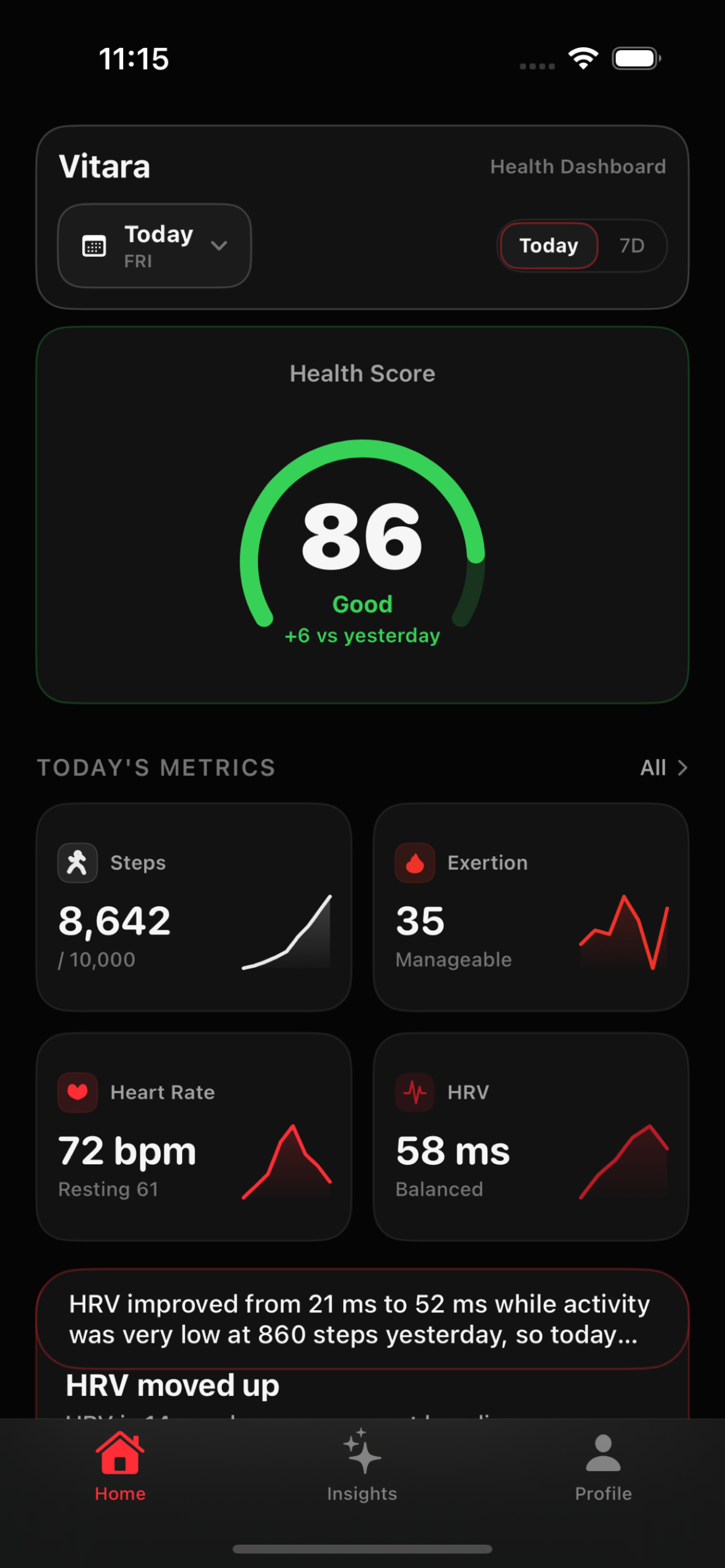
The app currently focuses on:
- health score and daily score history
- steps, activity, exertion, and workout load
- heart rate and resting heart rate
- HRV with source, method, and measurement-window context
- sleep and recovery-related trends
- built-in analysis templates
- natural-language health Q&A
- optional AI summaries with provider controls
Vitara is for wellness reflection and trend understanding. It is not a medical app, medical device, diagnostic tool, or substitute for professional medical advice, diagnosis, or treatment.
How it works
TL;DR: authorize Apple Health, read the local dashboard, then use AI only when you want a deeper explanation.
First, Vitara asks for read access to the Apple Health metrics the user wants it to summarize. The dashboard then builds a local view of recent signals and highlights the strongest changes. This deterministic layer works without Pro, without network access, and without an AI endpoint.
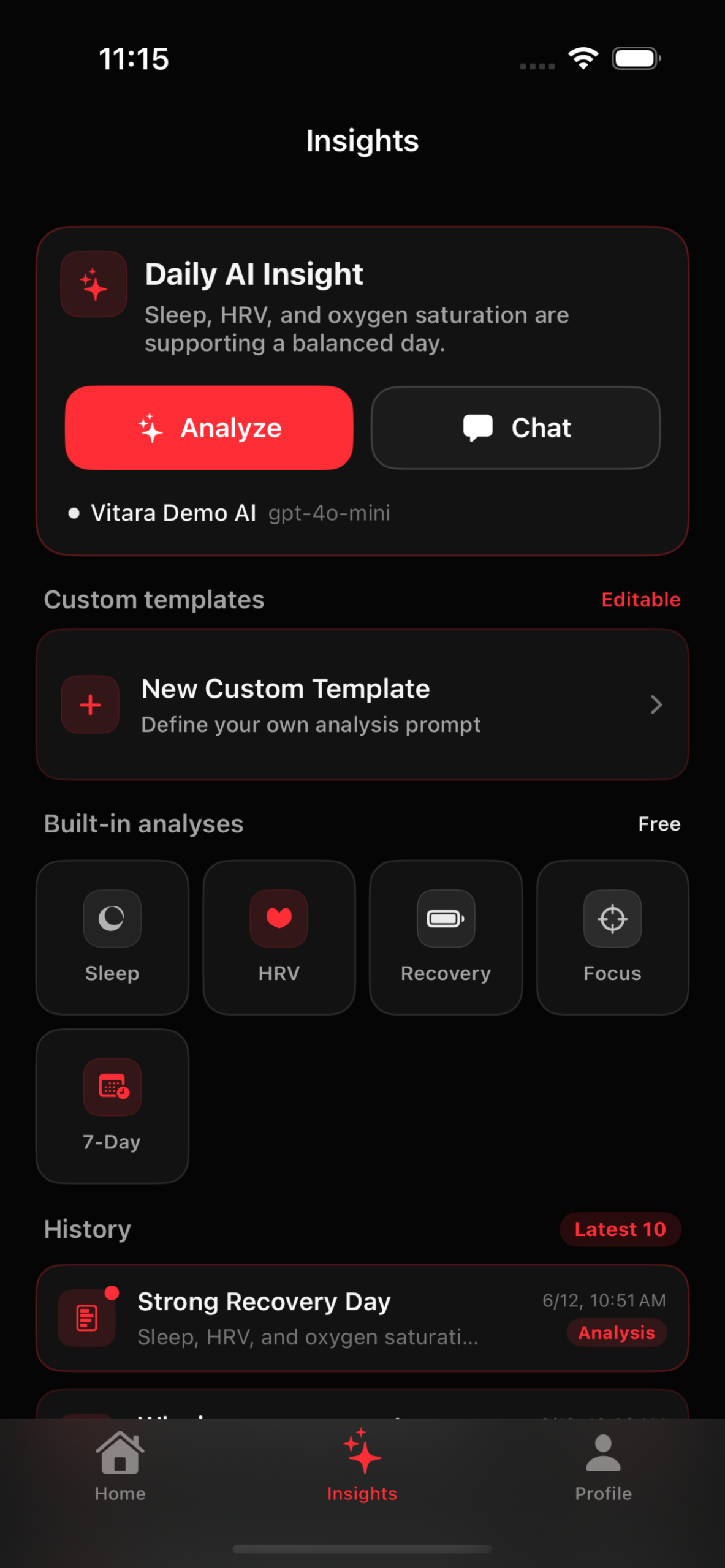
Second, Vitara shows the context behind the movement. For example, HRV views can call out Apple Health source, HealthKit SDNN method, and measurement-window context before any readiness or recovery explanation is shown. The point is not to turn every metric into a single magic score. The point is to show what moved and what the app is comparing it against.
Third, optional AI can add a plain-language summary or answer a question. On supported devices, Apple Intelligence can be used. Users can also configure an OpenAI-compatible endpoint if they prefer another provider. Custom endpoint flows are designed to keep the recipient visible and the selected summary under user control.
A worked example
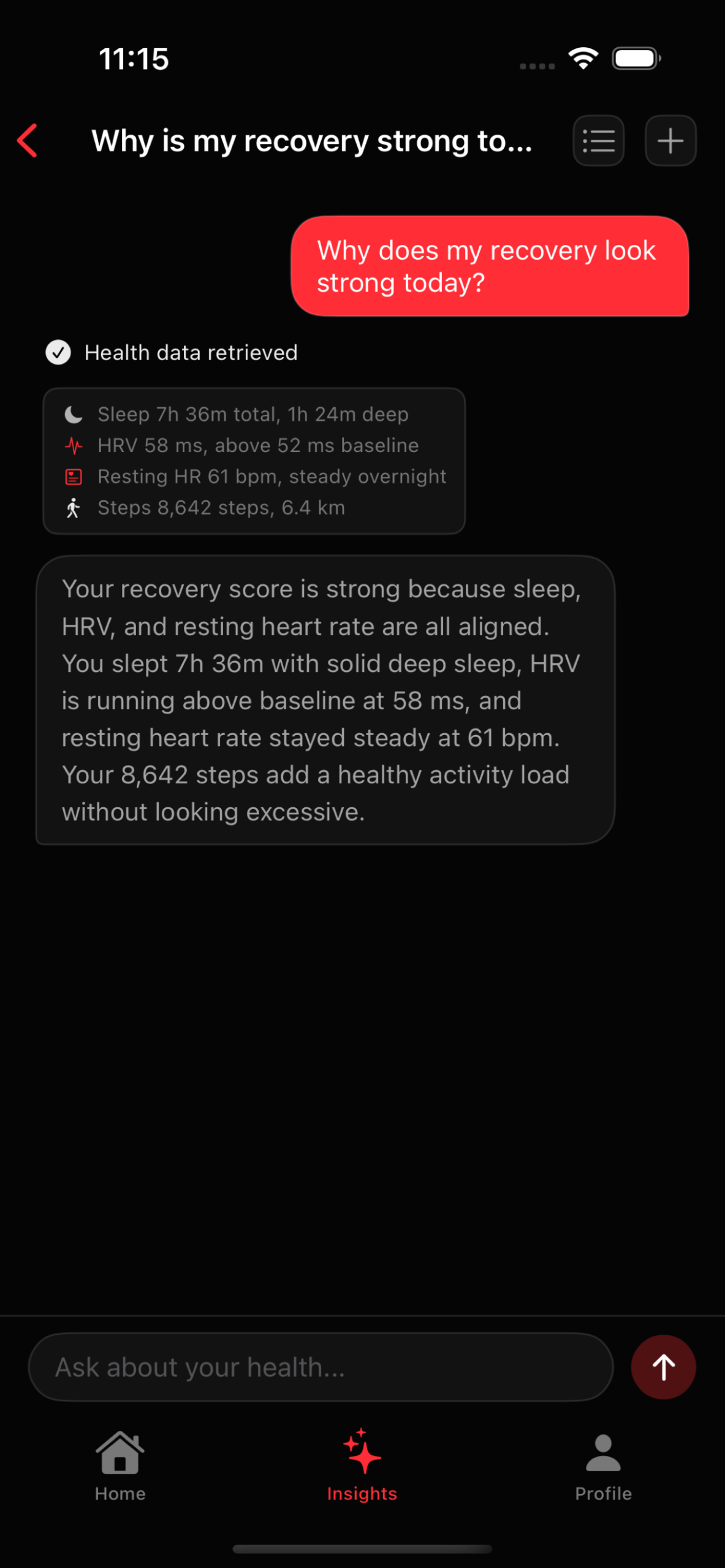
Here is a sample day using the demo values shown in the current Vitara screenshots.
The dashboard shows:
- Health Score: 86, up 6 points vs yesterday
- Steps: 8,642 out of a 10,000-step target
- Exertion: 35, marked manageable
- Heart rate: 72 bpm, with resting heart rate at 61 bpm
- HRV: 58 ms, marked balanced
The local “What changed” card then explains the key movement before any AI paragraph is involved. In the screenshot example, HRV improved from 21 ms to 52 ms while activity was very low at 860 steps yesterday. Instead of just saying “recovery improved”, Vitara shows the movement and the comparison context.
The exertion detail can add more training context:
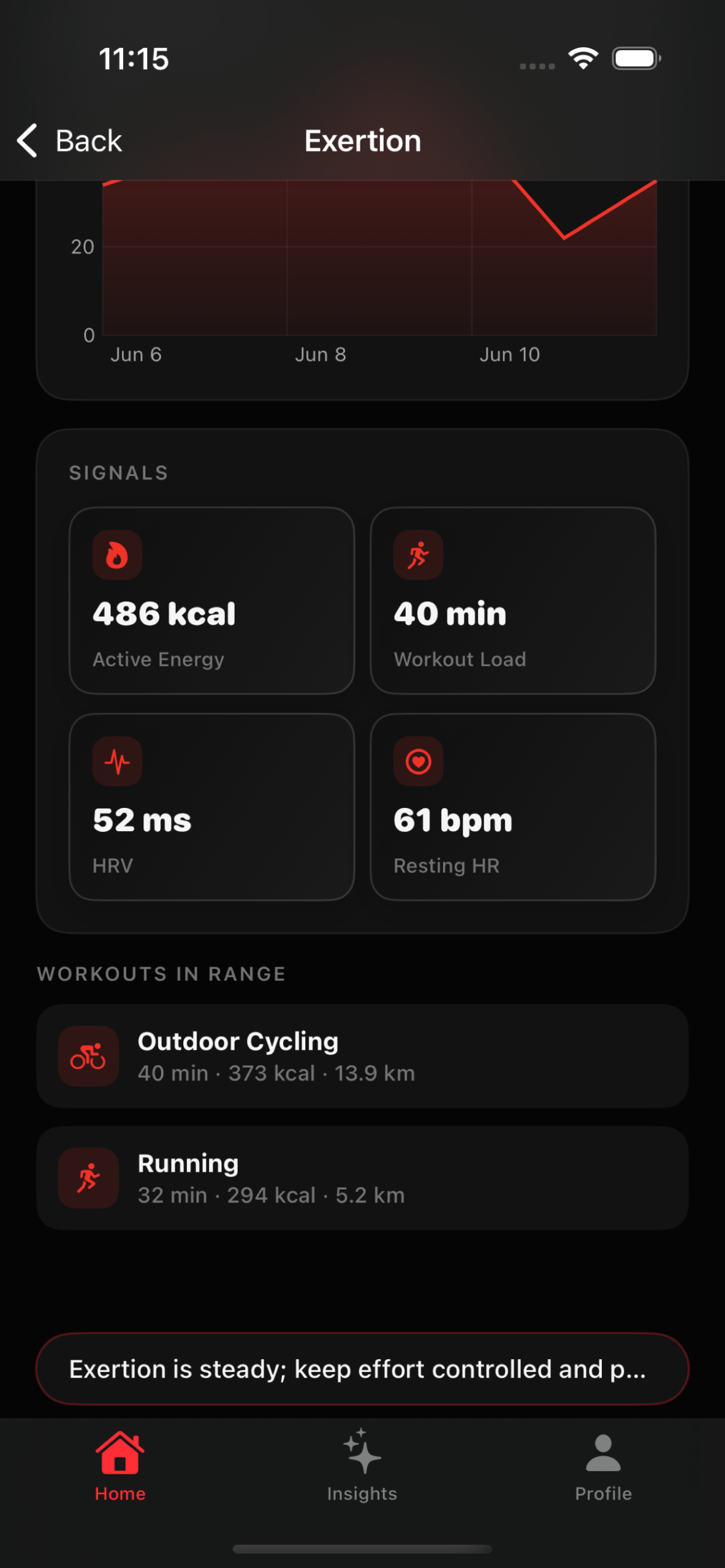
- Active Energy: 486 kcal
- Workout Load: 40 min
- HRV: 52 ms
- Resting HR: 61 bpm
- Workouts in range: 40 min outdoor cycling and 32 min running
For an Apple Watch user, that is the useful shape of the answer. It does not diagnose anything. It does not pretend HRV is a clean universal score. It says: here is what moved, here is the nearby training context, and here is the baseline window the app is comparing against.
If the user wants more, they can open an AI insight or ask a plain-English question such as, “Why does my recovery look better today?” The important part is that the AI summary comes after the data boundary is visible.
AI, privacy, and provider control
Vitara treats AI as optional context, not the foundation of the product.
The dashboard and local “What changed” explanations are designed to work before AI is involved. When AI is used, Vitara tries to make the boundary clear: what data was selected, what summary or text may leave the device, and which provider is being used.
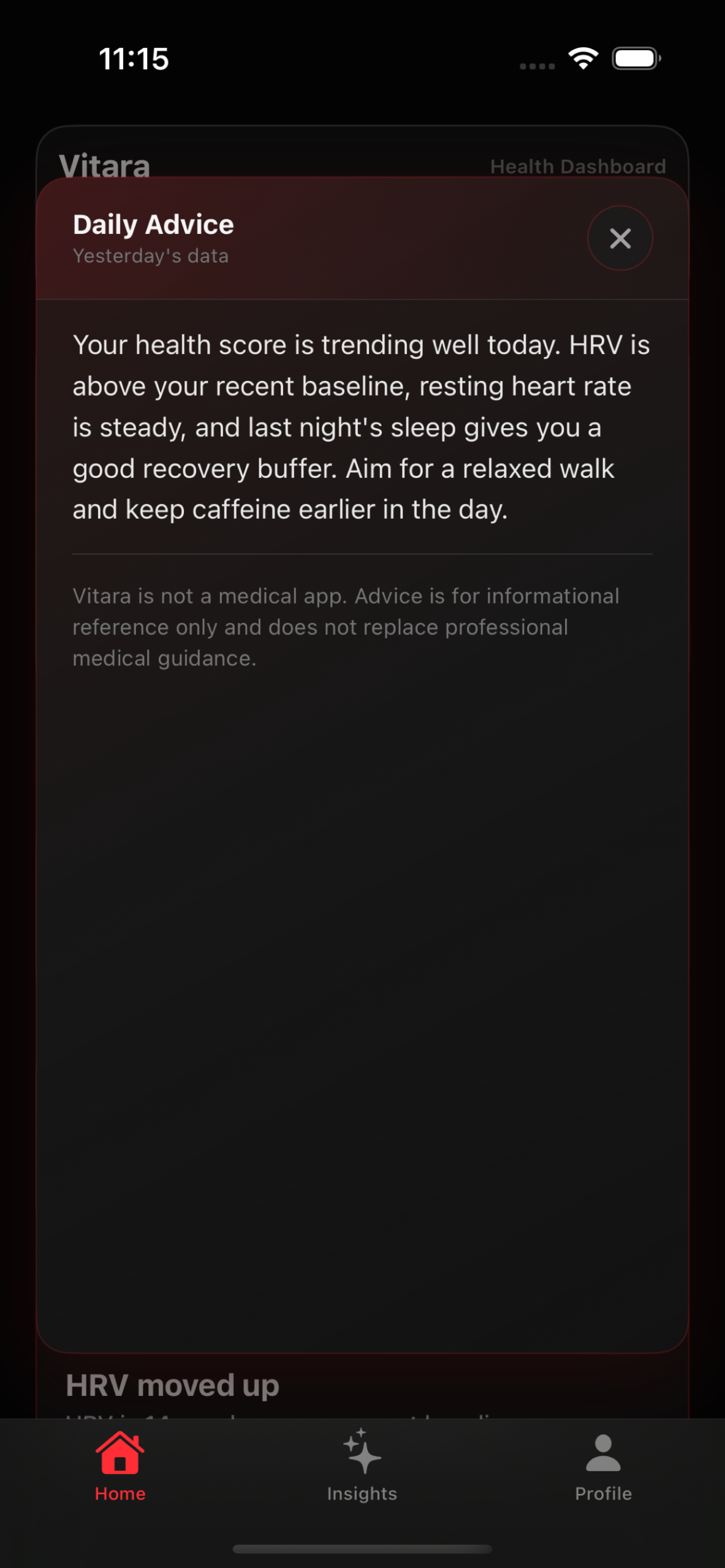
Supported devices can use Apple Intelligence where available. Users who want another model can configure an OpenAI-compatible endpoint. Custom API keys are stored in the iOS Keychain. The practical goal is not to make an absolute “nothing ever leaves the phone” claim. The goal is to keep health-data interpretation under user control.
Integrations and compatibility
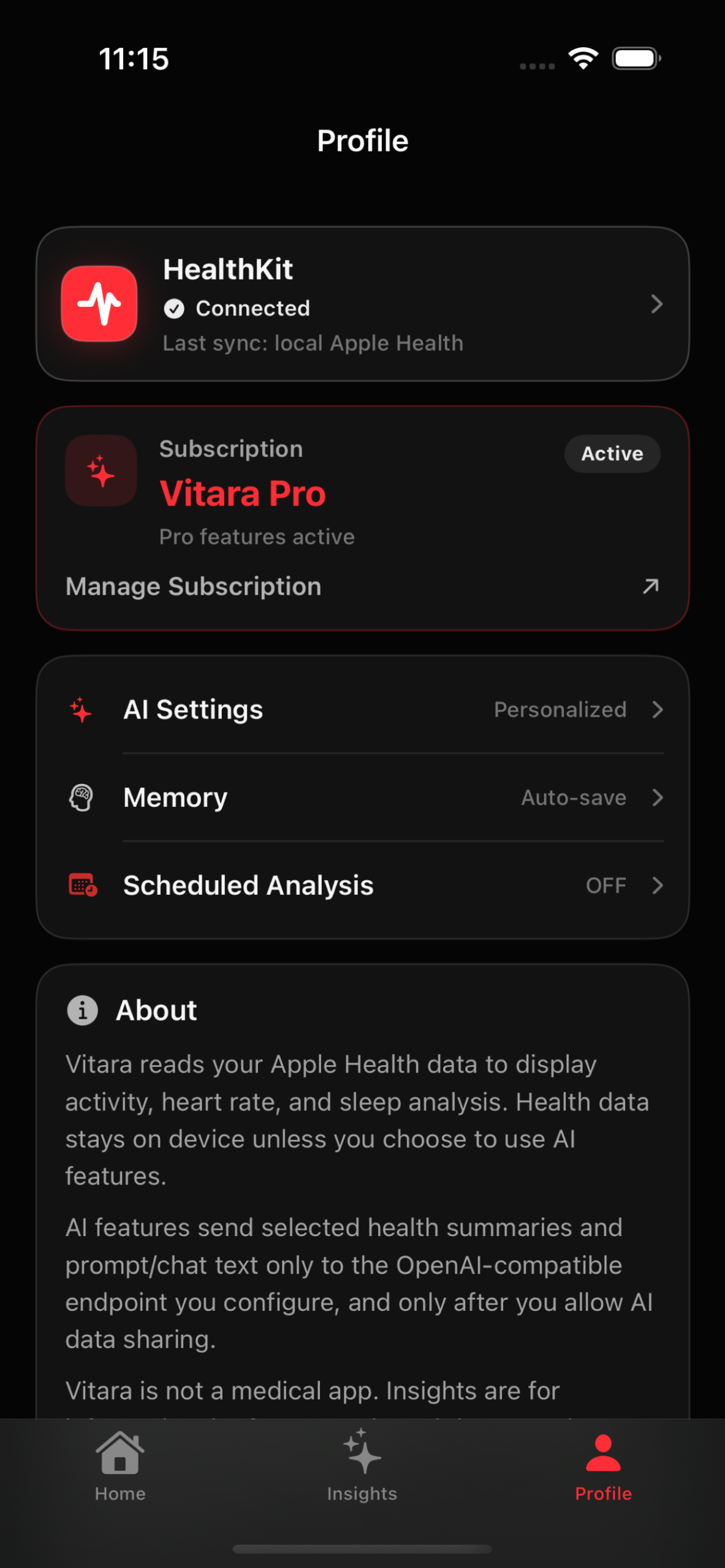
Vitara is built for:
- iPhone running iOS 17 or later
- Apple Health
- Apple Watch data stored in HealthKit
- Apple Intelligence on supported devices
- optional OpenAI-compatible endpoints
- custom API keys stored in Keychain
The app reads HealthKit data with user permission. Current focus areas include activity, workouts, heart rate, resting heart rate, HRV, sleep, blood oxygen, respiratory rate, weight, distance, and active energy.
Vitara is available on the App Store: vitara-app.pages.dev
Who it is for
Vitara is most useful for Apple Watch users who already look at health and training data but want a clearer first pass. That might be someone comparing HRV after a few harder workouts, checking whether sleep and exertion moved together, or trying to understand why one day looks different from the previous week.
It is not a coaching replacement. It is not a medical interpretation engine. It is a trend dashboard with optional explanations.
If Apple Health already answers every question you have, you probably do not need another layer. If Apple Health feels like a storage room full of useful signals but too little interpretation, Vitara is built for that gap.
Summary
Vitara turns Apple Health into a dashboard for recent change. It starts with local trend explanations, keeps source and baseline context visible, and then offers optional AI summaries or Q&A when the user wants more detail.
The product bet is simple: Apple Watch users do not always need more data. They often need to know what changed.
Quick answers
Is Vitara a medical app?
No. Vitara is not a medical app or medical device. Insights are for informational reference, wellness reflection, and trend understanding only. They do not replace professional medical advice, diagnosis, or treatment.
Does Vitara require an AI account?
No. The dashboard and local “What changed” explanations work before AI is involved. On supported devices, Apple Intelligence can be used. Users can also add an OpenAI-compatible endpoint if they want another provider.
What makes Vitara different from reading Apple Health directly?
Apple Health is the data source. Vitara is the interpretation layer above it. It focuses on recent changes, source and window context, baseline comparisons, and optional plain-language explanations.
Related reading on the5krunner
- Fitbit AIR vs watchOS 27: HR and HRV Accuracy Tested: testing across five devices showing watchOS 27 records HRV for just four minutes per hour, the kind of measurement-window context Vitara surfaces in its dashboard.
- Garmin HRV Fails Again: Forerunner 265 Study: an academic comparison of the Forerunner 265’s HRV against an ECG reference, useful background on why wrist HRV data needs careful interpretation across sources.
- Apple Watch Insider: all the5krunner Apple Watch coverage, including accuracy testing, watchOS updates, and feature analysis.
Author: Hoyu, developer of Vitara, edited by the5krunner
Last Updated on 29 June 2026 by the5krunner
My favourite kit and nutrition
- Garmin Fenix 9 Pro — I’ve just bought one.
- Injinji – Runners protect your toes. Avoid discomfort and minor injury. Run more. Run faster. I use them.
- Garmin 90-degree charging adapter — A small keyring adapter you can use anywhere. Essential when away. I use one.
- Garmin charging puck — the fastest and most reliable way to top up your Garmin before a session. I use one.
- Ravemen FR300 — Front light that mounts directly under your Garmin or Wahoo head unit. Keeps your bars clean and your beam pointed where it matters. I use one.
- Body Glide – The blue anti-chafe stick that all swimmers and many runners use. I use it.
- Maurten — The race nutrition trusted by elite athletes. Gels and drink mixes engineered to be easy on the stomach. I use them.
- Garmin Varia RTL515 — A radar rear light that alerts you to vehicles approaching from behind. Pairs with your Edge or Wahoo. I use this model.
- Favero Assioma Pro RS2 — The power-meter pedals most serious cyclists choose. Accurate, easy to move between bikes. I use this model.
- Garmin Forerunner 970 — A serious choice for a pro-grade triathlon watch. I use this.
- Polar H10 — My daily driver for accurate, waking HRV readings.
- Wahoo ELEMNT Roam 3 — The bike computer that has the feature Garmin lacks: usability. I use mine on most rides.
Reader-Powered Content

This content is not sponsored. It’s mostly me behind the labour of love, which is this site, and I appreciate everyone who supports it.
Support the site: Follow (free, fewer ads) · Subscribe (paid, ad-free) · Buy Me A Coffee ❤️
All articles are written by real people, fact-checked, and verified for originality. See the Editorial Policy. FTC: Affiliate Disclosure — some links pay commission. As an Amazon Associate, I earn from qualifying purchases.

tfk is the founder and author of the5krunner, an independent endurance sports technology publication. With 20 years of hands-on testing of GPS watches and wearables, and competing in triathlons at an international age-group level, tfk provides in-depth expert analysis of fitness technology for serious athletes and endurance sport competitors. ID

Can’t find the app in the Australian or UK app stores.
The app description says EU and UK. I was able to install it using Portugal store.
Strangely enough there are 2 Vitara apps available, but the other is from some Chinese developer (but has some similarities design wise…).
Sorry mistake, the “Chinese” app is the one in review here. Meanwhile not sure where I saw the EU-UK thing, but can confirm with were available for PT.