WristTopo: offline topo maps and turn-by-turn navigation for Apple Watch
It puts a detailed offline topographic map on your wrist, with full turn-by-turn navigation, so the phone can stay in your pack.
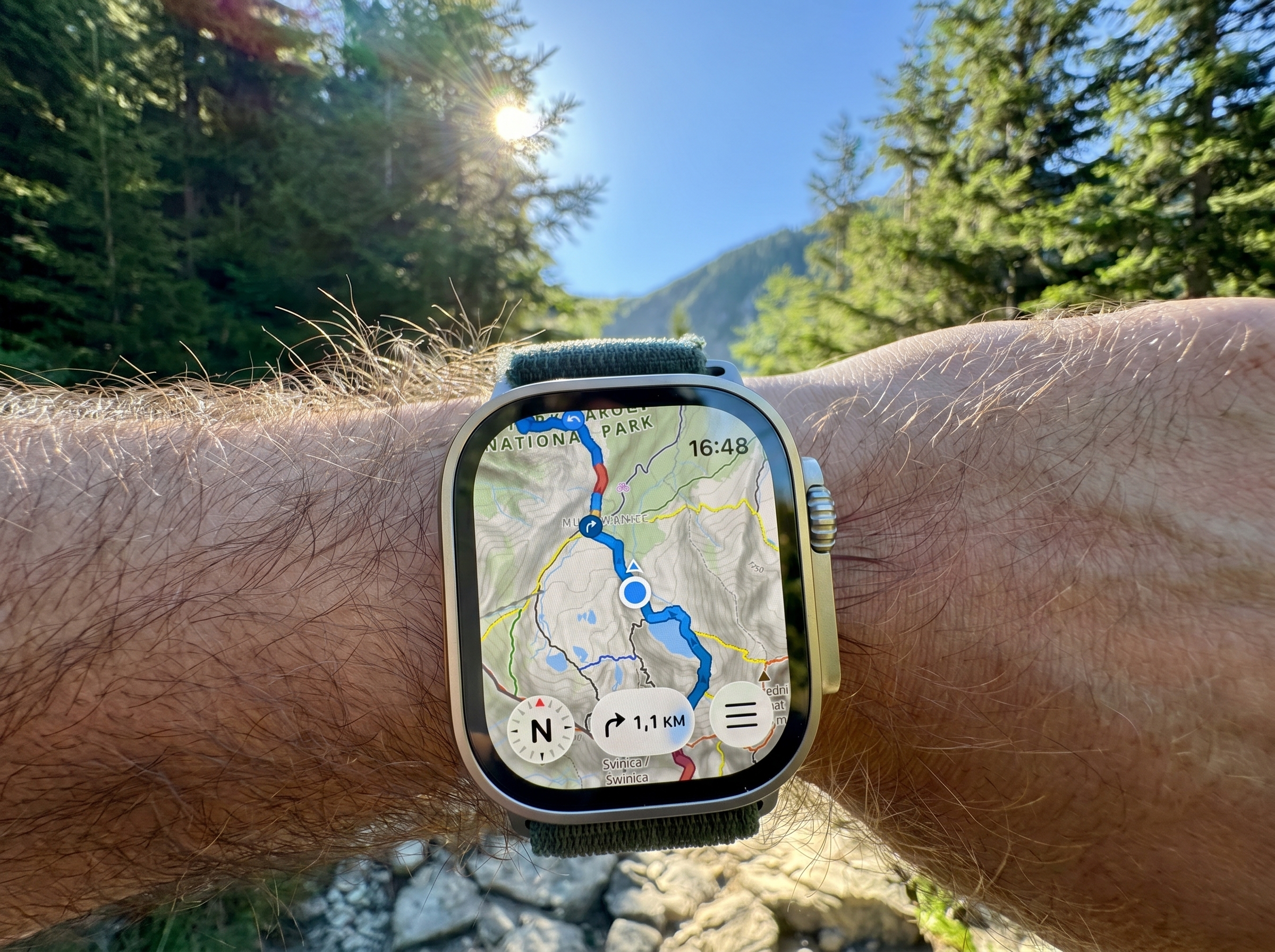
The problem with Apple Watch outdoors
You are an hour past the trailhead. There is no signal, the next junction is unsigned, and the map you need is on your wrist instead of buried in your pack. That is the situation WristTopo is built for.
The Apple Watch is now a capable piece of outdoor hardware: accurate GPS, a bright always-on screen, fast interaction, and, on Ultra models, strong battery life. The harder part is navigation. The watch can record a run, ride, or hike perfectly well. The question is whether it can also serve as a map and route tool when you are away from roads, phone signal, and easy decisions.
The usual workarounds are familiar: carry the iPhone for the map, follow a bare GPX line without much terrain context, or use a third-party app that handles one part of the problem but compromises elsewhere. WristTopo is built on a narrower premise: the map itself should live on the watch and be readable at a glance.
How WristTopo works
TL;DR: Plan a route on the iPhone, sync it to the watch with offline map tiles, then leave the phone behind. The watch handles turn-by-turn navigation, the topo map, and activity recording offline.
WristTopo is built by a single developer, eighteen months in. The core loop is simple:
- Plan or import a route on the iPhone over a topographic, satellite, or 3D terrain map
- Download offline map tiles around the route or area
- Route and tiles sync to the watch automatically
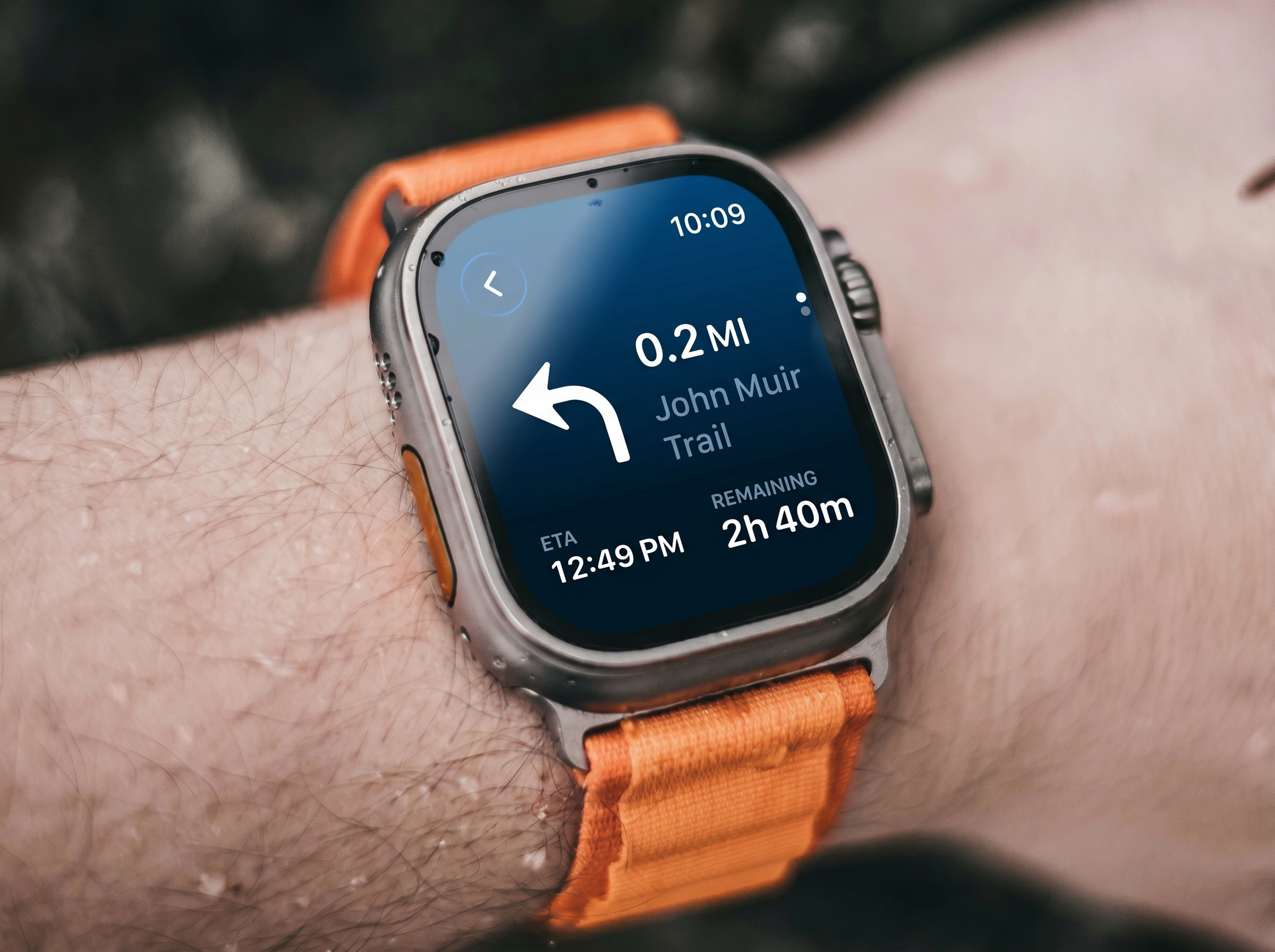
- On the trail, the watch shows your position, draws the route, and delivers turn cues
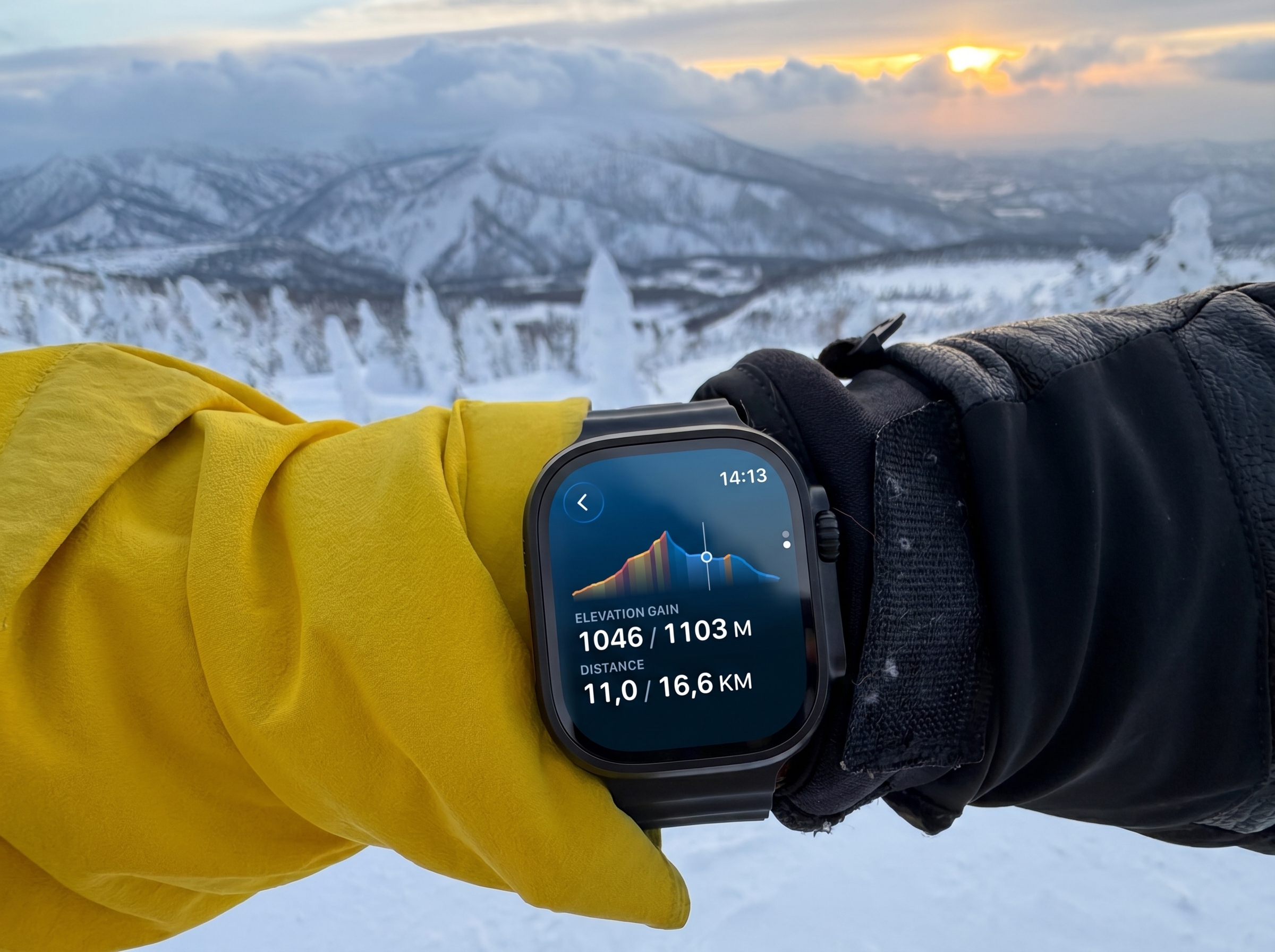
- Distance to next turn, ETA, and elevation profile stay on the wrist
The map and the trail
Two things make WristTopo stand out.
The first is the content. Hiking trails are colour-coded to local conventions, mountain-bike trails are shaded by difficulty, cycle paths are marked, and field features such as huts, shelters and water sources appear on the map. Hill shading gives the terrain shape. Satellite and winter styles are available on the watch itself.
The second is rendering. WristTopo uses its own watch-focused map engine, so the map pans and zooms smoothly rather than feeling like a small companion view borrowed from the phone. On a watch, that is the difference between glancing at a dot and reading the ground around you.
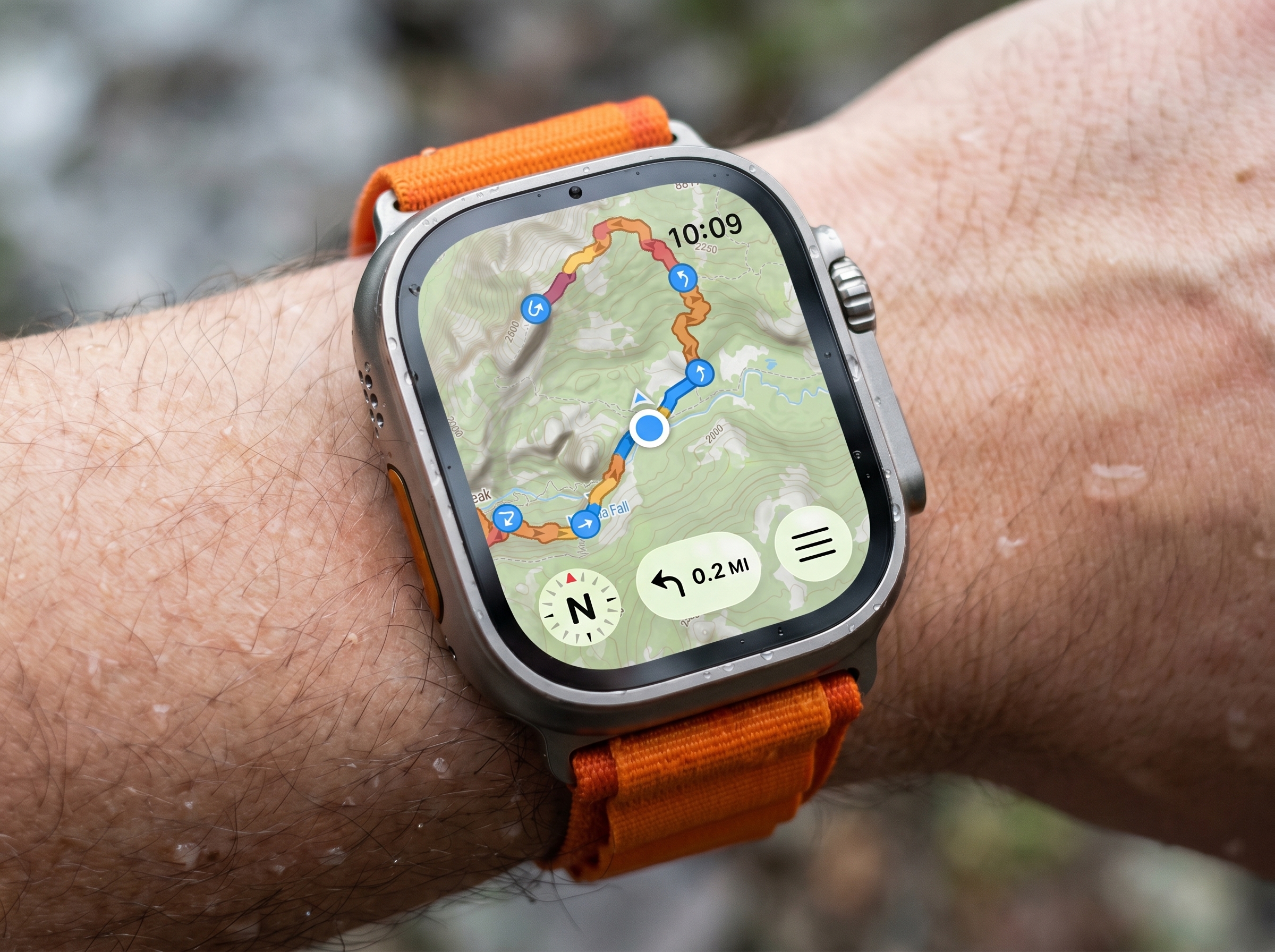
On the route, the map centres on your position and can orient to the way you are facing. The watch also shows the route’s elevation profile, including the climbing ahead. On Series 9, Ultra 2, and later, Apple’s double-tap gesture lets you switch between the map and stats without touching the screen.
A worked example: in the developer’s own testing, continuous turn-by-turn navigation with activity tracking on an Apple Watch Ultra 3 draws roughly 7-8 per cent of battery per hour. That is more than twelve hours on one charge. Smaller and older models draw more, so take that as a best-case reference.
Planning, recording, and on-watch routing
Routes start on the iPhone over a topographic base with satellite and 3D terrain layers. Routing profiles include hiking, cycling, mountain biking, and as-the-crow-flies navigation, and they can be combined in a single route.
GPX import is central. WristTopo can import GPX files as-is and auto-detect turns from the track shape. With Snap to Trails, it can map-match the GPX to the real trail and road network, so turn cues land at actual junctions and can include trail or street names. The original and snapped versions are shown side by side before you accept the change.
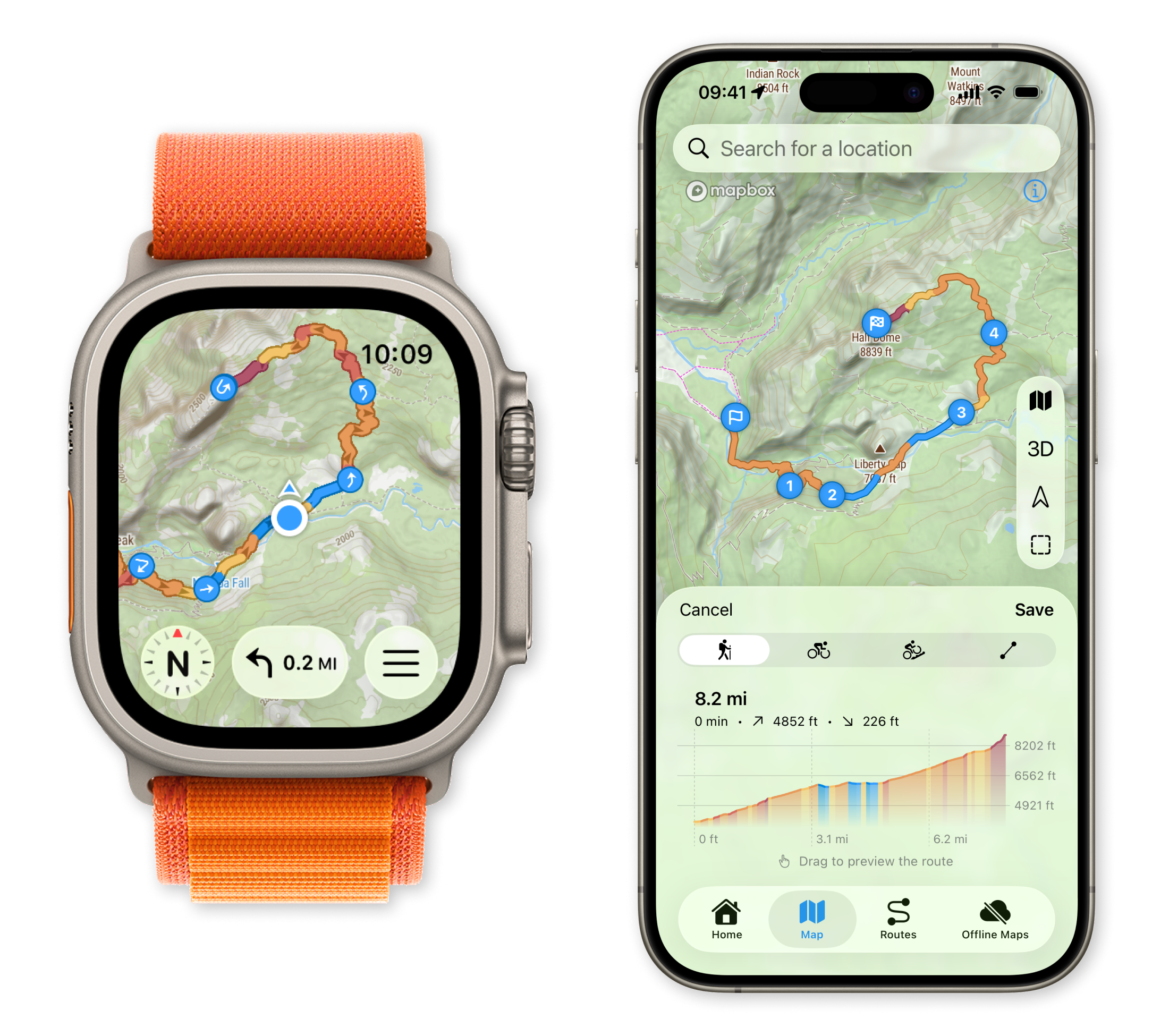
Recording is independent of navigation. Start a workout once at the trailhead, then switch routes, check another line, follow a bail-out option, or navigate somewhere new without interrupting the activity file. WristTopo records 34 activity metrics and supports custom screen layouts, so the watch can show the data fields that matter for the day.
You can also record in Apple’s Workout app or another third-party recorder, while using WristTopo just for maps and navigation. That matters if you already have a preferred training platform.
Backtrack can retrace your exact path to the start, offline. WristTopo can also show several routes on the watch at once, making it easier to compare a planned route with a shortcut, extension, or escape option.
On-watch routing can generate a route to a chosen point without the phone, though it needs a data connection. For remote days, plan ahead and download.
Compatibility
- Apple Watch: Series 4 and later, including Ultra models. Double-tap requires Series 9, Ultra 2 or later.
- iPhone companion required for planning, GPX import, and offline tile downloads.
- Map content includes topographic, satellite and winter styles, hill shading, hiking and MTB trails, cycle paths, huts, shelters and water sources.
- Routing covers hiking, cycling, mountain biking, as-the-crow-flies, and mixed profiles within a route. GPX import includes an optional Snap to Trails feature.
- Activity sync: Apple Health and Strava.
Things to note
WristTopo is deliberately focused. It is a maps-and-navigation app, not a full training platform or a social route-discovery network.
The privacy model is simple and transparent: no ads, no tracking, no account requirement, and no business built around profiling where users go. There is a free version to try, with Pro available as a subscription or a one-time purchase.
Summary
For Apple Watch users who spend real time outdoors, WristTopo closes a specific gap: a high-quality offline topographic map, route planning, GPX handling, turn-by-turn guidance, Backtrack, and activity recording centred around the watch. It complements the kit covered in our hiking technology guide.
It will not replace every route-planning, training, or analysis tool. Its job is more focused: make the Apple Watch useful as a serious wrist-based navigation device, while letting the phone stay packed away.
Quick answers
Does WristTopo work fully offline?
Yes. With the route synced and map tiles downloaded, navigation runs on the watch with no phone or data connection: map, route line, turn cues, Backtrack, and activity recording. Creating a fresh route directly from the watch is the main exception.
How long does the Apple Watch battery last with WristTopo running?
In the developer’s testing, continuous turn-by-turn navigation with activity tracking draws roughly 7-8 per cent per hour on an Apple Watch Ultra 3, comfortably more than 12 hours on one charge. Smaller and older models draw more.
Can I record my activity in another app while using WristTopo for navigation?
Yes. Apple’s Workout app, or another third-party recorder, can run alongside WristTopo for navigation. WristTopo’s own recording also syncs to Apple Health.
Author: Piotr from WristTopo, edited by the5krunner
Free version on the App Store. Pro tier available as a subscription or a one-time purchase. More at wristtopo.app.
If you enjoyed reading this, here is another in the Indie Spotlight series: Bloote: Find and follow personalised routes for every training session.
Last Updated on 12 October 2026 by tfk the5krunner
Small things I always use
- Garmin 90-degree charging adapter: Charges your Garmin from any USB-C cable. Essential when travelling. I use one.
- Body Glide: The blue anti-chafe stick swimmers and runners carry. I use it.
- Speedo earplugs: Fewer ear infections and no cold-water dizziness. I use them.
- Dryrobe Advance: My winter changing robe for open-water swims. I use one. A cheaper option is the AONYIYI changing robe.
- Maurten: Race fuel that stays easy on the stomach. I use them.
- Beet It Sport nitrate shots: Beetroot shots I take in the days before a race. I use them.
- Garmin charging puck: The quickest way to top up before a session. I use one.
- Injinji: Toe socks that stop rubbing, so you run more. I use them.
- Ultimate toe protectors: Stop black toenails on long runs. They work. I use them.
- Compressport R2 v2 calf sleeves: My calf sleeves of choice. I use them.
- Cellucor C4: My pre-workout before hard sessions.
- TPU tubes: Schwalbe Aerothan, Tubolito and Pirelli SmarTube. Light, tiny spares. I use all three.
- G8 insoles: Adjustable insoles that are good. I use them.
- Cycplus Cube: A 97g electric pump that gets a road tyre rideable in two minutes. I carry one. 5% off with code THE5KRUNNER.
Watches and sensors
- Polar H10: My daily driver for waking HRV.
- Polar Verity Sense: My backup arm-worn HR sensor.
- Nomad bedside charger: Charges my iPhone and Apple Watch overnight. I use it, and many of their bands.
- Train.Red: The best muscle oxygen sensor I’ve used.
- Tymewear: Accurate heart rate and reliable ventilatory zones. I use it to pace endurance rides over an hour.
- Garmin Forerunner 970: A pro-grade triathlon watch. I use this.
- Apple Watch Ultra 4: My daily smartwatch. No phone needed on rides.
- Garmin Fenix 9 Pro: I’ve just bought one.
On the bike
- Continental GP5000 for everyday riding, and Aero 111 on the front for special occasions.
- Helmets: Specialized S-Works Evade 3 for road riding, and Rudy Project Wing for TT-style races. I use both.
- Ravemen FR300: A front light that mounts under your Garmin or Wahoo. I use one.
- Wahoo TRACKR Radar: I use it on one bike and Varia on the other. They perform the same.
- Garmin Varia RTL515: Radar that warns you of cars from behind. I use this model.
- Wahoo ELEMNT Roam 3: The bike computer that’s easy to use. I use mine on most rides.
- Favero Assioma Pro RS2: Accurate power pedals that swap easily between bikes. I use this model.
Home and indoor training
- NPE Runn: Makes my basic treadmill smart, sending more accurate speed and distance to my watch and Zwift. I use it.
- Google Wifi: Keeps Zwift connected in my pain cave. I use it.
- Apple TV 4K: Zwift on the big screen. I use two.
- Google Nest Doorbell (wired, 2nd gen): My video doorbell, running in both Google Home and Apple Home. I use it.
Health, recovery and sleep
- FreeStyle Libre 3 Plus: Shows how my blood sugar responds to diet.
- hDrop: Measures my sweat loss in summer and indoors.
- Fourth Frontier Zone: Checks my heart under load in hard sessions.
- Oura Ring 5: My partner’s recovery tracker of choice.
- Eight Sleep: A cooling mattress cover my partner and I use nightly.
Reader-Powered Content

This content is not sponsored. It’s mostly me behind the labour of love, which is this site, and I appreciate everyone who supports it.
Support the site: Follow (free, fewer ads) · Subscribe (paid, ad-free) · Buy Me A Coffee
Written by real people, with AI assistance. Fact-checked and verified for originality. See the Editorial Policy. FTC: Affiliate Disclosure — some links pay commission. As an Amazon Associate, I earn from qualifying purchases.

tfk is the founder and author of the5krunner, an independent endurance sports technology publication. With 20 years of hands-on testing of GPS watches and wearables, and competing in triathlons at an international age-group level, tfk provides in-depth expert analysis of fitness technology for serious athletes and endurance sport competitors. See the gear tfk uses. ID

Yeah, I have used it for some time on my AWU 3 and it is a really nice one and the developer has added meanwhile some really nice features. It is easy to use (and not so “complicated” like workoutdoors). I really was wondering, why Apple did not buy it and added it as a standard app for the Apple watches. Ok, you have to pay € 8,99/year but it is a great and easy to use app for outdoors (not for fitness, but it isn`t build for fitness).
Best app for outdoors as for now for people, who need mapping; better for outdoors than Workoutdoors due to much better maps – with marked coloured, numbered trails (foot and mtb). Also very nice 3D view in iphone app. Definitely worth paying.
Hi Volker, Piotr here, the developer of WristTopo. Thanks a lot, really happy to read this! 🙂
You described the idea very well: WristTopo is built mainly for outdoor mapping and navigation. The recent workout additions, and the upcoming Strava integration, should make it a more complete package, but I’ll probably keep the main focus on the mapping side.
I always try to follow user feedback, and outdoor navigation felt like a bigger gap on Apple Watch than simply building another workout app. Let’s see how it develops 🙂
Thanks Vol! Really glad to read this, as maps are a big focus of WristTopo. Happy to hear the marked trails and 3D view are useful.
Quick update for anyone following this: the Strava integration I mentioned is now live in WristTopo v6.8 🙂
Recorded workouts sync straight to Strava with the correct sport types, and I also added a bunch of new activity types in this release, plus the usual mix of smaller and bigger improvements.