COROS adds AllTrails route sync: useful, but behind Garmin
COROS watches can now connect directly to AllTrails, giving users access to the platform’s 500,000-plus trail maps without manually exporting GPX files. Routes sync to the COROS app and can then be manually pushed to the watch for turn-by-turn navigation. Completed activities sync back to AllTrails automatically.
Why this partnership makes sense
AllTrails has 95 million users, the majority in the United States. COROS’s buyer base also skews towards the US, led by its Pace-series road and recreational running watches rather than its higher-profile ultra and hiking lineup. AllTrails’ routing depth in the US is substantially stronger than European-first alternatives like Komoot, making it a more immediately useful app for the typical COROS customer. The two audiences overlap in a way that a COROS-Komoot deal would not. It’s a good move for Coros.
How to set it up
Connection is initiated from the AllTrails app, not the COROS app.
- Go to Profile, then Settings,
- then Connected Devices, and
- select COROS.
- Log in with your COROS credentials.
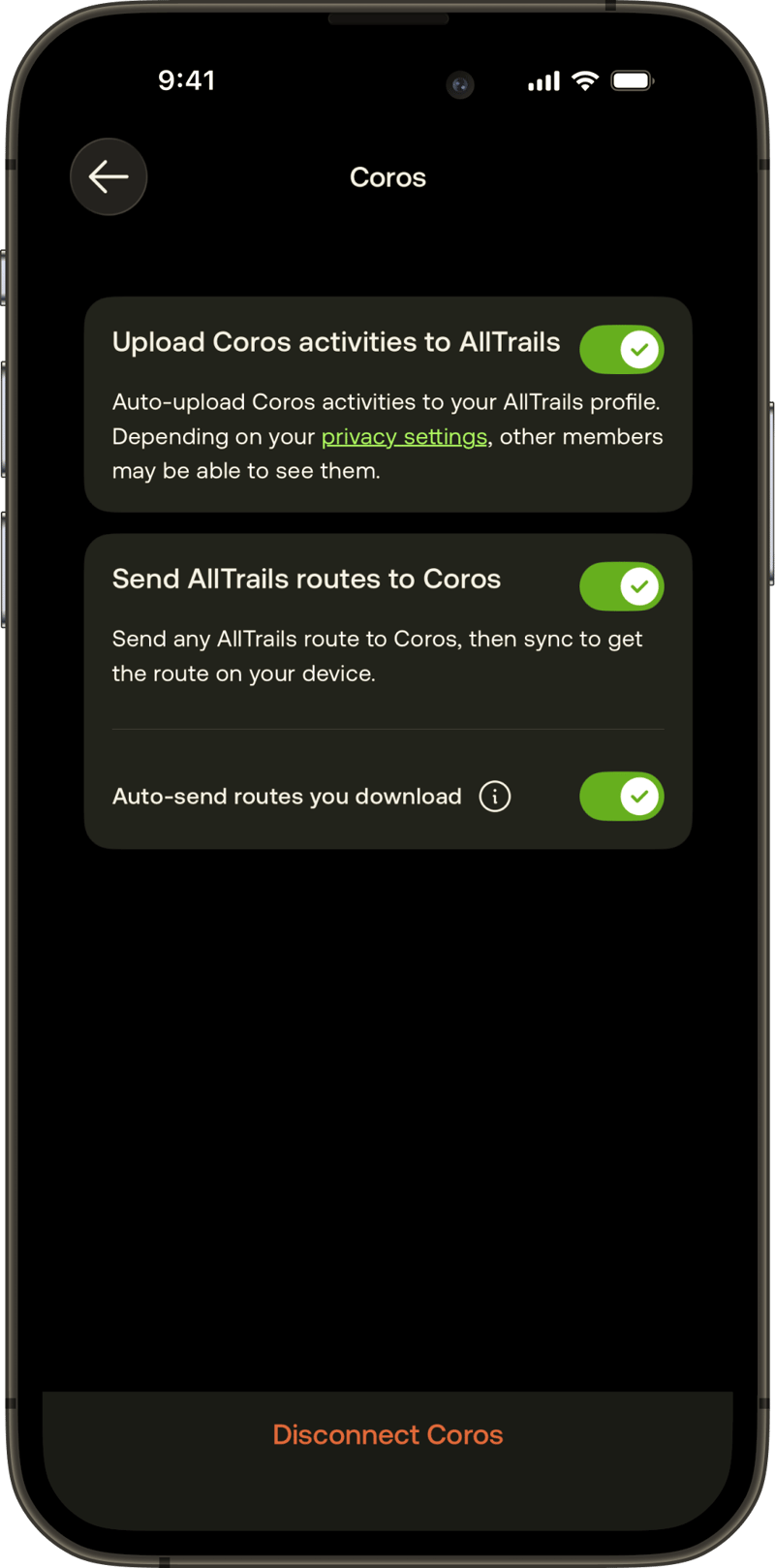
- Three toggles control what syncs: COROS activities uploading to AllTrails, an AllTrails route shortcut appearing in the COROS app, and automatic route download on save.
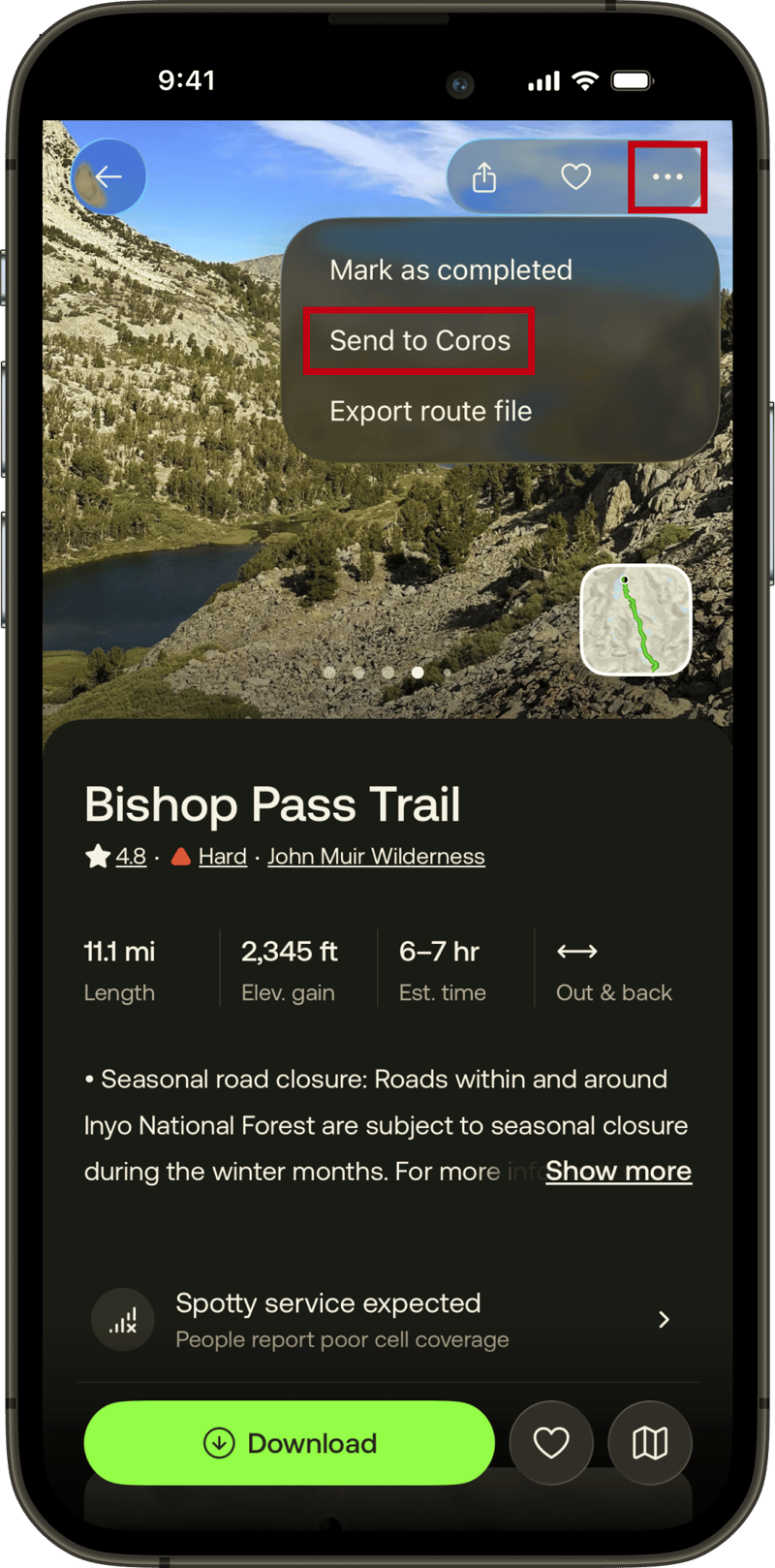
Once connected, AllTrails Plus and Peak subscribers ($36 and $80 per year respectively) can tap the three-dot menu on any route and select Send to COROS. The route lands in the COROS app’s Route Library. From there, open the route and tap Sync with your device to push it to the watch. Base (free) users must still export a GPX file manually and open it in the COROS app.
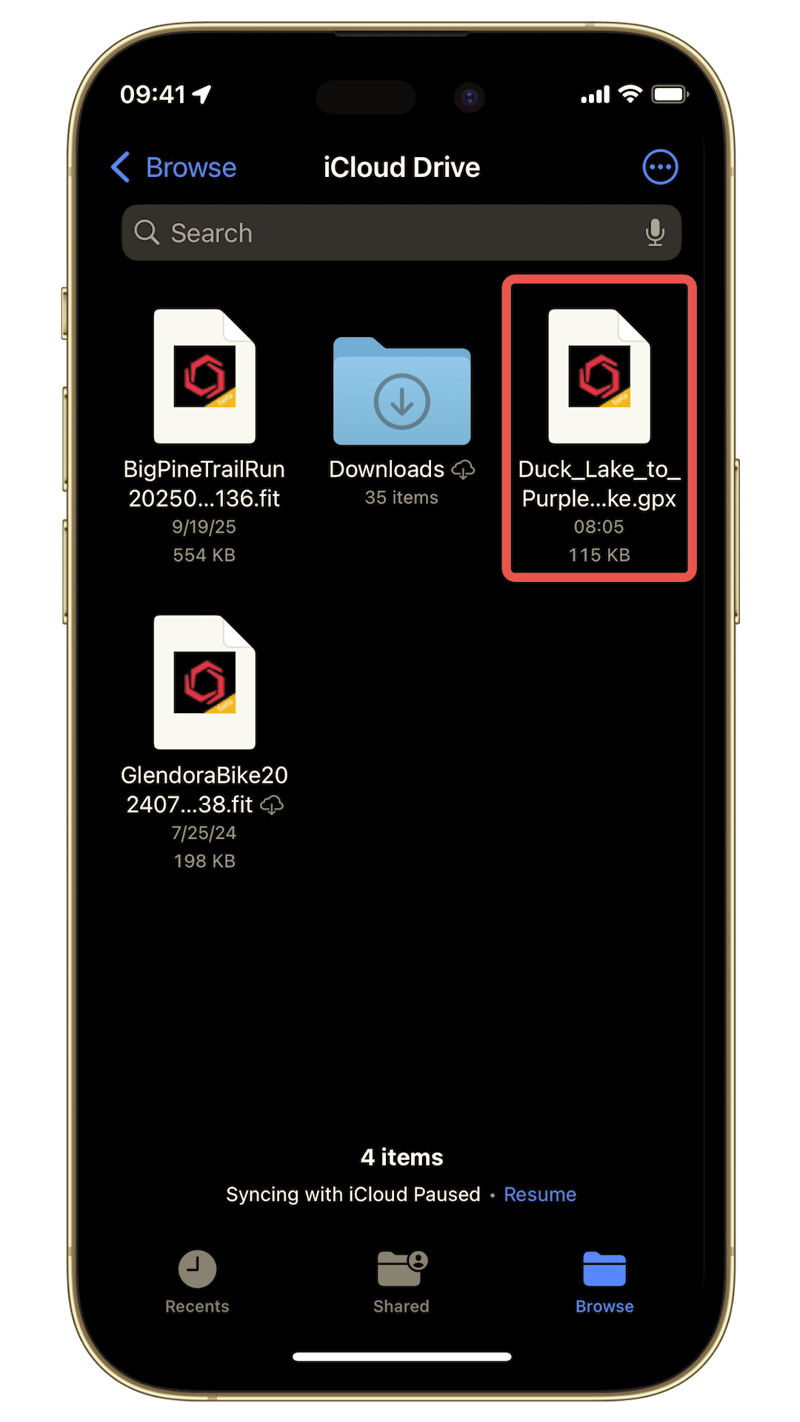
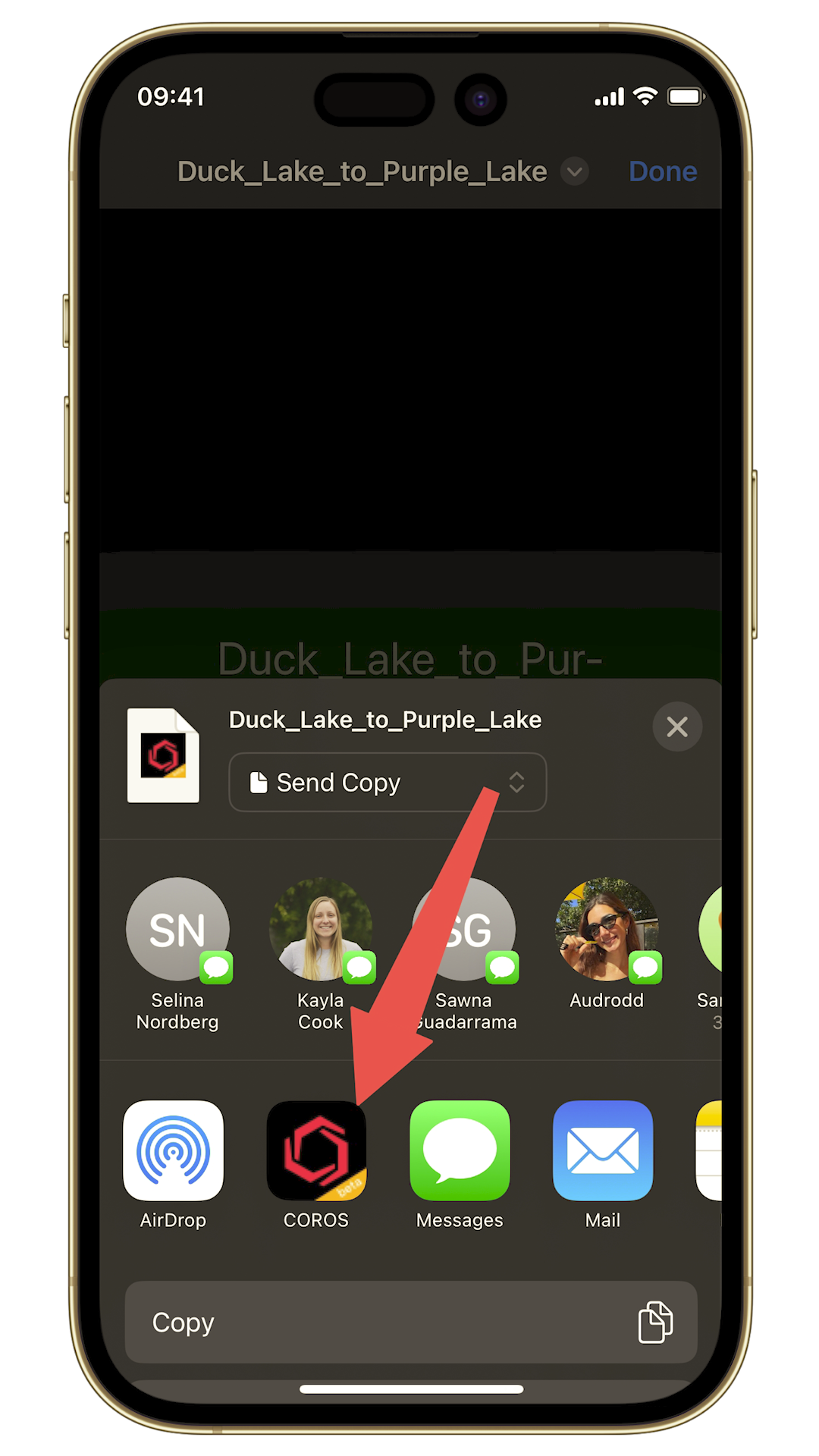
The manual GPX path requires saving the file to your phone’s storage, then opening it with the COROS app, i.e. the same multi-step workaround that existed before this integration.
How this compares to Garmin
Garmin already had an AllTrails integration before this announcement. When a Plus or Peak user downloads a route on AllTrails with auto-sync enabled, it is automatically synced to Garmin Connect. The next time the watch syncs with the Garmin Connect app, the route appears on the watch, with no further action required.
COROS requires the user to manually open the app and tap sync. That is a meaningful difference in daily use. The gap is wider still against Strava and Komoot, which use Garmin’s Connect Courses API to automatically push starred routes to the watch, with no interaction beyond the initial one-time setup.
COROS does not yet support background route sync from any third-party partner. Every route, regardless of its source, requires a manual tap in the app. One extra annoying step, or at least annoying if you do it regularly or forget to do it and wonder where your route is on the watch.
A necessary catch-up, not a step forward
AllTrails already works well with Garmin. COROS users who previously relied on AllTrails had to export GPX files manually; this integration removes that step for paid AllTrails subscribers. That is a real improvement for a real group of premium users, but not a competitive advance. COROS is playing catch-up to Garmin, and doing it in a clunky way.
The pattern is becoming familiar. COROS announced a Wahoo partnership in April, a partnership with AllTrails now, and the Komoot integration has been available for years. Each deal adds a headline, but the underlying integration quality lags. The veneer is there but the substance is not. The watch sync step that requires manual intervention is the same issue in each case and is a COROS platform limitation. Garmin solved this at the API level in 2020. Coros is at least 6 years behind the curve.
For a broader look at hiking navigation technology and how the platforms compare in terms of trail use, the hiking guide covers the full picture. GPS accuracy data across COROS, Garmin, and Amazfit hardware is in the GPS accuracy hub.
Last Updated on 13 June 2026 by the5krunner
My favourite kit and nutrition
- Injinji – Runners protect your toes. Avoid discomfort and minor injury. Run more. Run faster. I use them.
- Garmin 90-degree charging adapter — The small adapter that keeps your charging cables tidy. Essential for race day. I use one.
- Garmin charging puck — the fastest and most reliable way to top up your Garmin before a session. I use one.
- Ravemen FR300 — Front light that mounts directly under your Garmin or Wahoo head unit. Keeps your bars clean and your beam pointed where it matters. I use one.
- Body Glide – The blue anti-chafe stick that all swimmers and many runners use. I use it.
- Maurten — The race nutrition trusted by elite athletes. Gels and drink mixes engineered to be easy on the stomach. I use them.
- Garmin Varia RTL515 — A radar rear light that alerts you to vehicles approaching from behind. Pairs with your Edge or Garmin watch. I use this model.
- Favero Assioma Pro RS2 — The power-meter pedals most serious cyclists choose. Accurate, easy to move between bikes. I use this model.
- Garmin Forerunner 970 — A serious choice for a pro-grade triathlon watch. I use this.
- Polar H10 — My daily driver for accurate, waking HRV readings.
- Wahoo ELEMNT Roam 3 — The bike computer that has the feature Garmin lacks: usability. I use mine on most rides.
Reader-Powered Content

This content is not sponsored. It’s mostly me behind the labour of love, which is this site, and I appreciate everyone who supports it.
Support the site: Follow (free, fewer ads) · Subscribe (paid, ad-free) · Buy Me A Coffee ❤️
All articles are written by real people, fact-checked, and verified for originality. See the Editorial Policy. FTC: Affiliate Disclosure — some links pay commission. As an Amazon Associate, I earn from qualifying purchases.

theparkrunner is a contributing writer covering road races, endurance events and the travel side of racing life. Reports focus on upcoming events, race destinations and what athletes need to know before they arrive.
