CycleLytic: Terrain-Honest Cycling Analytics That Answer “Am I Getting Faster?”
You finish a ride, glance at your average speed, and try to read the tea leaves. Faster than last week, progress? Slower, a bad day, or just a hillier route? For most riders, the honest answer is: you can’t tell. Average speed blends every gradient into one number, and that number moves as much with the terrain you happened to ride as with your fitness.
And speed is only half the question. The same blur hides whether the effort itself is improving: your power, your heart rate, the quality of the workout.
CycleLytic is a small, independent tool built to fix exactly that.
The problem: same average, different ride
A flat 20-miler and a mountainous 20-miler can post identical average speeds and trend lines, even though one is a recovery spin and the other is the hardest ride of your month. So the most basic question a cyclist asks, “am I getting faster on this terrain?”, gets a misleading answer every time terrain enters the mix.
Ride flatter routes for a few weeks, and your average climbs: you look fitter without being fitter. Add hills, and it drops: you look worse while actually getting stronger. The number lies quietly in both directions.
How CycleLytic works
TL;DR: CycleLytic connects to your ride history and sorts every ride by how much you climb per mile, so it compares flat-to-flat and climb-to-climb rather than averaging it all.
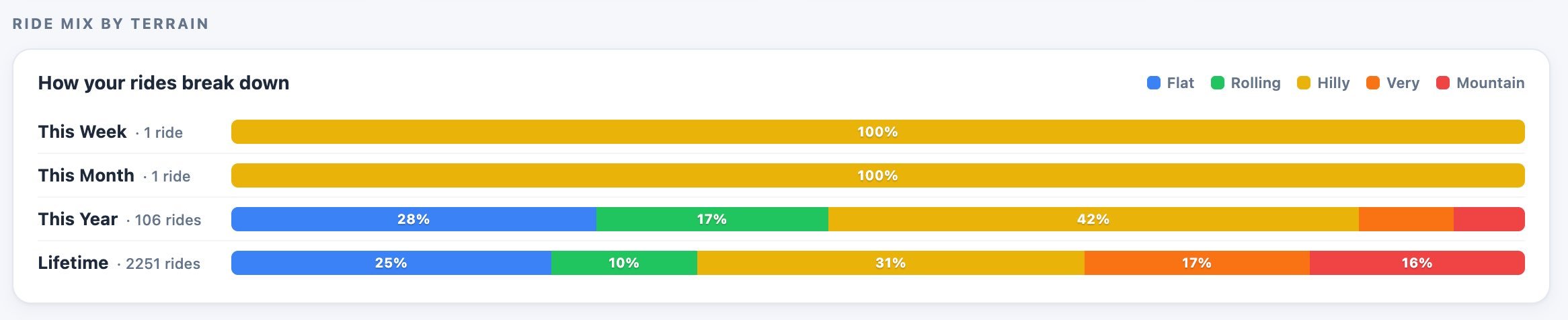
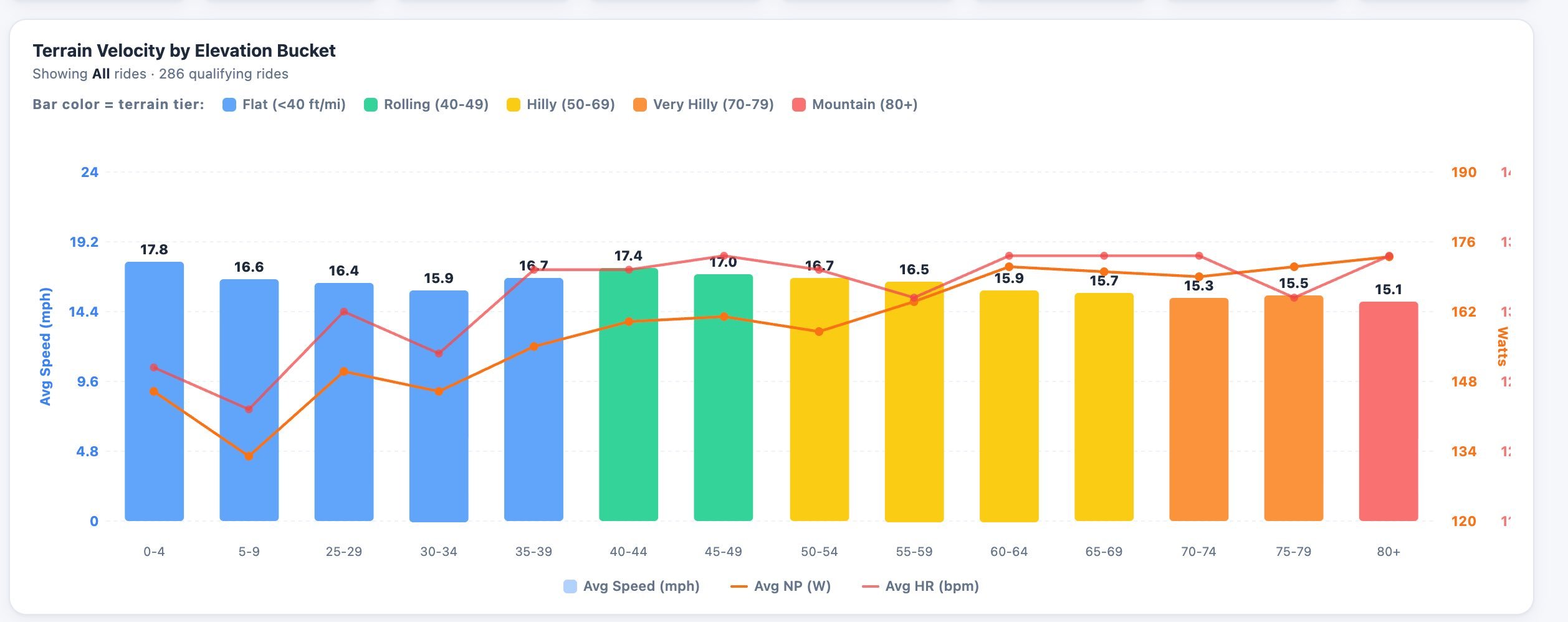
It buckets each ride by climbing rate: flat, rolling, hilly, mountain (feet per mile, or metres per km). It then reports your speed, power, and heart rate for each terrain type. Instead of a single blended average, you can see how you’re doing on the specific road you’re actually asking about. Connect once, and your rides start flowing in; there’s nothing to log by hand.
A worked example: two rides, same 17.0 mph, opposite stories
Numbers make it concrete. Take two riders who each logged a 30-mile ride at exactly 17.0 mph average this month. On paper, a tie. Here is what terrain bucketing shows when each ride is compared to that rider’s own 8-week baseline.
Rider A: the flatlander (629 ft of climbing)
| Terrain (climb rate) | Miles | This ride | 8-wk baseline | Change |
|---|---|---|---|---|
| Flat (<25 ft/mi) | 25 | 17.6 mph | 18.3 mph | −0.7 |
| Rolling (25–50) | 3 | 15.8 mph | 16.3 mph | −0.5 |
| Hilly (50–100) | 2 | 13.0 mph | 13.5 mph | −0.5 |
| Whole ride | 30 | 17.0 mph | n/a | no change |
Rider A is slower on every kind of road. The 17.0 average only held up because they rode an even flatter route than usual: easy terrain propping up a number that’s actually slipping.
Rider B: the climber (1,927 ft of climbing)
| Terrain (climb rate) | Miles | This ride | 8-wk baseline | Change |
|---|---|---|---|---|
| Flat (<25 ft/mi) | 3 | 21.5 mph | 21.0 mph | +0.5 |
| Rolling (25–50) | 4 | 19.0 mph | 18.3 mph | +0.7 |
| Hilly (50–100) | 21 | 16.5 mph | 15.6 mph | +0.9 |
| Mountain (100+) | 2 | 14.0 mph | 13.1 mph | +0.9 |
| Whole ride | 30 | 17.0 mph | n/a | no change |
Rider B is faster on every kind of road, over three times the climbing (1,927 ft vs 629 ft), same headline number. The average that flattered Rider A undersells Rider B.
Same 17.0 mph. The whole-ride average called it a tie, but it was wrong in opposite directions. Only the terrain view gets it right, and answering that question, honestly, is the entire reason CycleLytic exists.
What else does it show
The same idea drives a few more views:
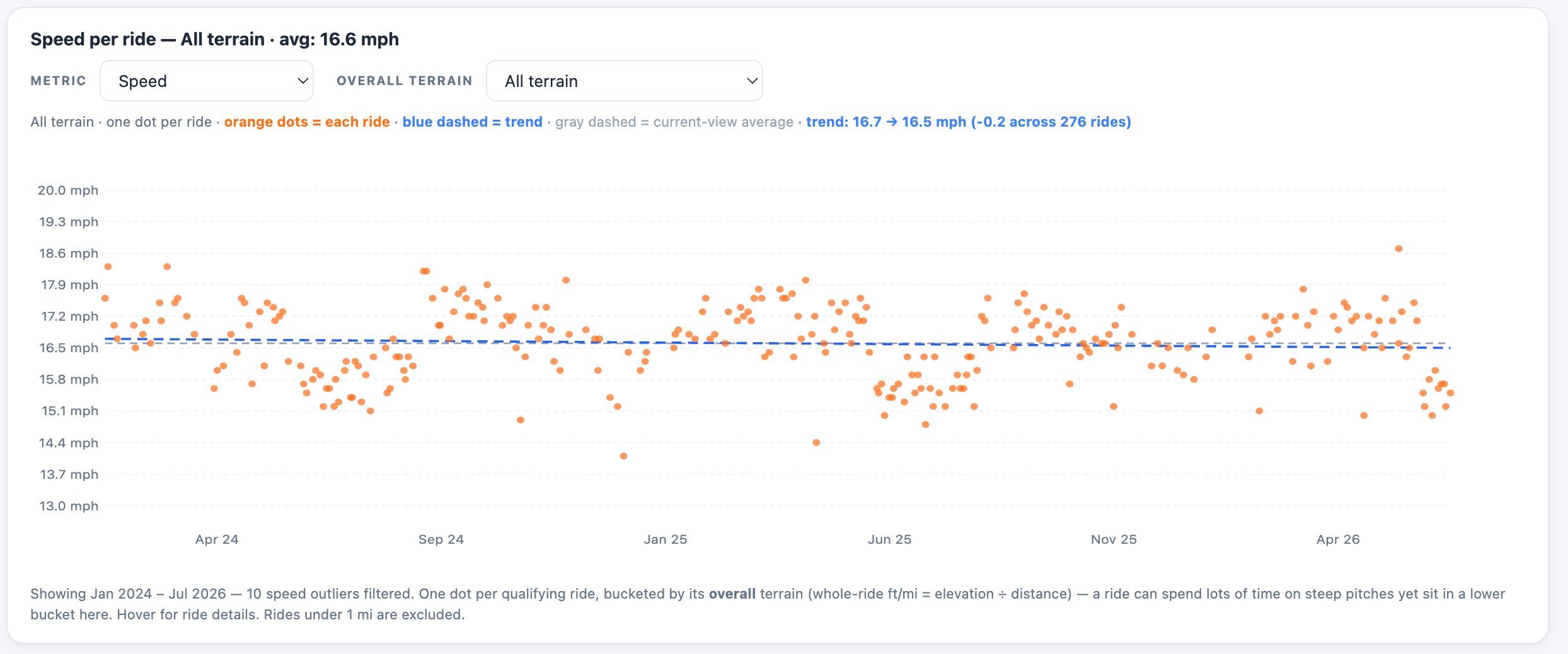
- Honest speed trends: a monthly median-speed chart you can filter by gradient bucket, e.g. “on 40–50 ft/mile terrain, my median speed went from 16.2 to 17.1 mph this year.” Progress you can trust, because the terrain is held constant.
- Aerobic efficiency: your power tracked against your heart rate, so you can tell whether your engine is getting more economical, not just more powerful.
- Free route exports: turn-by-turn TCX/GPX you can send straight to a Garmin or Wahoo, included in the base product, where Strava reserves route building and on-device navigation for paying subscribers.
How it sits alongside Strava
CycleLytic is the analysis layer on top of Strava. Strava handles social networking, activity logging, and some insights; CycleLytic adds terrain-categorised knowledge that Strava doesn’t offer. One-click connect, and it never modifies or deletes anything on the provider’s side. The only thing it ever writes is an optional wind & weather note on your Strava rides, and only if you turn it on.
What it connects to, and what it costs
Connect your rides from Strava, ROUVY, Suunto or Hammerhead, or upload .FIT /.GPX files directly. Route exports go out as TCX/GPX for Garmin and Wahoo head units. There’s a free tier that covers the activity feed, full ride details and community features. Pro is $36/year (about half of Strava’s $80) and adds deeper analytics. The core terrain analysis of your own rides isn’t locked behind the paywall. Built independently in North Carolina by a road cyclist who wanted the terrain-honest view for himself, then opened it up to other riders.
In short
Average speed answers “am I getting faster?” with a number that’s as much about the route as it is about the rider. CycleLytic sorts every ride by terrain and compares like with like, so the answer finally means something. It connects to Strava and the major platforms in one click, is free to start, and you can click around a fully loaded demo (no signup) at cyclelytic.com/demo.
Quick answers
Do I have to leave Strava to use this?
No. CycleLytic sits on top of Strava (or ROUVY, Suunto, Hammerhead). You connect once and keep using Strava exactly as before; CycleLytic just adds the terrain-adjusted analysis.
How does it decide what counts as hilly?
By climbing rate: vertical gain per distance (feet per mile, or metres per km). Every ride is bucketed into flat, rolling, hilly or mountain, and your speed, power and heart rate are reported per bucket so you always compare like with like.
What's free, and what's behind Pro?
The free tier covers the activity feed, full ride details and community features. Pro ($36/year) unlocks the full analytics suite: terrain stats, trends, route analysis and training zones. Your own rides’ core terrain analysis isn’t paywalled.
Related reading on the5krunner
- LeCoach: AI Cycling and Running Coach for Intervals.icu: another indie cycling analytics layer, built on Intervals.icu.
- IntervalCoach: AI Training That Adapts to Your Recovery Each Day: multi-sport adaptive training on Intervals.icu, covering cycling, running and triathlon.
- Runalyze MCP server gives AI the richest sports dataset yet: on the wider trend of sports analytics platforms opening their data layer.
Author: Michael Falkson, founder of CycleLytic, edited by the5krunner.
The previous Indie Spotlight covered Awesome Maps for Garmin.
Last Updated on 3 October 2026 by tfk the5krunner
Small things I always use
- Garmin 90-degree charging adapter: Charges your Garmin from any USB-C cable. Essential when travelling. I use one.
- Body Glide: The blue anti-chafe stick swimmers and runners carry. I use it.
- Speedo earplugs: Fewer ear infections and no cold-water dizziness. I use them.
- Dryrobe Advance: My winter changing robe for open-water swims. I use one. A cheaper option is the AONYIYI changing robe.
- Maurten: Race fuel that stays easy on the stomach. I use them.
- Garmin charging puck: The quickest way to top up before a session. I use one.
- Injinji: Toe socks that stop rubbing, so you run more. I use them.
- Ultimate toe protectors: Stop black toenails on long runs. They work. I use them.
- Compressport R2 v2 calf sleeves: My calf sleeves of choice. I use them.
- Cellucor C4: My pre-workout before hard sessions.
- TPU tubes: Schwalbe Aerothan, Tubolito and Pirelli SmarTube. Light, tiny spares. I use all three.
- G8 insoles: Adjustable insoles that are good. I use them.
- Cycplus Cube: A 97g electric pump that gets a road tyre rideable in two minutes. I carry one. 5% off with code THE5KRUNNER.
Watches and sensors
- Polar H10: My daily driver for waking HRV.
- Polar Verity Sense: My backup arm-worn HR sensor.
- Nomad bedside charger: Charges my iPhone and Apple Watch overnight. I use it, and many of their bands.
- Train.Red: The best muscle oxygen sensor I’ve used.
- Tymewear: Accurate heart rate and reliable ventilatory zones. I use it to pace endurance rides over an hour.
- Garmin Forerunner 970: A pro-grade triathlon watch. I use this.
- Apple Watch Ultra 4: My daily smartwatch. No phone needed on rides.
- Garmin Fenix 9 Pro: I’ve just bought one.
On the bike
- Continental GP5000 for everyday riding, and Aero 111 on the front for special occasions.
- Helmets: Specialized S-Works Evade 3 for road riding, and Rudy Project Wing for TT-style races. I use both.
- Ravemen FR300: A front light that mounts under your Garmin or Wahoo. I use one.
- Wahoo TRACKR Radar: I use it on one bike and Varia on the other. They perform the same.
- Garmin Varia RTL515: Radar that warns you of cars from behind. I use this model.
- Wahoo ELEMNT Roam 3: The bike computer that’s easy to use. I use mine on most rides.
- Favero Assioma Pro RS2: Accurate power pedals that swap easily between bikes. I use this model.
Home and indoor training
- NPE Runn: Makes my basic treadmill smart, sending more accurate speed and distance to my watch and Zwift. I use it.
- Google Wifi: Keeps Zwift connected in my pain cave. I use it.
- Apple TV 4K: Zwift on the big screen. I use two.
- Google Nest Doorbell (wired, 2nd gen): My video doorbell, running in both Google Home and Apple Home. I use it.
Health, recovery and sleep
- FreeStyle Libre 3 Plus: Shows how my blood sugar responds to diet.
- hDrop: Measures my sweat loss in summer and indoors.
- Fourth Frontier Zone: Checks my heart under load in hard sessions.
- Oura Ring 5: My partner’s recovery tracker of choice.
- Kineon MOVE+: Red light therapy for niggles. It works.
- Eight Sleep: A cooling mattress cover my partner and I use nightly.
Reader-Powered Content

This content is not sponsored. It’s mostly me behind the labour of love, which is this site, and I appreciate everyone who supports it.
Support the site: Follow (free, fewer ads) · Subscribe (paid, ad-free) · Buy Me A Coffee ❤️
Written by real people, with AI assistance. Fact-checked and verified for originality. See the Editorial Policy. FTC: Affiliate Disclosure — some links pay commission. As an Amazon Associate, I earn from qualifying purchases.

tfk is the founder and author of the5krunner, an independent endurance sports technology publication. With 20 years of hands-on testing of GPS watches and wearables, and competing in triathlons at an international age-group level, tfk provides in-depth expert analysis of fitness technology for serious athletes and endurance sport competitors. ID
