If you run with Strava, 2026 has been a year of doors closing. Year in Sport went behind the subscription last December. Fitness & Freshness, custom zones and Best Efforts live there too. Then the developer program changes arrived in June, API access began requiring a paid Strava subscription, and long-loved third-party tools began losing their sync: the best-known analytics extension has been frozen on the Chrome Web Store since late 2024, and its desktop companion lost Strava sync entirely this summer. If your training analysis depends on someone else’s developer link to Strava, you have learned this year that it can be switched off.
Negative Split is a free Chrome extension, built by a runner, that takes a different route: it computes everything locally, in your browser, from the Strava pages you are already looking at. There is no API, no account and no server. There is nothing for Strava to revoke.
The problem: the analysis moved behind two paywalls at once
A runner on free Strava in 2026 sees distance, pace and a map. The interesting questions sit elsewhere. How hard was that run really, I mean, once the hills are accounted for? Is my training load building, or am I digging a hole? What would I run a marathon in today? Strava answers those questions behind its subscription; the same company’s API pricing is squeezing and pushing away the independent tools that used to answer them for free. The result is an odd gap: your own running data is on the screen in front of you, and the arithmetic on top of it is the thing being sold back to you.
What is a Negative Split
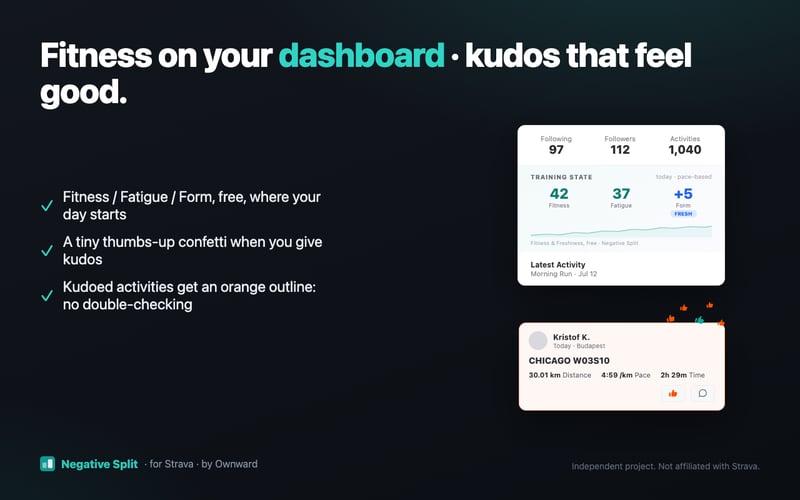
Negative Split is a Manifest V3 Chrome extension for runners (now you know!). Install it, open Strava as usual, and your own pages grow new sections: a pacing and training-load card on every activity, a sortable personal-best list and race predictions on your profile, Fitness / Fatigue / Form on your dashboard, and a free Year-in-Sport-style recap with a shareable, holographic “Year Card”. It is free, it works with a free Strava account, and the developer’s stated plan is to keep the core free.
How it works
TL;DR: Negative Split reads the Strava pages you already view and computes every metric locally in your browser; no server, no login, no API token that can expire or be priced out.
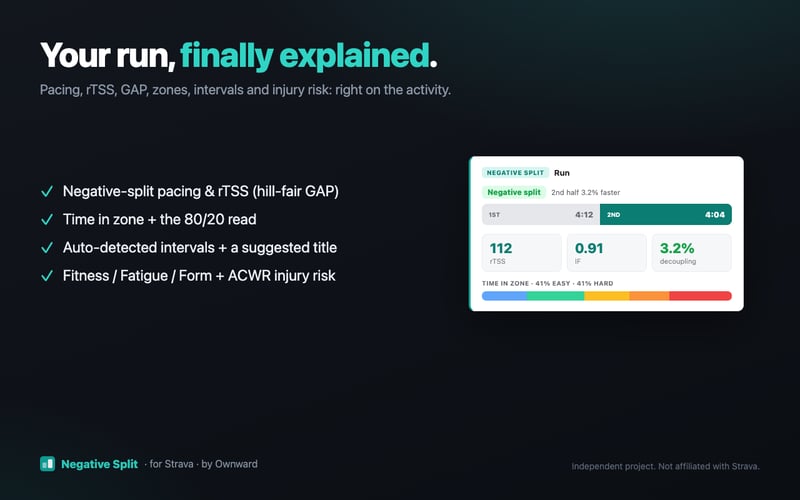
Technically, it is a set of content scripts. When you open one of your activities, the extension reads the same streams the page itself loads, runs the sports-science arithmetic on your machine, and renders the results next to Strava’s own content. The math is deliberately boring: Minetti’s energy-cost model for grade-adjusted pace, an exponentially weighted impulse-response model for Fitness/Fatigue/Form, Riegel-style scaling with a personal fade exponent for race predictions. No machine learning, no cloud inference, no “AI insights” (!!!). Every number on screen has a formula behind it, and most of them show that formula in a tooltip. If you distrust a value, you can check it with a calculator.
Because nothing depends on the Strava API, this year’s developer program changes do not apply to it. There is no sync to break and no token to re-authorise. The honest trade-off is that if Strava redesigns a page, a section can temporarily disappear until the extension is updated. It is built to fail silently, so Strava itself is never touched, and fixes ship in days rather than months.
A worked example, with real numbers
The developer’s own 28-km-long run makes the arithmetic concrete. Threshold pace is the one number you enter by hand once in the popup: here, 4:00/km, roughly a one-hour race pace. The run itself averaged about 5:15/km moving. Grade-adjusting each second of the run with the Minetti model and normalising gives an Intensity Factor of 0.77; in other words, the run sat at 77 per cent of threshold effort once the hills were priced in. Duration times intensity squared gives a training load of rTSS 147 for the session. Those two numbers, plus a decoupling figure that shows whether pace-per-heartbeat drifted in the second half, tell you more about the run than anything on the free activity page.
Two more examples of the same transparency. A 6×6-minute interval session is detected automatically from the velocity stream: the extension found exactly six work repetitions, at paces stepping from 4:12/km down to 4:00/km, and suggested “6×6′ @4:12→4:00” as the workout title, which matched what the runner had typed by hand. And on profiles, where a threshold has not been entered, the extension estimates one from visible personal bests: a 39:52 10K PB produced an estimated threshold of 3:59/km, one second off the manually configured value.
The free Year in Sport, plus a holographic Year Card
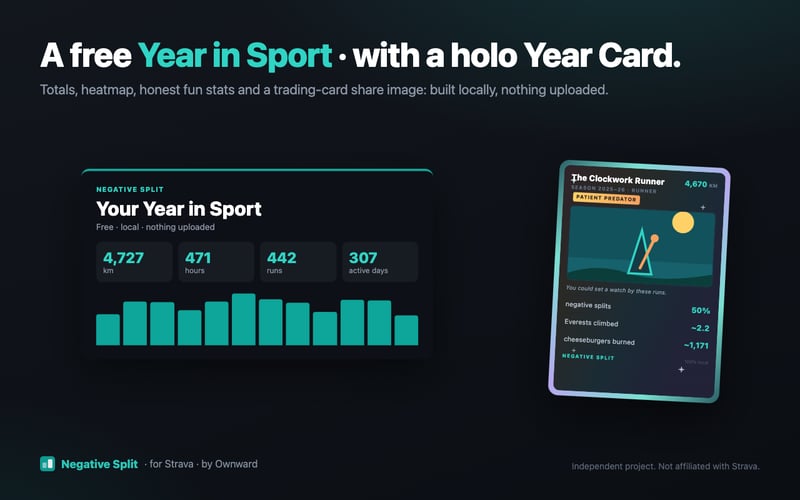
The recap is the feature with the obvious backstory: Strava paywalled Year in Sport in December 2025. Negative Split builds a private one from your own history on demand, any day of the year: totals, sport splits, a daily heatmap, monthly volume, season bests, and previous-period comparisons. On top of that sit honest fun stats (cheeseburgers burned, Everests climbed, the walk to Mordor, each with its formula one hover away) and a runner archetype (“The Dawn Metronome”, “The Weekend Volcano”) rendered on a tilting, foil-shimmering trading card you can download as a share image. It is a toy, in the best sense, and every number on it is computed in the same deterministic way as the training load.
Compatibility, and what it does not do
It works with Chrome on desktop, as well as Chromium-based browsers installed from the Chrome Web Store: Edge, Brave, Opera, and Arc. Any watch or platform that syncs with Strava is supported, whether Garmin, COROS, Polar, Suunto, Apple Watch, or phone apps, because the extension reads Strava’s processed data rather than communicating with devices. Both free and subscribed Strava accounts work.
The extension does not cover the Strava mobile apps, since it is a browser extension that runs on strava.com in a desktop browser. Cycling gets basic support, but the analytics are runner-first and lack a power-meter suite. There is no synced full-history database; the recap and trends are built from what Strava’s own pages provide. Negative Split is an independent project, not affiliated with Strava.
Privacy, by architecture
The extension requests one named host permission (strava.com) and local storage, and that is the whole story. The Chrome Web Store data disclosure reads “no data collected”, and the architecture is why: there is no server to send anything to. Threshold pace and body weight (used only for the fun-stat calorie estimates, with the estimate formula shown) live in local browser storage. Privacy is enforced by architecture rather than by policy, which is the strongest form.
Summary
Negative Split is what independent Strava tooling looks like after 2026: local-first, deterministic, and structurally immune to API repricing. Free users get back a version of the analysis Strava sells (training load, form, predictions, a year recap), and data-minded runners get arithmetic they can audit. The catch with any DOM-based tool is that Strava redesigns can cause short outages. For a free install with nothing to sign up for, it is a very easy tool to try and a hard one to argue with.
Get it: Negative Split for Strava on the Chrome Web Store. More at ownward.hu/negative-split.
Quick answers
Does it work with my Garmin, COROS or Apple Watch?
Yes, indirectly. If your runs land on Strava, Negative Split can analyse them. It reads Strava’s web pages, so the recording device never matters.
Do I need a Strava subscription?
No. It works on free accounts, and most of what it adds (training load, Fitness/Fatigue/Form, race predictions, the year recap) overlaps with what the subscription sells. Subscribers can run both side by side.
What happens when Strava changes its website?
Affected sections disappear rather than break the page, and updates restore them, typically within days. There is no login or token involved, so recovery never needs anything from you beyond the automatic extension update.
Related reading on the5krunner
- Klimat Strava Weather App: 80 Million Activities Later: another independent Strava tool that adds detailed weather context to activities, and has proved that the free-to-users model can survive at scale.
- My Running Dashboard: Analytics Built From One Runner’s DNF: a free running dashboard with CP-anchored fitness, race predictions and a Time Machine that rewinds your training history.
- Pace It: Running Analytics That Show Whether Your Training Is Actually Working: pace-at-effort trends and personalised training paces for Apple Watch and iPhone, sitting on Strava or HealthKit.
Author: Lajos Gere, developer of Negative Split, edited by the5krunner.
If you enjoyed reading this, here is another in the Indie Spotlight series: My Running Dashboard – Beta: Analytics Built From One Runner’s DNF.
Last Updated on 12 October 2026 by tfk the5krunner
Small things I always use
- Garmin 90-degree charging adapter: Charges your Garmin from any USB-C cable. Essential when travelling. I use one.
- Body Glide: The blue anti-chafe stick swimmers and runners carry. I use it.
- Speedo earplugs: Fewer ear infections and no cold-water dizziness. I use them.
- Dryrobe Advance: My winter changing robe for open-water swims. I use one. A cheaper option is the AONYIYI changing robe.
- Maurten: Race fuel that stays easy on the stomach. I use them.
- Garmin charging puck: The quickest way to top up before a session. I use one.
- Injinji: Toe socks that stop rubbing, so you run more. I use them.
- Ultimate toe protectors: Stop black toenails on long runs. They work. I use them.
- Compressport R2 v2 calf sleeves: My calf sleeves of choice. I use them.
- Cellucor C4: My pre-workout before hard sessions.
- TPU tubes: Schwalbe Aerothan, Tubolito and Pirelli SmarTube. Light, tiny spares. I use all three.
- G8 insoles: Adjustable insoles that are good. I use them.
- Cycplus Cube: A 97g electric pump that gets a road tyre rideable in two minutes. I carry one. 5% off with code THE5KRUNNER.
Watches and sensors
- Polar H10: My daily driver for waking HRV.
- Polar Verity Sense: My backup arm-worn HR sensor.
- Nomad bedside charger: Charges my iPhone and Apple Watch overnight. I use it, and many of their bands.
- Train.Red: The best muscle oxygen sensor I’ve used.
- Tymewear: Accurate heart rate and reliable ventilatory zones. I use it to pace endurance rides over an hour.
- Garmin Forerunner 970: A pro-grade triathlon watch. I use this.
- Apple Watch Ultra 4: My daily smartwatch. No phone needed on rides.
- Garmin Fenix 9 Pro: I’ve just bought one.
On the bike
- Continental GP5000 for everyday riding, and Aero 111 on the front for special occasions.
- Helmets: Specialized S-Works Evade 3 for road riding, and Rudy Project Wing for TT-style races. I use both.
- Ravemen FR300: A front light that mounts under your Garmin or Wahoo. I use one.
- Wahoo TRACKR Radar: I use it on one bike and Varia on the other. They perform the same.
- Garmin Varia RTL515: Radar that warns you of cars from behind. I use this model.
- Wahoo ELEMNT Roam 3: The bike computer that’s easy to use. I use mine on most rides.
- Favero Assioma Pro RS2: Accurate power pedals that swap easily between bikes. I use this model.
Home and indoor training
- NPE Runn: Makes my basic treadmill smart, sending more accurate speed and distance to my watch and Zwift. I use it.
- Google Wifi: Keeps Zwift connected in my pain cave. I use it.
- Apple TV 4K: Zwift on the big screen. I use two.
- Google Nest Doorbell (wired, 2nd gen): My video doorbell, running in both Google Home and Apple Home. I use it.
Health, recovery and sleep
- FreeStyle Libre 3 Plus: Shows how my blood sugar responds to diet.
- hDrop: Measures my sweat loss in summer and indoors.
- Fourth Frontier Zone: Checks my heart under load in hard sessions.
- Oura Ring 5: My partner’s recovery tracker of choice.
- Kineon MOVE+: Red light therapy for niggles. It works.
- Eight Sleep: A cooling mattress cover my partner and I use nightly.
Reader-Powered Content

This content is not sponsored. It’s mostly me behind the labour of love, which is this site, and I appreciate everyone who supports it.
Support the site: Follow (free, fewer ads) · Subscribe (paid, ad-free) · Buy Me A Coffee ❤️
Written by real people, with AI assistance. Fact-checked and verified for originality. See the Editorial Policy. FTC: Affiliate Disclosure — some links pay commission. As an Amazon Associate, I earn from qualifying purchases.

tfk is the founder and author of the5krunner, an independent endurance sports technology publication. With 20 years of hands-on testing of GPS watches and wearables, and competing in triathlons at an international age-group level, tfk provides in-depth expert analysis of fitness technology for serious athletes and endurance sport competitors. ID
