Running fitness changes slowly. You do the work for weeks, sometimes months, and the only way to know if it is working is to race or go back and forth across runs to see the pattern. Your watch records every run in detail, but there is no simple way to see whether today’s easy run was actually faster at the same heart rate than the one you did in March.
Progress feels invisible while you are in it.
Pace It was built to fix that. Its developer, Dionysis Kastellanis, is training with an Apple Watch Ultra 2. The hardware measures everything, and the sensors are genuinely good, but the software that ships with the watch barely scratches the surface of what that data can tell you. He wanted to track how his fitness was changing as he trained, so he built Pace It.
Pace It is an iOS and Apple Watch app that makes training progress visible while you are training. It reads the workouts recorded by your watch or synced from Strava and reveals trends that get lost in per-run stats: pace at a given heart rate over months, training load ratio, zone-by-zone pace progression, and personalised training paces grounded in your own running.
What Pace It Shows You
TL;DR: Pace It turns your workout history into pace-at-effort trends and personalised training paces, so you can see your fitness progress while you train.
The app is built around two main tabs: Progress and Insights. Progress is the dashboard you check daily. It shows your current week at a glance: mileage, training load, training distribution, VO2 Max, yearly summaries and personal bests. Insights is where the longer-term picture lives. It tracks how your training impacts your running efficiency over weeks and months, and reveals trends that are invisible on a per-run basis.
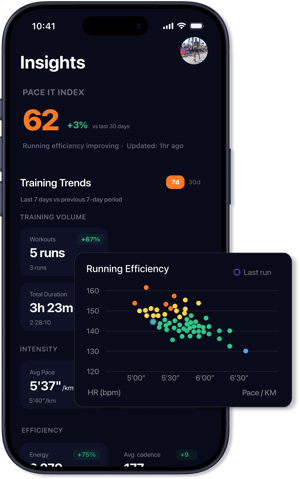
The headline number in Insights is the Pace It Index, a single 0-to-100 score with a 30-day delta. It is built from four pillars: fitness (VO2 Max), efficiency (pace relative to heart rate), consistency (how often you run), and volume (weekly distance with diminishing returns). While VO2 Max on its own is a single-variable estimate that barely changes week to week, the Pace It Index combines what your body can do with how consistently and efficiently you do it. When your easy runs get faster at the same heart rate, and you are running regularly, the score goes up. When you stop or regress, it decays. The score responds to real changes in your training as they happen.
The Core Insight: Pace at Effort
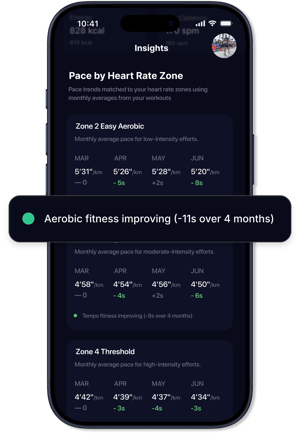
Pace It tracks your average pace in each heart rate zone, month by month, and plots it so you can see the trend. If your Zone 2 pace goes from 5:31/km in February to 5:20/km by June, your aerobic fitness has genuinely improved, allowing you to run faster at the same heart rate. That single chart is the most honest fitness signal available from a watch, and it is what the app was originally built around.
Alongside that, there is a running efficiency scatter. Every run from the last 90 days is plotted as a dot, with pace on one axis and average heart rate on the other, colour-coded by zone, and a trend indicator showing whether your efficiency is improving, declining, or stable.
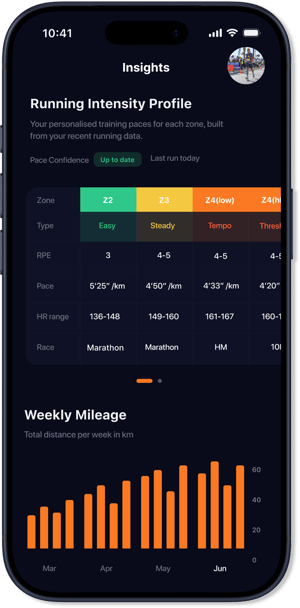
The Running Intensity Profile takes your last 60 days of running and derives seven personalised training paces, from recovery through to sprint, each tied to the heart rate zone it corresponds to. It also generates race-time estimates for 5K, 10K, half marathon, and marathon, built from your own data and updated as your fitness changes.
How the Analytics Work
Pace It pulls workout data from HealthKit or from Strava. It merges data from multiple sources, deduplicates overlapping workouts, and builds a unified training history over years.
During setup, you configure heart rate zones, and the app uses those as the foundation for everything it calculates:
- Training distribution showing the split between easy and hard running, and where your time falls across zones
- Training Load Ratio, an acute-to-chronic workload ratio that flags when you are building too fast or need to back off
- LT1/LT2 threshold estimates derived from your own pace-at-HR data rather than a generic lookup table
All of these updates are automatically applied as new workouts come in. There is no manual logging.
The Apple Watch App
Apple Watch hardware has reached the point where its sensors rival those of dedicated running watches. What has been missing is a running app that uses all of it and really makes sense of pace and heart rate data. Without context, these metrics feel meaningless. Pace It includes a native watchOS app, built to give Apple Watch runners the kind of experience the watch sensors deserve. It offers 40+ running metrics across 5 fully customisable screens, including gauges for live targets with directional haptic feedback when you drift above or below your range.
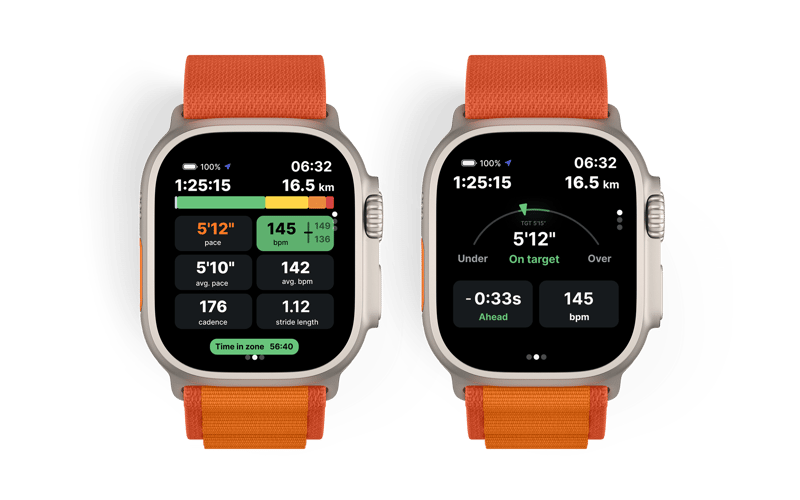
For structured training, you can build custom workouts on the iPhone and sync them to the watch: a warm-up, interval blocks with work and recovery steps, and a cooldown. The watch executes each step with auto-advance, countdown haptics in the final seconds of a recovery interval, and a preview of the next step.
Outside of workouts, the watch dashboard shows Training Load Ratio, weekly mileage, training distribution, VO2 Max trend, and last run summary.
How Pace It Sits Alongside Other Tools
Pace It syncs runs from Strava or HealthKit and adds its own analytics layer on top. It can also upload HealthKit workouts back to Strava if you want them in both places. It is a companion to existing tools rather than a replacement.
What Pace It owns is the long view: pace-at-effort trends across months, personalised training paces from your own data, a highly configurable Apple Watch experience, and a clean UI that users consistently point out. The interface is designed to reveal what matters. If you care about whether your fitness is moving in the right direction, that is where Pace It sits.
What Else Pace It Covers
- Personal best tracking across 5K, 10K, half marathon, marathon, and longest run, with improvement deltas versus your second-best time
- Shoe tracking: assign shoes to runs manually or by workout type, track distance per pair with replacement warnings, and see a usage breakdown across your rotation.
- Workout categorisation: runs are automatically classified as easy, tempo, intervals, long run, race, and so on, with manual override.
- Widgets and complications, iOS home screen widgets for weekly mileage, Pace It Index, VO2 Max trend, personal bests, training distribution, and a recent runs calendar. watchOS complications for mileage, Training Load Ratio, and distribution
Pricing and Availability
Pace It is free to download and use. The free tier includes a run diary with weekly goals, personal best tracking, workout categorisation, and the Pace It Index. For deeper analytics (pace-at-effort progression, efficiency scatter, training trends, Training Load Ratio, personalised paces) and the Apple Watch workout app, there are monthly and yearly subscriptions, both with a 7-day free trial. A one-time lifetime purchase is also available. The app currently holds a 4.9 out of 5 rating on the App Store.
Things to Note
Pace It is iPhone-only. There is no Android version. If you run with a non-Apple watch, your data can still flow in via Strava.
The analytics improve with more data. Zone progression needs several months of consistent running to show meaningful trends. If you have years of HealthKit or Strava data, the app will ingest it on first setup.
The focus is on analytics for the runner’s own training. There are no social features.
Summary
Most runners train consistently and only find out it worked on race day. Pace It exists to change that. It turns the data your watch already collects into a clear answer: is the same effort producing a faster pace than it did three months ago? If you want to see your fitness improving while you train, that is what Pace It is for.
The app is free to download on the App Store. More at paceit.app.
Quick answers
Does Pace It work if I do not have an Apple Watch?
Pace It is iPhone-only for the app itself, but it runs on any watch and can sync via Strava. You lose the native Apple Watch workout app experience, but the analytics work the same on any run data that reaches HealthKit or Strava.
How long does it take to see meaningful trends?
Zone-by-zone pace progression needs several months of consistent running to show a real trend. If you already have years of history in HealthKit or Strava, the app ingests it on first setup, so trends appear immediately from your existing data rather than waiting for new runs to accumulate.
What does the free tier include, and what is behind the paywall?
The free tier includes the run diary with weekly goals, personal best tracking, workout categorisation, and the Pace It Index. The deeper analytics, including pace-at-effort progression, efficiency scatter, training trends, Training Load Ratio, and personalised paces, plus the Apple Watch workout app, are behind a monthly or yearly subscription, both with a 7-day free trial. A one-time lifetime purchase is also available.
Related reading on the5krunner
- CycleLytic: Terrain-Honest Cycling Analytics That Answer “Am I Getting Faster?”: the cycling equivalent, sorting every ride by terrain so the same question gets an honest answer.
- LeCoach: AI Cycling and Running Coach for Intervals.icu: an AI coach that builds a periodised plan around your athletic profile and adapts daily.
- IntervalCoach: AI Training That Adapts to Your Recovery Each Day: multi-sport adaptive training on Intervals.icu, rewriting today’s workout from your recovery data.
Author: Dionysis Kastellanis, founder of Pace It, edited by the5krunner.
The previous Indie Spotlight covered TouchTrails.
Last Updated on 3 October 2026 by tfk the5krunner
Small things I always use
- Garmin 90-degree charging adapter: Charges your Garmin from any USB-C cable. Essential when travelling. I use one.
- Body Glide: The blue anti-chafe stick swimmers and runners carry. I use it.
- Speedo earplugs: Fewer ear infections and no cold-water dizziness. I use them.
- Dryrobe Advance: My winter changing robe for open-water swims. I use one. A cheaper option is the AONYIYI changing robe.
- Maurten: Race fuel that stays easy on the stomach. I use them.
- Garmin charging puck: The quickest way to top up before a session. I use one.
- Injinji: Toe socks that stop rubbing, so you run more. I use them.
- Ultimate toe protectors: Stop black toenails on long runs. They work. I use them.
- Compressport R2 v2 calf sleeves: My calf sleeves of choice. I use them.
- Cellucor C4: My pre-workout before hard sessions.
- TPU tubes: Schwalbe Aerothan, Tubolito and Pirelli SmarTube. Light, tiny spares. I use all three.
- G8 insoles: Adjustable insoles that are good. I use them.
- Cycplus Cube: A 97g electric pump that gets a road tyre rideable in two minutes. I carry one. 5% off with code THE5KRUNNER.
Watches and sensors
- Polar H10: My daily driver for waking HRV.
- Polar Verity Sense: My backup arm-worn HR sensor.
- Nomad bedside charger: Charges my iPhone and Apple Watch overnight. I use it, and many of their bands.
- Train.Red: The best muscle oxygen sensor I’ve used.
- Tymewear: Accurate heart rate and reliable ventilatory zones. I use it to pace endurance rides over an hour.
- Garmin Forerunner 970: A pro-grade triathlon watch. I use this.
- Apple Watch Ultra 4: My daily smartwatch. No phone needed on rides.
- Garmin Fenix 9 Pro: I’ve just bought one.
On the bike
- Continental GP5000 for everyday riding, and Aero 111 on the front for special occasions.
- Helmets: Specialized S-Works Evade 3 for road riding, and Rudy Project Wing for TT-style races. I use both.
- Ravemen FR300: A front light that mounts under your Garmin or Wahoo. I use one.
- Wahoo TRACKR Radar: I use it on one bike and Varia on the other. They perform the same.
- Garmin Varia RTL515: Radar that warns you of cars from behind. I use this model.
- Wahoo ELEMNT Roam 3: The bike computer that’s easy to use. I use mine on most rides.
- Favero Assioma Pro RS2: Accurate power pedals that swap easily between bikes. I use this model.
Home and indoor training
- NPE Runn: Makes my basic treadmill smart, sending more accurate speed and distance to my watch and Zwift. I use it.
- Google Wifi: Keeps Zwift connected in my pain cave. I use it.
- Apple TV 4K: Zwift on the big screen. I use two.
- Google Nest Doorbell (wired, 2nd gen): My video doorbell, running in both Google Home and Apple Home. I use it.
Health, recovery and sleep
- FreeStyle Libre 3 Plus: Shows how my blood sugar responds to diet.
- hDrop: Measures my sweat loss in summer and indoors.
- Fourth Frontier Zone: Checks my heart under load in hard sessions.
- Oura Ring 5: My partner’s recovery tracker of choice.
- Kineon MOVE+: Red light therapy for niggles. It works.
- Eight Sleep: A cooling mattress cover my partner and I use nightly.
Reader-Powered Content

This content is not sponsored. It’s mostly me behind the labour of love, which is this site, and I appreciate everyone who supports it.
Support the site: Follow (free, fewer ads) · Subscribe (paid, ad-free) · Buy Me A Coffee ❤️
Written by real people, with AI assistance. Fact-checked and verified for originality. See the Editorial Policy. FTC: Affiliate Disclosure — some links pay commission. As an Amazon Associate, I earn from qualifying purchases.

tfk is the founder and author of the5krunner, an independent endurance sports technology publication. With 20 years of hands-on testing of GPS watches and wearables, and competing in triathlons at an international age-group level, tfk provides in-depth expert analysis of fitness technology for serious athletes and endurance sport competitors. ID
