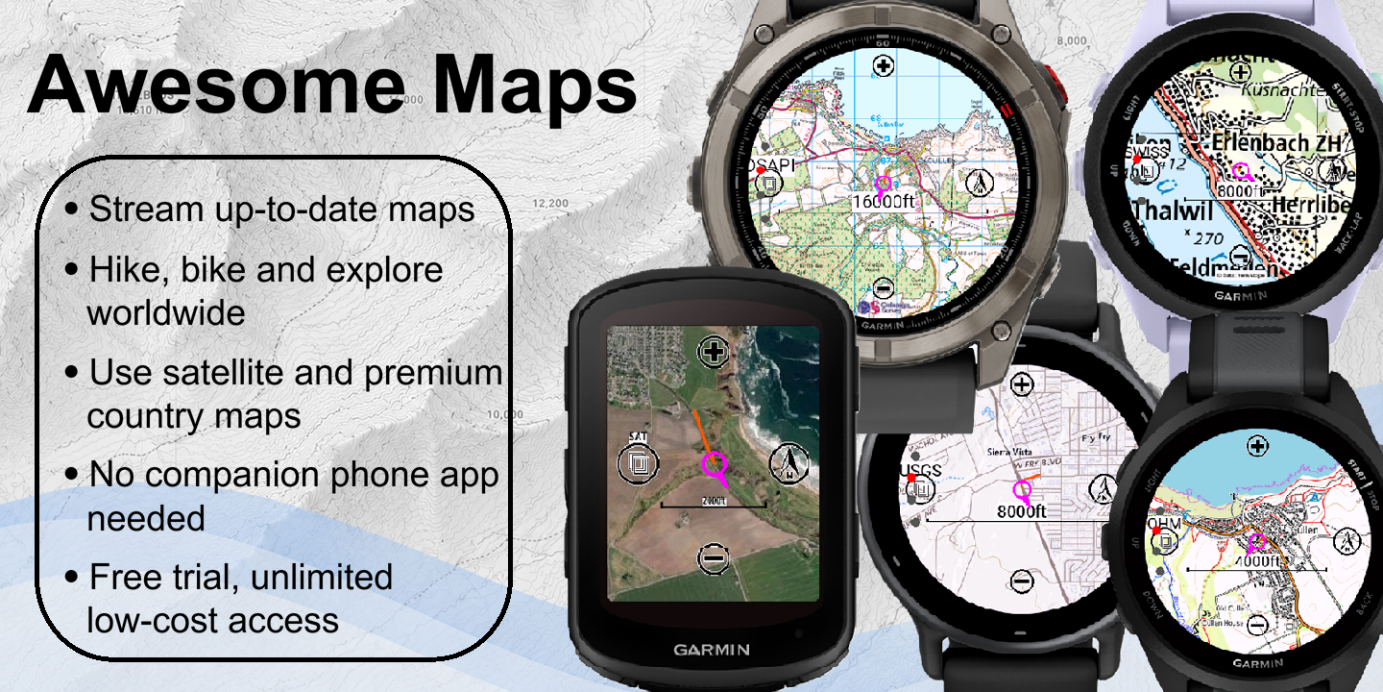
A Forerunner 70 at £220 gets richer mapping than a Forerunner 970 at £620. Awesome Maps is how.
The Mapping Gap on Garmin
Many Garmin users want reliable maps for outdoor activities. Yet, on-device mapping is often limited to select models, requires advanced downloads, or relies on managing offline areas before a trip. Awesome Maps addresses that gap by making fresh, map-tile-based coverage available on demand to almost all modern devices running CIQ 5+ (2022 onwards). This excludes the hardware-limited GPSMAP devices.
How it Works
TL;DR: Awesome Maps streams premium map tiles to a Garmin device on demand, including Ordnance Survey, IGN, Swisstopo, and satellite imagery, viewable as a datafield during an activity or as a glance widget on the watch face.
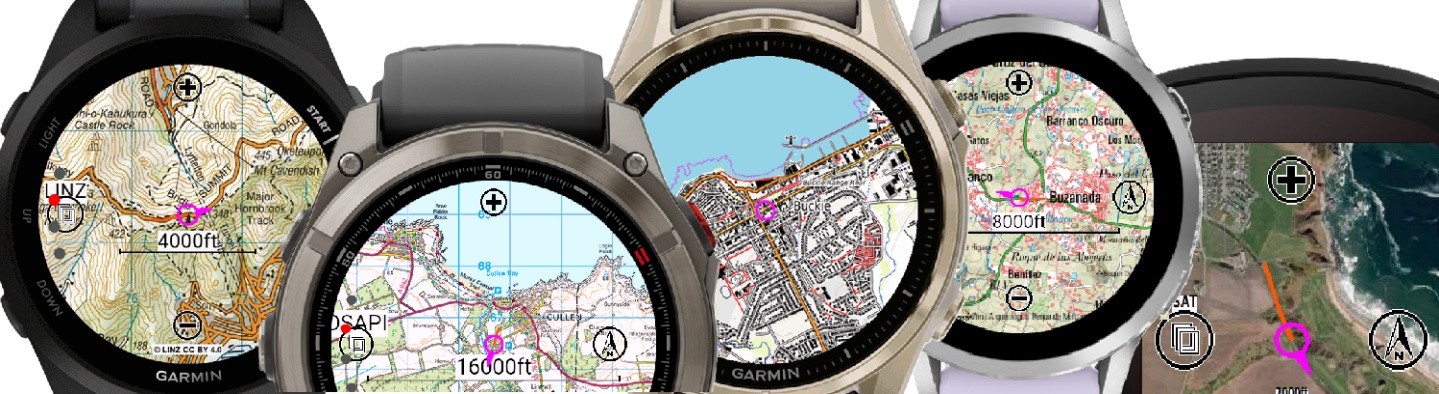
Awesome Maps streams map tiles as the user moves, creating a small, dynamic cache to improve performance, reduce reload times and allow rotated maps. Users can choose zoom levels, map orientation, and supported map types from the device interface, making it easy to view useful maps during activities or from the home-screen glance, which also displays a grid reference.
Integrations
Awesome Maps is available as both an activity data field and a glance app/widget. It integrates with a range of mapping sources, including Open Hiking Map, satellite imagery and premium national mapping providers, including the USGS (USA), Ordnance Survey (Great Britain), IGN (France and Spain), LINZ (New Zealand), Kartverket (Norway), Swisstopo (Switzerland) and NGI (Belgium) to deliver high-quality cartographic topographic maps.
Background
Awesome Maps started as a personal need for Ordnance Survey and satellite maps on the author’s Edge 1040 head unit. The initial concept expanded to include alternative satellite maps, rotation, and other national mapping agency providers. There is a head full of ideas behind it.
CrispGarmin, an indie developer with a background in spatial data management, developed Awesome Maps. Sourcing large-scale map integrations and applying the precise geodetic transformations needed for accurate Ordnance Survey coordinates “took me back to university exams”. CrispGarmin: “I’m really proud of Awesome Maps, and there are certainly many places where it could go. Thank you to all the early adopters, especially the ones who contacted me with ideas or feedback.”
Two technical challenges shaped the app. Code optimisation for the resource-limited datafield version, which must run in parallel with other datafields rather than as a full-screen app, so it has less memory allocation. And testing across nearly 100 Garmin device models on every release: Garmin’s CIQ simulator helps, but applying four GPS modes and three connectivity states to every model on every release is not realistic. Early v1.x users who had a poor experience should give the current version another try.
Quick answers
Can you follow routes offline?
No. Awesome Maps is focused on viewing maps on Garmin devices. It can show a recent route “snail trail”, but does not (yet) allow routes to be uploaded and followed within Awesome Maps. It is not an equivalent to on-device TopoActive maps for offline use, dynamic routing and similar.
Do you need a mobile data connection?
On first load, yes. Mobile data is required to download the initial map data wherever the user is. That data is then cached for speed and to limit further data downloads until the zoom level or map type changes.
How much does Awesome Maps cost?
Awesome Maps is a freemium app. The trial version offers full functionality with monthly limits. Unlimited access is £3.49 per three months, or £4.99 with premium maps included, with annual discounts available. The same per-device licence covers both the glance/widget and the datafield app, doubling the monthly free limit if used together. Premium providers like Ordnance Survey require paid licensing, which is why not everything can be free.
Where to Download
Awesome Maps is available from the Connect IQ store at apps-developer.garmin.com or via garminapps.com. For more information.
If your country is not yet covered, get in touch via garminapps.com, especially if you know map data is publicly available or under a developer licence.
Related reading on the5krunner
- Garmin Connect IQ 9: Do You Miss Out On The New Capabilities?Six new CIQ 9 capabilities, which devices qualify, and which do not.
- Apple Watch Offline Maps: WristTopo Topo Navigation App: the equivalent indie story on Apple Watch, with a full offline topographic map and turn-by-turn guidance on the wrist.
- Garmin Forerunner 170 Review: the FR170 and its sibling FR70 both benefit from Awesome Maps, since neither carries Garmin’s own topographic maps.
Author: CrispGarmin, developer of Awesome Maps, edited by the5krunner
Last Updated on 28 August 2026 by the5krunner
My favourite kit and nutrition
- Garmin Fenix 9 Pro — I’ve just bought one.
- Injinji – Runners protect your toes. Avoid discomfort and minor injury. Run more. Run faster. I use them.
- Garmin 90-degree charging adapter — A small keyring adapter you can use anywhere. Essential when away. I use one.
- Garmin charging puck — the fastest and most reliable way to top up your Garmin before a session. I use one.
- Ravemen FR300 — Front light that mounts directly under your Garmin or Wahoo head unit. Keeps your bars clean and your beam pointed where it matters. I use one.
- Body Glide – The blue anti-chafe stick that all swimmers and many runners use. I use it.
- Maurten — The race nutrition trusted by elite athletes. Gels and drink mixes engineered to be easy on the stomach. I use them.
- Garmin Varia RTL515 — A radar rear light that alerts you to vehicles approaching from behind. Pairs with your Edge or Wahoo. I use this model.
- Favero Assioma Pro RS2 — The power-meter pedals most serious cyclists choose. Accurate, easy to move between bikes. I use this model.
- Garmin Forerunner 970 — A serious choice for a pro-grade triathlon watch. I use this.
- Polar H10 — My daily driver for accurate, waking HRV readings.
- Wahoo ELEMNT Roam 3 — The bike computer that has the feature Garmin lacks: usability. I use mine on most rides.
Reader-Powered Content

This content is not sponsored. It’s mostly me behind the labour of love, which is this site, and I appreciate everyone who supports it.
Support the site: Follow (free, fewer ads) · Subscribe (paid, ad-free) · Buy Me A Coffee ❤️
All articles are written by real people, fact-checked, and verified for originality. See the Editorial Policy. FTC: Affiliate Disclosure — some links pay commission. As an Amazon Associate, I earn from qualifying purchases.

tfk is the founder and author of the5krunner, an independent endurance sports technology publication. With 20 years of hands-on testing of GPS watches and wearables, and competing in triathlons at an international age-group level, tfk provides in-depth expert analysis of fitness technology for serious athletes and endurance sport competitors. ID

Works quite well on the Instinct 3. Since i only use maps on the watch for a check and not necessarily for navigation, this makes the instinct 3 the perfect watch for me.