What changes when the watch changes?
A new Apple Watch Ultra 4 arrives with bigger numbers: heart rate every five seconds, heart rate variability as often as every five minutes, a new Recovery HRV and a daily Readiness score. What those numbers don’t say is how much of it reaches Apple Health, the record every health app on the iPhone reads from. Apple’s own apps show summaries and scores, not how many readings were saved, when, or how each one was measured.
Heart Analyzer, built by Simon from the Cotswolds in the UK, is designed to show exactly that. To test the new hardware, an Apple Watch Ultra 4 was worn alongside an Apple Watch Ultra 2, and Heart Analyzer compared what each one saved. The findings split neatly between day and night: far more heart rate detail while awake, a big increase in HRV readings while asleep, and overnight heart rate that was no more frequent at all.
How Heart Analyzer works
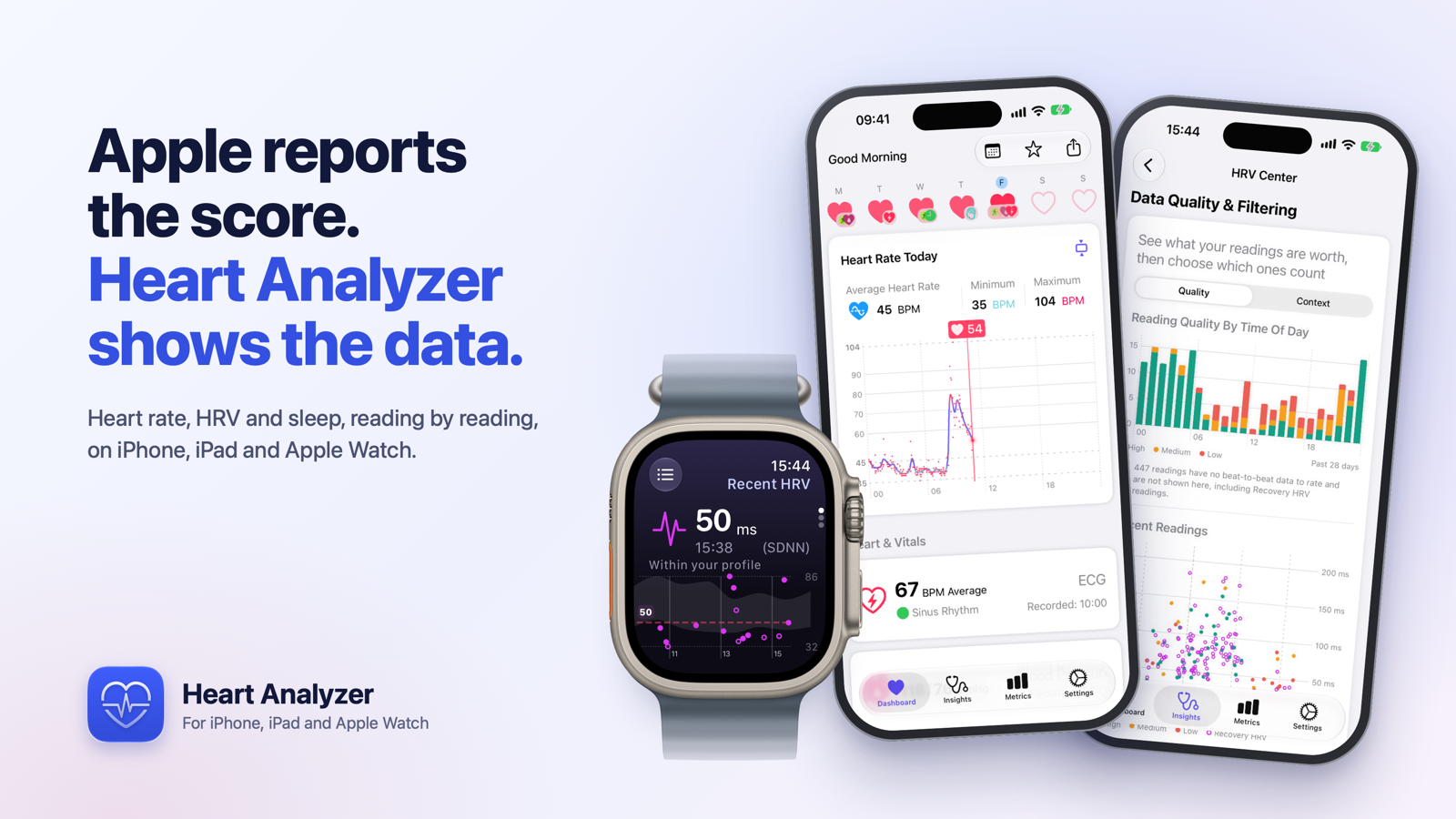
TL;DR: Heart Analyzer turns the heart data Apple Watch saves to Apple Health into detailed views on iPhone, iPad and Apple Watch: every reading, when it was taken and how it was measured, alongside long-term trends, HRV analysis, sleep, workouts and a daily Balance score. Everything is processed on the device, with no account, no adverts and no third-party analytics.
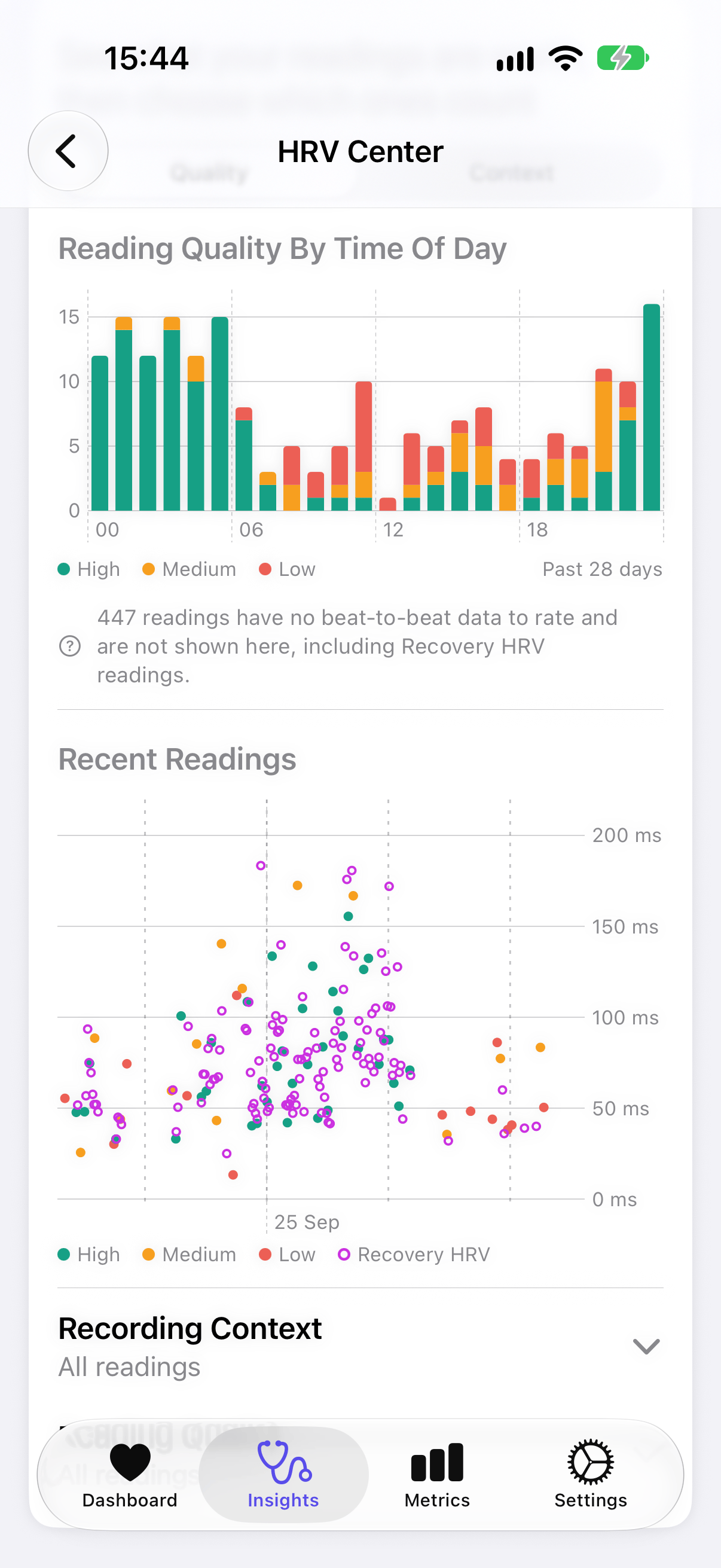
The dashboard brings together heart rate, HRV, resting heart rate, sleep and activity, with a swipe between days and access to the readings behind each chart. The HRV Center lets users switch between SDNN and rMSSD, explore time-of-day patterns and rolling averages, and assess reading quality where beat-to-beat data is available. Heart Analyzer has calculated rMSSD from that underlying data for years. Version 12.8 adds Apple’s new Recovery HRV readings from Series 12 and Ultra 4. These arrive without beat-to-beat data, so they remain visible alongside the other readings but cannot receive the same quality assessment.
What the Ultra 4 comparison revealed
These results come from one person’s data, all on watchOS 27.0. The algorithms can and probably will change in future.
Heart rate: far more detail by day, none extra at night
Awake, Ultra 4 saved a heart rate reading roughly every 30 seconds, against every four to five minutes on Ultra 2: about ten times the detail. Overnight that advantage disappeared. On three nights wearing both watches, Ultra 4 saved 108, 149 and 127 readings between 23:00 and 06:00. Ultra 2 saved 159, 181 and 145.
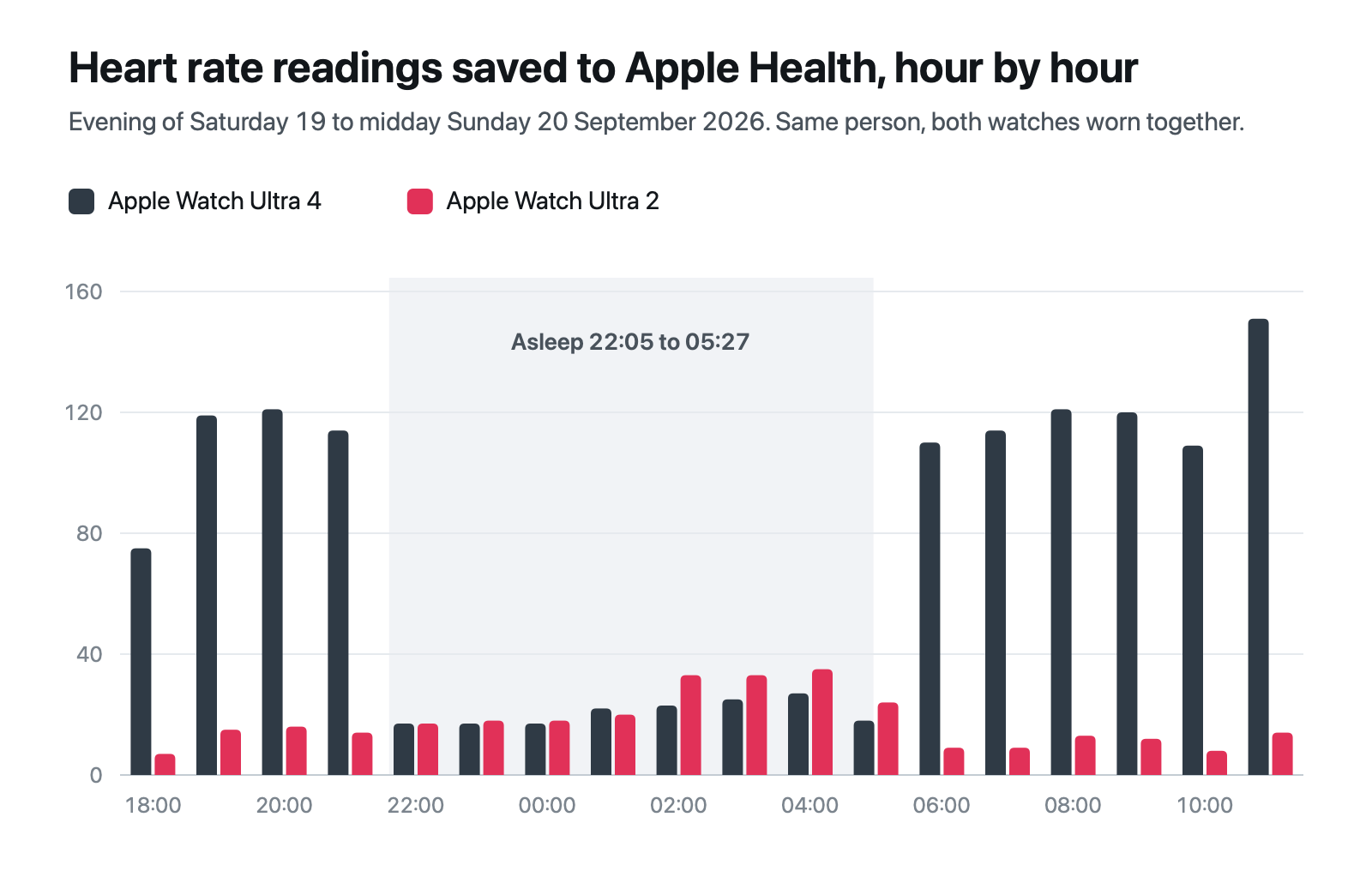
The switch between the two rates follows the Sleep Focus schedule, not sleep itself.
HRV: the opposite pattern
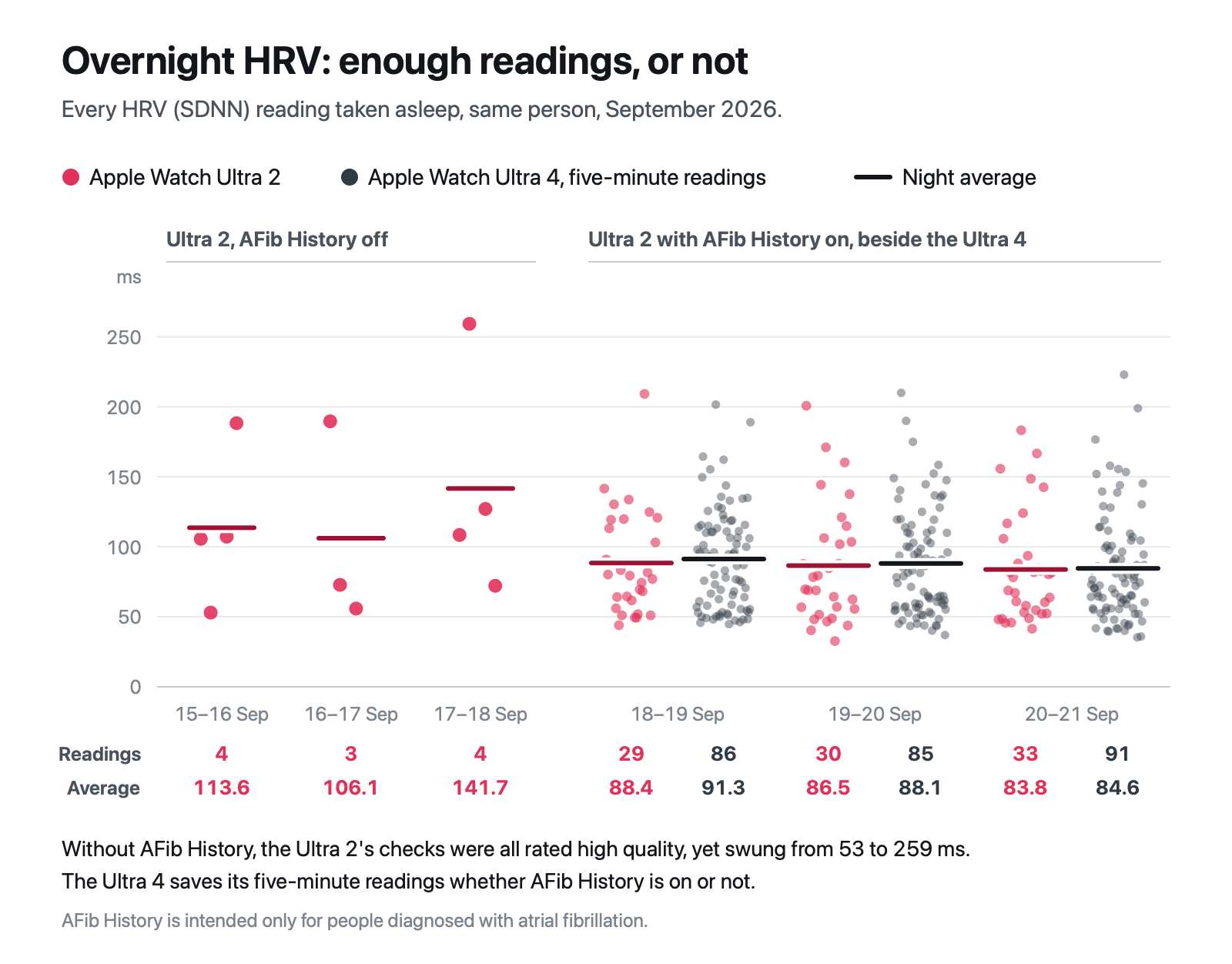
Asleep, Ultra 4 saved around 100 five-minute HRV readings a night, covering about 92% of it, where older watches take a one-minute check every couple of hours by default. Awake, the new watch managed about one every 90 minutes, nothing like every five minutes.
Heart Analyzer’s HRV Center helps sort through that volume. It rates the one-minute checks from the beats behind them, and filtering lets a user analyse only the high-quality data.
Overnight HRV: getting sufficient readings
Without AFib History, an older watch’s check every couple of hours gives it three or four one-minute readings a night, and they swing a long way. Ultra 2’s ranged from 53 to 259 ms, all rated high quality by Heart Analyzer, so each night’s average came down to which moments it caught: 114, 106 and 142 ms on the three nights before Ultra 4 arrived. With AFib History on, the same Ultra 2 took around 30 checks a night, enough to match Ultra 4: on all three nights both were worn, its overnight average came within 3 ms of Ultra 4’s five-minute readings, which the new watch takes with or without AFib History. For anyone upgrading from a watch without AFib History, the overnight figure goes from a few snapshots to the whole night and is likely to move; with AFib History already on, it should barely change.
For anyone who has just upgraded, the practical takeaway is to treat the first weeks on the new watch as a new baseline. These are initial observations from one Ultra 4 running the first watchOS 27 release. Similar behaviour on Series 12 is an expectation rather than a tested finding, and software updates could change the results.
Balance: overnight recovery meets yesterday’s effort
For runners and other active Apple Watch owners, those readings feed a bigger question: how does last night’s recovery compare with the previous day’s effort?
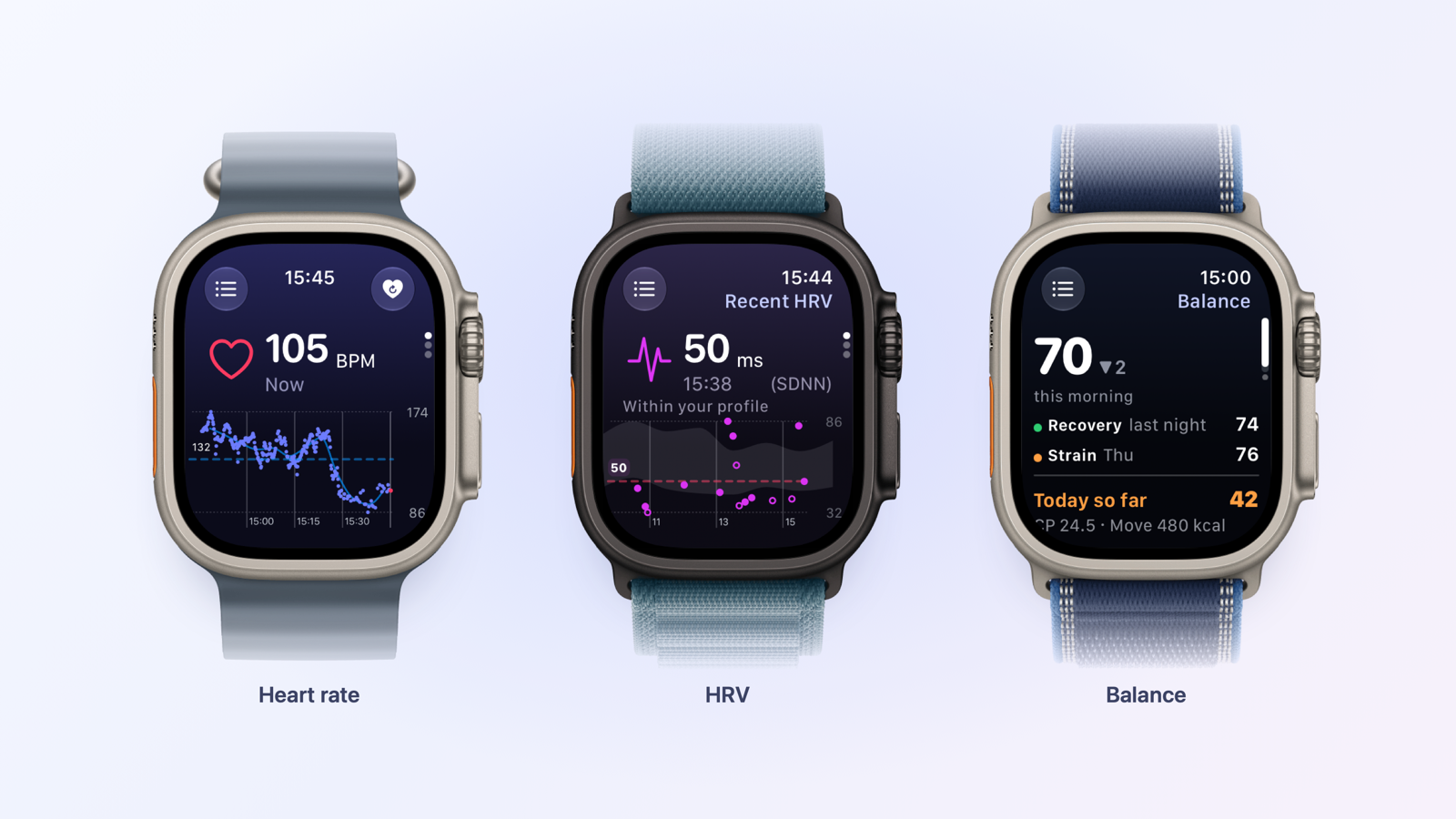
Balance is Heart Analyzer’s morning score, bringing the two together on a scale from 0 to 100. Recovery combines overnight HRV, sleeping heart rate and sleep duration. Strain combines Cardio Points, Heart Analyzer’s measure of cardiac exercise, with Move. Each input is ranked against up to a year of the user’s own history, so what counts as a hard day or a good night depends on that person’s normal range.
Recovery carries 70% of the score and Strain 30%, and if one input is missing the others share its weight. The score shows its working: tap any morning to see each measurement and its own score, then open Baseline Details for the exact personal ranges.
Balance’s HRV input is always rMSSD: calculated from the watch’s beat-to-beat data on older watches, and Apple’s Recovery HRV on Series 12 and Ultra 4 when a night has enough of it. Because it builds from existing Apple Health history, 14 nights of tracked sleep from the past year are enough for a first score on setup. Balance is available on iPhone, Apple Watch, Home Screen and Lock Screen widgets, and watch-face complications.
Everything else Heart Analyzer shows
Heart Analyzer works with any Apple Watch running watchOS 10 or later; the newest hardware adds data rather than being required. Alongside Balance and the HRV Center, it includes:
- Dashboard: heart rate, HRV, resting heart rate, sleep, workouts and activity for any day.
- Sleep: multiple sessions, naps and time out of bed, with heart rate through the night.
- Workouts and Cardio Points: workout detail, cardiac exercise goals, custom heart rate zones and heart rate recovery.
- Insight Trends: resting heart rate, cardio fitness, blood oxygen, respiratory rate, blood pressure and more, where the data exists.
- Heart Rate Alerts: custom high and low limits, mute times and an option to alert only on sustained changes.
- Heart Reports: password-protected PDF reports over custom timescales, to share with a doctor or other healthcare professional.
- A standalone Apple Watch app: charts, workout detail and complications on the wrist.
Independently developed, with on-device processing
Heart Analyzer has been built and maintained in the UK since 2015. It reads Apple Health with read-only access and processes everything on the user’s devices, with no account, adverts or third-party analytics.
Heart Analyzer is free to download for iPhone, iPad and Apple Watch, with a large free feature set. Premium is optional, with monthly, annual and lifetime options. More information and download links are on Heart Analyzer’s website and here at the app store.
Quick answers
Why did my HRV go up after upgrading to Series 12 or Ultra 4?
Mostly because of when the watch measures. By default, older watches take one-minute HRV checks every couple of hours; Series 12 and Ultra 4 also save five-minute readings all night, when HRV is naturally higher. Overnight, a few one-minute checks can land almost anywhere: in the comparison above, Ultra 2’s ranged from 53 to 259 ms, while with AFib History on it took enough readings to match Ultra 4. Treat the first weeks on a new watch as a new baseline.
Does Heart Analyzer work with an older Apple Watch?
Yes. It supports Apple Watch on watchOS 10 or later with an iPhone on iOS 17 or later. Everything except Apple’s Recovery HRV works on older models, including Balance and Heart Analyzer’s own rMSSD, because their one-minute HRV checks come with the beat-to-beat data it uses.
What does Heart Analyzer offer for free?
A lot. The free app covers the heart data Apple Watch already collects, so a user can start without committing to a subscription. Premium is an optional purchase for additional capabilities.
Related reading: Cinder, Cortisol+.
Author: Simon, developer of Heart Analyzer, edited by the5krunner.
Last Updated on 28 September 2026 by the5krunner
Small things I always use
- Garmin 90-degree charging adapter: Charges your Garmin from any USB-C cable. Essential when travelling. I use one.
- Body Glide: The blue anti-chafe stick swimmers and runners carry. I use it.
- Speedo earplugs: Fewer ear infections and no cold-water dizziness. I use them.
- Maurten: Race fuel that stays easy on the stomach. I use them.
- Garmin charging puck: The quickest way to top up before a session. I use one.
- Injinji: Toe socks that stop rubbing, so you run more. I use them.
- Cellucor C4: My pre-workout before hard sessions.
- TPU tubes: Schwalbe Aerothan, Tubolito and Pirelli SmarTube. Light, tiny spares. I use all three.
Watches and sensors
- Polar H10: My daily driver for waking HRV.
- Polar Verity Sense: My backup arm-worn HR sensor.
- Nomad bedside charger: Charges my iPhone and Apple Watch overnight. I use it, and many of their bands.
- Train.Red: The best muscle oxygen sensor I’ve used.
- Garmin Forerunner 970: A pro-grade triathlon watch. I use this.
- Apple Watch Ultra 4: My daily smartwatch. No phone needed on rides.
- Garmin Fenix 9 Pro: I’ve just bought one.
On the bike
- Continental GP5000 for everyday riding, and Aero 111 on the front for special occasions.
- Ravemen FR300: A front light that mounts under your Garmin or Wahoo. I use one.
- Wahoo TRACKR Radar: I use it on one bike and Varia on the other. They perform the same.
- Garmin Varia RTL515: Radar that warns you of cars from behind. I use this model.
- Wahoo ELEMNT Roam 3: The bike computer that’s easy to use. I use mine on most rides.
- Favero Assioma Pro RS2: Accurate power pedals that swap easily between bikes. I use this model.
Home and indoor training
- Google Wifi: Keeps Zwift connected in my pain cave. I use it.
- Apple TV 4K: Zwift on the big screen. I use two.
- Google Nest Doorbell (wired, 2nd gen): My video doorbell, running in both Google Home and Apple Home. I use it.
Health, recovery and sleep
- FreeStyle Libre 3 Plus: Shows how my blood sugar responds to diet.
- hDrop: Measures my sweat loss in summer and indoors.
- Fourth Frontier Zone: Checks my heart under load in hard sessions.
- Oura Ring 5: My partner’s recovery tracker of choice.
- Kineon MOVE+: Red light therapy for niggles. It works.
- Eight Sleep: A cooling mattress cover my partner and I use nightly.
Reader-Powered Content

This content is not sponsored. It’s mostly me behind the labour of love, which is this site, and I appreciate everyone who supports it.
Support the site: Follow (free, fewer ads) · Subscribe (paid, ad-free) · Buy Me A Coffee ❤️
Written by real people, with AI assistance. Fact-checked and verified for originality. See the Editorial Policy. FTC: Affiliate Disclosure — some links pay commission. As an Amazon Associate, I earn from qualifying purchases.

tfk is the founder and author of the5krunner, an independent endurance sports technology publication. With 20 years of hands-on testing of GPS watches and wearables, and competing in triathlons at an international age-group level, tfk provides in-depth expert analysis of fitness technology for serious athletes and endurance sport competitors. ID
