Fitbit Air Accuracy: The Spec Everyone Noted and Nobody Explained
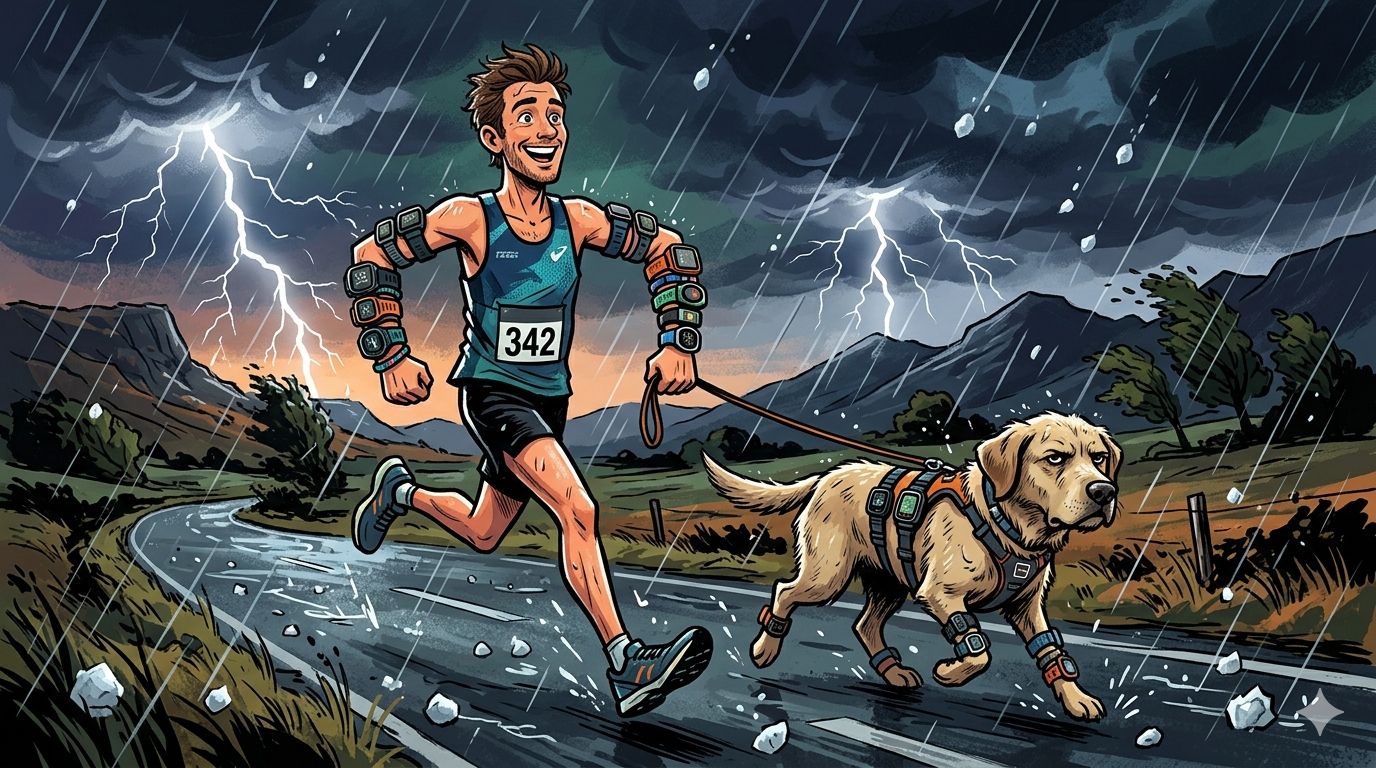
Another day. Another half-marathon. Another 15 minutes dodging lightning, hailstones and keeping the dog and me alive.
Doggo was happy enough; she loves running. Or at least I like to think she does, although I have noticed that when we get to St Mary’s Uni, the start point of my 10-mile test route, she realises what we are about to do and becomes the petulant child, running at exactly five metres behind me at the same speed. Annoying. But I love her really.
The weather was perfect for a test, as the heat of the last few weeks had subsided and only ‘a bit’ of rain was forecast — thank you, BBC. Once the clouds started to appear near Kingston, they were a definite “very black shade of black”. I saw lightning a mile or so away and expected the dog’s sixth sense and fear of loud noises to kick in. It didn’t. I took that as the animal kingdom’s signal that things were going to be OK, just as we passed a coffee shop, a perfect pausing point. I should have realised that Doggo’s only sixth sense is the ability to feel food within a five-mile radius.
I have been testing the Fitbit Air, part of the wider Google Fitbit and Wear OS ecosystem, for several weeks now, across runs, rides, swims, gym sessions, HYROX sims and yoga. (Yoga’s quite hard, don’t knock it.) The numbers have looked reasonably accurate throughout. More precisely: mostly pretty good, with occasional moments of madness, but not enough to question the value-for-money claim on a $99 sensor. Bias figures are clean, with limits of agreement within the Excellent threshold for the sport type in most sessions, and the overlaid charts blend into near-unanimity across two to four competitor devices. Nothing that would alarm a careful reviewer.
Then I looked at n.
Cyclists know it is all about n+1. Always wanting more. But reviewers perhaps now need to pay attention to the plain, conservative, singular n.
The Number in Plain Sight
Every review since launch lists the same 2-second recording intervals. DCR noted it. Everyone noted it. Then everyone moved on to the charts.
Here is what nobody connected it to. During sport, the stored interval stretches to 5 seconds in practice, which I confirmed by raw TCX file analysis, compared with the 1-second rate of every other device in the comparison. The most likely explanation is confidence-gated storage, i.e., Air stores only data it believes is correct.
I also found that better optical contact on the biceps produces more stored data points as well as cleaner ones. A doubly positive whammy.
Published reviews described the accuracy of the Air’s recordings. The sparsity of the recording and what causes it went unreported.
Here’s an example of what I mean.
What The Run Stats showed
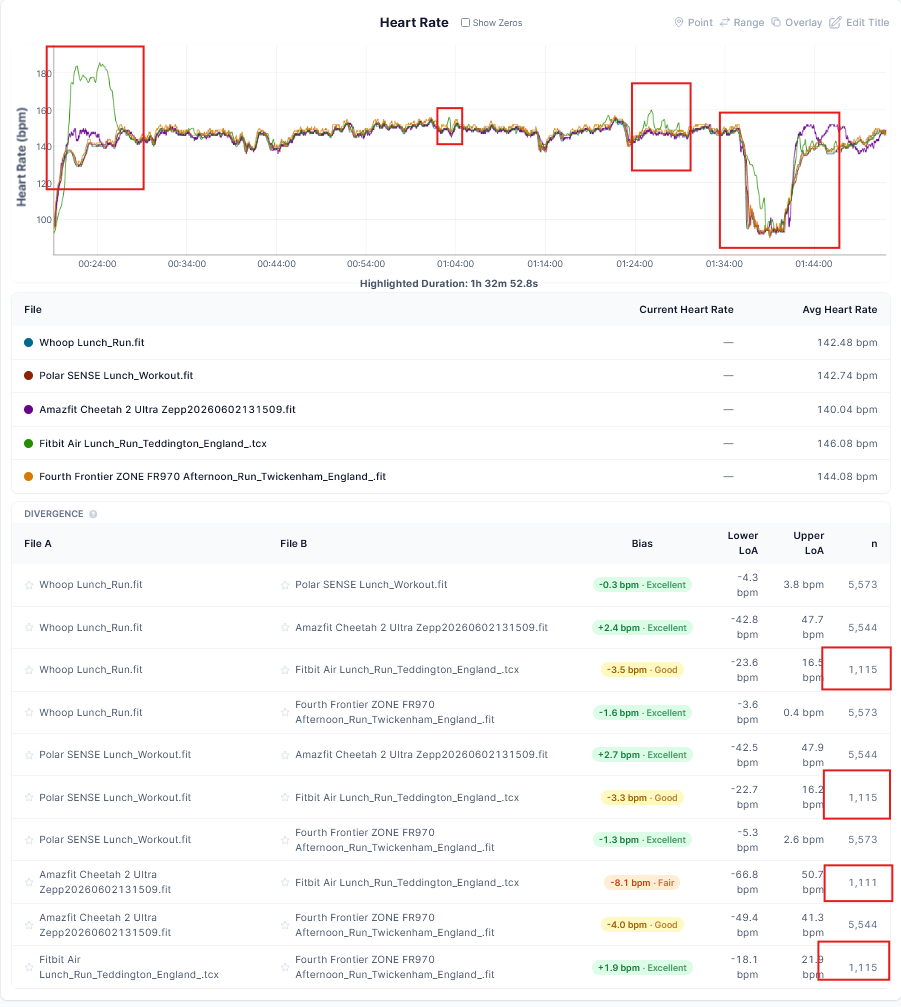
Setting aside the 2 periods where I started running, and the Air and Helio straps both struggled to lock in, the devices all agree pretty well visually. Sure, Cheetah’s trace is a little jaggedy, but this is all fine and won’t mess up your training load calculations at all.
Quantifying it with some stats, you will see Air’s accuracy appears excellent compared to the reference ECG strap — Frontier ZONE.
- Whoop: Bias -1.6 bpm, Excellent. LoA -3.6 to 0.4 bpm. N=5,573.
- Polar SENSE: Bias -1.3 bpm, Excellent. LoA -5.3 to 2.6 bpm. N=5,573.
- Amazfit Cheetah 2: Bias -4.0 bpm, Good. LoA -49.4 to 41.3 bpm. N=5,544.
- Fitbit Air: Bias +1.9 bpm, Excellent. LoA -18.1 to 21.9 bpm. N=1,115.
But stop there a minute. Check out the last figure, N=1,115. Fitbit Air has 1/5 as many data points. Is that what an accurate heart rate monitor looks like?
The Treadmill Test: Where It Matters Most
Another clear example came on the treadmill a few days ago. Analysis of the raw export file from a 31-minute-interval session reveals something more unusual than a simple cadence lock. The Air simultaneously detected two competing periodic signals and alternated between them from approximately minute six onwards. One signal averaged 169 bpm, rising to 190 bpm, corresponding to foot-strike frequency. The other averaged 111 bpm, a second mechanical artefact, most likely treadmill belt or motor vibration. Both are wrong: the true heart rate, as measured by four reference devices, was approximately 131-132 bpm throughout.
See also the road bike sprint comparison for the wrist result against the Amazfit Cheetah 2 Ultra.
Statistically, the session mean of approximately 157 bpm was the average of two sets of wrong signals. The verdict of roughly 37 bpm above the reference of 120bpm is correct for the cadence-locked period, but masks the dual-signal nature of the failure. At a 1-second sampling rate, this pattern is immediately visible in the chart. At 2 to 5 seconds and at longer averages, the two incorrect streams merge to become one incorrect stream.
Does It Matter?
For health data, probably not. Resting heart rate, HRV/RMSSD, sleep stages, recovery score, and Daily Readiness are all derived from periods of relative stillness, during which a 2- to 5-second exercise reporting is more than adequate. The wellness buyer is well served.
Training load calculations require broadly accurate, continuous, high-frequency heart rate data. Sparsely sampled data produce less precise figures for interval work, which can artificially extend or shorten short, intense blocks – hence TRIMP will be wrong.
Note that this infrequent recording or broadcasting is not what the sensor is doing. The sensor is probably making 25 readings per second to determine the RR intervals. It’s the algorithms on top of that which cause the problems.
Two Buyers Being Misled Right Now
Two groups are purchasing the Fitbit Air as a second device alongside an existing Garmin, Pixel Watch or Apple Watch, and both are likely to be disappointed.
- The first wants to broadcast heart rate from the Air to a Garmin bike computer or Wahoo head unit. The Air uses a proprietary, secure Bluetooth implementation that covers Peloton and Concept2. Garmin bike computers and Wahoo head units do not currently work with this.
- The second wants to use the Air as a replacement for, or meaningful complement to, a sports watch during training. Clean accuracy statistics in every published review suggest this is viable. The lower sampling rate, my treadmill dual-signal artefact, and my open-water swim failure point all indicate that the wellness device was used outside its comfort zone, i.e. in sport.
What Fitbit Air Is Good At
For casual wellness tracking, sleep, and recovery monitoring, the sampling rate is more than adequate, and the health metrics the Air produces are consistent and fit for purpose. Air and its app are more capable than anything that Garmin, Polar, or Amazfit has shipped. At $99 with no required subscription, the case for the wellness buyer is easier.
Comparing Air’s $99 base cost to Whoop’s sports subscription or Oura’s wellness subscription is not correct. To access Google Health’s more advanced features, you need the $99 device and the $99 subscription, which then makes the gap to Whoop or Oura’s subscriptions considerably smaller. Sure, Whoop’s AI Coach is good, and Google Health’s is a bit better but you need to subscribe to get that.
Move the Air to the bicep via a third-party compression sleeve, and sport accuracy closes on chest-strap standard: zero bias against a Fourth Frontier ZONE ECG reference on a structured run with hard intervals, limits of agreement of ±4.9 bpm, charts that track the shape of every interval correctly, and a stored sampling rate of approximately 2.4 seconds against the 5 seconds recorded in the worst wrist session. i.e. The sampling rate and quality both improve on the biceps.
The Verdict on the Verdicts
Every accuracy review of the Fitbit Air since launch noted the 2-second sampling rate and moved on. The connection between that specification, the confidence-gated storage that stretches the stored interval to 5 seconds during poor-contact wrist sport, and the n values in DCR Analyzer remained unconnected in published reviews.
The Air stores data when it trusts the signal. During sport on the wrist, it trusts roughly one reading in five. For wellness use, that is adequate. For sport, 1-second continuity is the requirement.
Every test and the verdict are in the Fitbit Air review.
Quick answers
What is confidence-gated storage, and does it affect Fitbit Air accuracy?
Confidence-gated storage means the Air only writes a data point to the file when the optical signal meets an internal quality threshold. During wrist sport, the stored interval stretches to approximately 5 seconds, yielding roughly one-fifth as many data points as competing devices. The statistics describe only the data points the device chose to keep.
Does wearing the Fitbit Air on the bicep improve accuracy?
Yes, significantly. Bicep placement improves both signal quality and data storage density, with the storage interval dropping from approximately 5 seconds on the wrist to 2.4 seconds on the bicep. Bias against a chest-strap reference drops to near zero, with a limit of agreement of ±4.9 bpm.
Can the Fitbit Air broadcast heart rate to a Garmin or Wahoo device?
No. The Air uses a proprietary Bluetooth implementation covering Peloton and Concept2. Garmin bike computers and Wahoo head units require the standard Bluetooth HR profile, which the Air does not support.
Last Updated on 16 October 2026 by tfk the5krunner
Small things I always use
- Garmin 90-degree charging adapter: Charges your Garmin from any USB-C cable. Essential when travelling. I use one.
- Body Glide: The blue anti-chafe stick swimmers and runners carry. I use it.
- Speedo earplugs: Fewer ear infections and no cold-water dizziness. I use them.
- Dryrobe Advance: My winter changing robe for open-water swims. I use one. A cheaper option is the AONYIYI changing robe.
- Maurten: Race fuel that stays easy on the stomach. I use them.
- Beet It Sport nitrate shots: Beetroot shots I take in the days before a race. I use them.
- Garmin charging puck: The quickest way to top up before a session. I use one.
- Injinji: Toe socks that stop rubbing, so you run more. I use them.
- Ultimate toe protectors: Stop black toenails on long runs. They work. I use them.
- Compressport R2 v2 calf sleeves: My calf sleeves of choice. I use them.
- Cellucor C4: My pre-workout before hard sessions.
- TPU tubes: Schwalbe Aerothan, Tubolito and Pirelli SmarTube. Light, tiny spares. I use all three.
- G8 insoles: Adjustable insoles that are good. I use them.
- Cycplus Cube: A 97g electric pump that gets a road tyre rideable in two minutes. I carry one. 5% off with code THE5KRUNNER.
Watches and sensors
- Polar H10: My daily driver for waking HRV.
- Polar Verity Sense: My backup arm-worn HR sensor.
- Nomad bedside charger: Charges my iPhone and Apple Watch overnight. I use it, and many of their bands.
- Train.Red: The best muscle oxygen sensor I’ve used.
- Tymewear: Accurate heart rate and reliable ventilatory zones. I use it to pace endurance rides over an hour.
- Garmin Forerunner 970: A pro-grade triathlon watch. I use this.
- Apple Watch Ultra 4: My daily smartwatch. No phone needed on rides.
- Garmin Fenix 9 Pro: I’ve just bought one.
On the bike
- Continental GP5000 for everyday riding, and Aero 111 on the front for special occasions.
- Helmets: Specialized S-Works Evade 3 for road riding, and Rudy Project Wing for TT-style races. I use both.
- Ravemen FR300: A front light that mounts under your Garmin or Wahoo. I use one.
- Wahoo TRACKR Radar: I use it on one bike and Varia on the other. They perform the same.
- Garmin Varia RTL515: Radar that warns you of cars from behind. I use this model.
- Wahoo ELEMNT Roam 3: The bike computer that’s easy to use. I use mine on most rides.
- Favero Assioma Pro RS2: Accurate power pedals that swap easily between bikes. I use this model.
Home and indoor training
- NPE Runn: Makes my basic treadmill smart, sending more accurate speed and distance to my watch and Zwift. I use it.
- Google Wifi: Keeps Zwift connected in my pain cave. I use it.
- Apple TV 4K: Zwift on the big screen. I use two.
- Google Nest Doorbell (wired, 2nd gen): My video doorbell, running in both Google Home and Apple Home. I use it.
Health, recovery and sleep
- FreeStyle Libre 3 Plus: Shows how my blood sugar responds to diet.
- hDrop: Measures my sweat loss in summer and indoors.
- Fourth Frontier Zone: Checks my heart under load in hard sessions.
- Oura Ring 5: My partner’s recovery tracker of choice.
- Eight Sleep: A cooling mattress cover my partner and I use nightly.
Reader-Powered Content

This content is not sponsored. It’s mostly me behind the labour of love, which is this site, and I appreciate everyone who supports it.
Support the site: Follow (free, fewer ads) · Subscribe (paid, ad-free) · Buy Me A Coffee
Written by real people, with AI assistance. Fact-checked and verified for originality. See the Editorial Policy. FTC: Affiliate Disclosure — some links pay commission. As an Amazon Associate, I earn from qualifying purchases.

tfk is the founder and author of the5krunner, an independent endurance sports technology publication. With 20 years of hands-on testing of GPS watches and wearables, and competing in triathlons at an international age-group level, tfk provides in-depth expert analysis of fitness technology for serious athletes and endurance sport competitors. See the gear tfk uses. ID

You can’t expect a $99 device to compare to a $400 to $1000 devices. For probably 99 percent of the population they would probably prefer the lower price, the way better battery performance and honestly would not see hardly difference between 5 seconds and 2.
Your title really will make people think it’s not accurate unless they read the whole article which we know people don’t..
1. I don’t
2. not 99% but for sure the majority
3. 5 vs 2, some would most might not
4. No it doesn’t
“unless they read the whole article which we know people don’t..”
Reading is a virtue, so I do not agree with the criticism levelled at the author
Will the sampling rate be adjusted and improved by upgrading??
upgrading from what to what.
the sampling rate is probably about 25hz,give or take. its the algorithm that dilutes it to 0.5Hz for reporting (or worse) depending on data quality.
so wearing on biceps should guarantee 0.5hz more often. remember the 0.5hz you get is normally good data.
I totally agree with you. I was gutted to see it didn’t work with QZ Fitness (and therefore my Echelon bike) and the Google Health app is a travesty (and harvests your data and is stuffed with a useless AI) – I just want to use Apple Health. But of course, Google Health can’t write to Apple Health, how very convenient for Google and inconvenient for me.
The sleep tracking is poor too – missing whole times I got up in the night and detecting me as asleep long before I really was. So far, the FitBit Air is a bit of a let-down for me.