Fitbit Air Has a Cadence Lock Problem on the Treadmill – Fine on a Road Bike
Let’s not beat about the bush concerning this morning’s Fitbit Air test. I expected near-perfect HR results for a hot indoor treadmill interval session, even though it was fairly warm.
My reference chest strap completely failed, but luckily I had Polar SENSE as a backup, plus Apple Watch Ultra 3, Amazfit Helio Strap, and Whoop MG. Yeah, greedy, right? I like backups — too many gadgets. But it saves time and the need to repeat a session when the chest strap decides not to play ball.
As you can see, the Air alternates between two levels throughout the locked period. The higher level sits around 170-190 bpm. The lower level sits around 107-113 bpm. Neither is correct. My true HR, as read by four independent reference devices, was approximately 131-132 bpm throughout the intervals. The Air was simultaneously outputting two incorrect answers, alternating between them at sub-second intervals.
The higher signal corresponds to foot-strike frequency — cadence-adjacent, as I like to call it. The lower signal is a second mechanical artefact, most likely treadmill belt or motor vibration, creating a second periodic signal that the optical sensor cannot distinguish from a pulse wave. The sensor algorithm detects two dominant frequencies in the PPG data and cannot resolve between them, so it exports both. The overall mean of ~157 bpm that appears in the statistics is not a consistent overread. It is the arithmetic average of two competing wrong signals.
Looking at the raw file data confirms the pattern exactly. The lock begins at approximately six to eight minutes into the session, precisely when the running rhythm is fully established. The first few minutes are clean. From that point, the oscillation is relentless and regular — a rapid alternation between the two artefact levels — until the final two minutes of the session, where the true HR begins to appear in some readings.
I had not spotted this behaviour before. I had not tested the Air on the treadmill before either, and I did update the firmware the previous day. So maybe it is a new firmware bug? Quite a bad one. The Air’s downstream metrics are based on TRIMP and a variant of the Karvonen formula (220-Age and HR reserve). Data like this means that everything else that is inferred from it is wrong.
For those of you who dislike easy-to-read charts, here is a statistical summary produced from DCRainmaker’s beta Analyzer tool:
- Amazfit Helio, Apple Watch Ultra 3, Whoop, and Polar SENSE show excellent accuracy, all agreeing closely around 131-132 bpm with minimal bias (under 0.5 bpm) and tight limits of agreement.
- Fitbit Air is inaccurate, reading ~157 bpm during the locked period — consistently ~37 bpm above the reference value — with poor agreement.
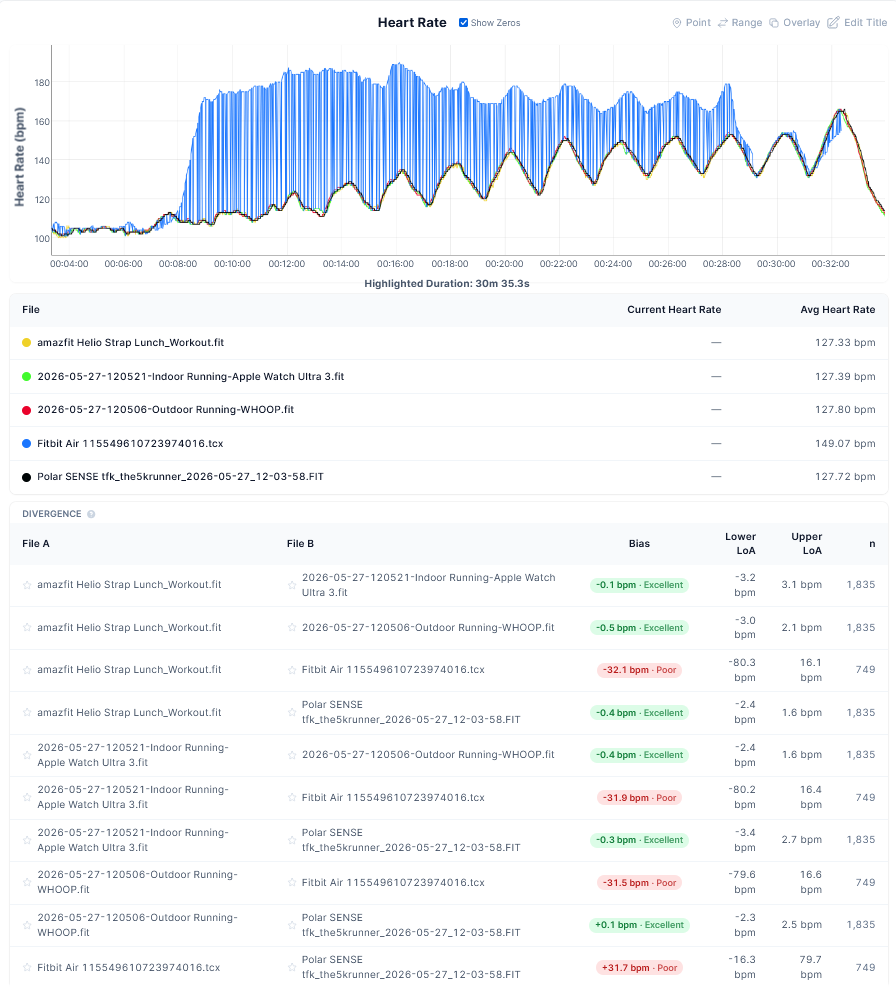
User error? It is always possible, but four other devices were happy with the same user at the same time.
Google is also rapidly addressing usability and other issues in the Google Health app — the companion app for the Air. There are still problems there, and I have singled out some of the design issues in the linked article, most notably the large wall of text presented by Gemini that fills most of the screens.
An Outdoor Ride Test
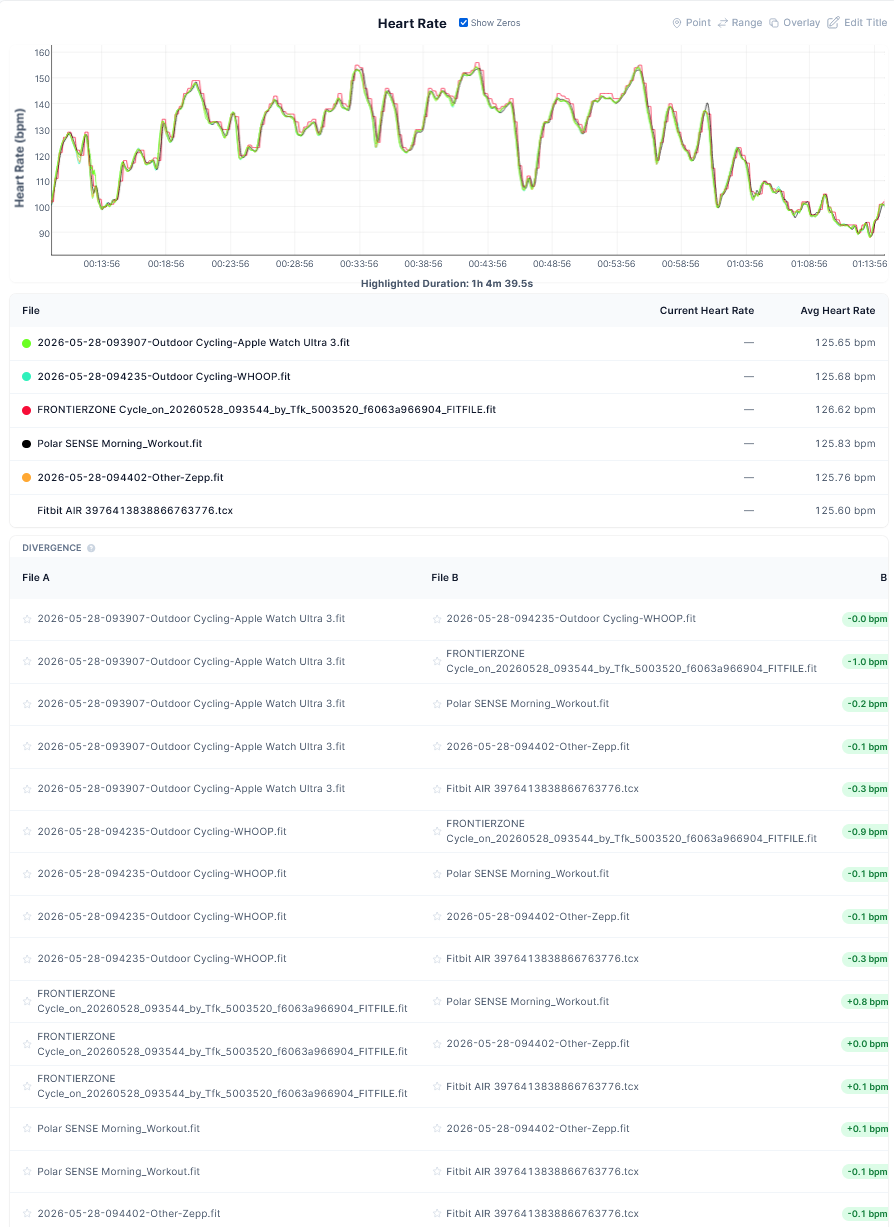
This test produced highly positive results for the Air on an hour road ride on relatively smooth roads at a modest pace, both on the hoods and on the drops. The DCR Analyzer data is shown on the chart below and can be summarised as follows:
- Fitbit Air accuracy: Excellent.
- Minimal bias (-0.3 to +0.1 bpm) versus Apple Watch, Whoop, Polar, Zepp, and others. Tight limits of agreement (mostly ±4-6 bpm). Reliable HR tracking.
Normally, one device or another would perform subpar on a road ride like this. I expect the very hot weather to have improved blood flow and made the optical sensor’s job easier. As you can see, all devices performed well.
A Gym Test
This was a fairly balanced workout covering upper body, core, quads and finishing with some more quads on the wall ball. Why? Because it is horrible.
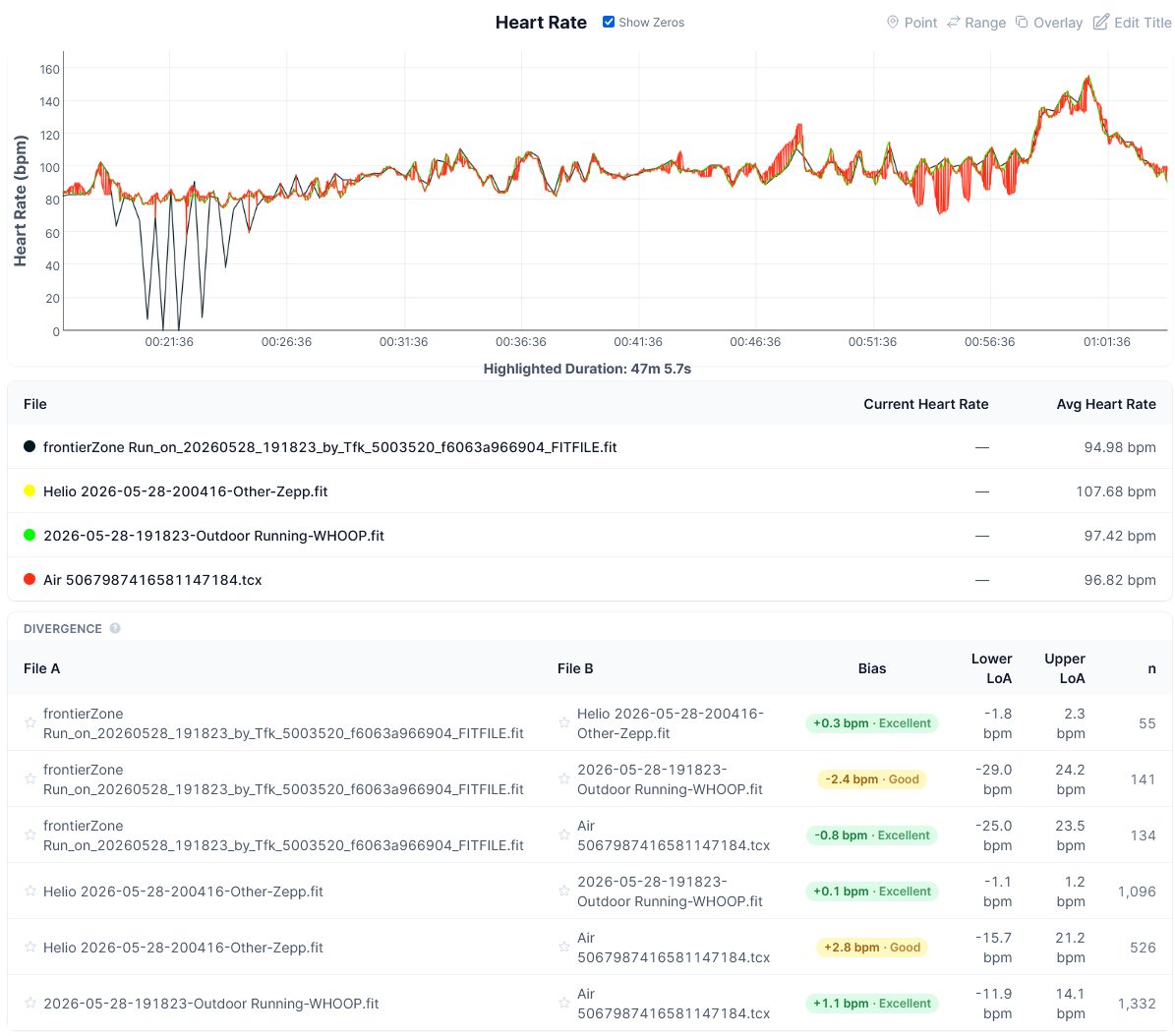
The official interpretation of the numbers is that the Fitbit Air shows good to excellent accuracy.
- Versus Fourth Frontier ZONE: -0.8 bpm bias (Excellent), wide LoA ±~24 bpm.
- Versus Helio: +2.8 bpm bias (Good).
- Versus Whoop: +1.1 bpm bias (Excellent), tightest LoA ±~13 bpm.
Looking at the chart, what do you think? I think there is a problem. This is clearly not the dual-signal artefact seen in the treadmill test. However, it is quite possibly a motion artefact caused by confusion between arm movement and the pulse wave. The wide LoA despite a clean bias figure tells that story: the sensor is broadly right on average but loses the signal during dynamic arm movements.
Quick answers
What is cadence lock in a wrist HR monitor?
Cadence lock occurs when the optical sensor picks up the rhythmic movement of the wrist or arm during running and interprets that motion frequency as a heartbeat signal. At running cadences of 160 to 200 steps per minute, the false HR reading lands in a plausible range, making it easy to miss without a reference device.
What is the dual-signal artefact seen in the Fitbit Air treadmill test?
Rather than locking onto a single wrong value, the Air’s optical sensor simultaneously detected two competing periodic signals in the PPG data during the treadmill session and alternated between them at sub-second intervals. The high signal averaged around 169 bpm, rising to 190 bpm, corresponding to foot-strike frequency. The low signal of around 111 bpm is a second mechanical artefact, most likely the treadmill belt or motor vibration. Neither signal is the true heart rate of 131 to 132 bpm.
Is the gym artefact the same problem as the treadmill artefact?
Same class of failure, different interference source. On the treadmill, the interference is sustained and regular, produced by a consistent mechanical source such as the belt or motor frequency. In the gym, interference is intermittent and irregular, arising from dynamic arm movement, grip pressure, and wrist flexion. The gym artefact resolves quickly once the movement stops, whereas the treadmill artefact persists for most of the session.
Does a cadence-locked HR reading affect training load calculations?
Yes, significantly. Metrics such as TRIMP, TSS, and any Karvonen-based calculations are entirely derived from the HR signal. A consistent 37 bpm overestimate will inflate every downstream load, recovery, and intensity figure.
Could the Fitbit Air firmware update cause this?
Possibly. The behaviour appeared after a firmware update and had not been observed in previous treadmill sessions. Without a pre-update control test on the same session type, it cannot be confirmed as firmware-induced, but it warrants a follow-up test.
Last Updated on 3 October 2026 by tfk the5krunner
Small things I always use
- Garmin 90-degree charging adapter: Charges your Garmin from any USB-C cable. Essential when travelling. I use one.
- Body Glide: The blue anti-chafe stick swimmers and runners carry. I use it.
- Speedo earplugs: Fewer ear infections and no cold-water dizziness. I use them.
- Dryrobe Advance: My winter changing robe for open-water swims. I use one. A cheaper option is the AONYIYI changing robe.
- Maurten: Race fuel that stays easy on the stomach. I use them.
- Garmin charging puck: The quickest way to top up before a session. I use one.
- Injinji: Toe socks that stop rubbing, so you run more. I use them.
- Ultimate toe protectors: Stop black toenails on long runs. They work. I use them.
- Compressport R2 v2 calf sleeves: My calf sleeves of choice. I use them.
- Cellucor C4: My pre-workout before hard sessions.
- TPU tubes: Schwalbe Aerothan, Tubolito and Pirelli SmarTube. Light, tiny spares. I use all three.
- G8 insoles: Adjustable insoles that are good. I use them.
- Cycplus Cube: A 97g electric pump that gets a road tyre rideable in two minutes. I carry one. 5% off with code THE5KRUNNER.
Watches and sensors
- Polar H10: My daily driver for waking HRV.
- Polar Verity Sense: My backup arm-worn HR sensor.
- Nomad bedside charger: Charges my iPhone and Apple Watch overnight. I use it, and many of their bands.
- Train.Red: The best muscle oxygen sensor I’ve used.
- Tymewear: Accurate heart rate and reliable ventilatory zones. I use it to pace endurance rides over an hour.
- Garmin Forerunner 970: A pro-grade triathlon watch. I use this.
- Apple Watch Ultra 4: My daily smartwatch. No phone needed on rides.
- Garmin Fenix 9 Pro: I’ve just bought one.
On the bike
- Continental GP5000 for everyday riding, and Aero 111 on the front for special occasions.
- Helmets: Specialized S-Works Evade 3 for road riding, and Rudy Project Wing for TT-style races. I use both.
- Ravemen FR300: A front light that mounts under your Garmin or Wahoo. I use one.
- Wahoo TRACKR Radar: I use it on one bike and Varia on the other. They perform the same.
- Garmin Varia RTL515: Radar that warns you of cars from behind. I use this model.
- Wahoo ELEMNT Roam 3: The bike computer that’s easy to use. I use mine on most rides.
- Favero Assioma Pro RS2: Accurate power pedals that swap easily between bikes. I use this model.
Home and indoor training
- NPE Runn: Makes my basic treadmill smart, sending more accurate speed and distance to my watch and Zwift. I use it.
- Google Wifi: Keeps Zwift connected in my pain cave. I use it.
- Apple TV 4K: Zwift on the big screen. I use two.
- Google Nest Doorbell (wired, 2nd gen): My video doorbell, running in both Google Home and Apple Home. I use it.
Health, recovery and sleep
- FreeStyle Libre 3 Plus: Shows how my blood sugar responds to diet.
- hDrop: Measures my sweat loss in summer and indoors.
- Fourth Frontier Zone: Checks my heart under load in hard sessions.
- Oura Ring 5: My partner’s recovery tracker of choice.
- Kineon MOVE+: Red light therapy for niggles. It works.
- Eight Sleep: A cooling mattress cover my partner and I use nightly.
Reader-Powered Content

This content is not sponsored. It’s mostly me behind the labour of love, which is this site, and I appreciate everyone who supports it.
Support the site: Follow (free, fewer ads) · Subscribe (paid, ad-free) · Buy Me A Coffee ❤️
Written by real people, with AI assistance. Fact-checked and verified for originality. See the Editorial Policy. FTC: Affiliate Disclosure — some links pay commission. As an Amazon Associate, I earn from qualifying purchases.

tfk is the founder and author of the5krunner, an independent endurance sports technology publication. With 20 years of hands-on testing of GPS watches and wearables, and competing in triathlons at an international age-group level, tfk provides in-depth expert analysis of fitness technology for serious athletes and endurance sport competitors. ID

You’re literally the only media outlet reporting cadence lock out of the plethora of reviews. Sounds like user error to me.
what user error do you suspect? unless unsmoothed data is used you wont see it on these charts, you would see a peak. Perhaps others have made that mistake? perhaps its something else like my high cadence?
You clearly are running too fast 😂
I believe that device makers just don’t care about getting their HRM right. If they did, there’d be devices with the ability to read multiple sources and pick the most plausible.
i agree on the general comments and the specific idea is an unusual one i hadnt thought of. kinda done already within sensors looking at different wavelengths but you mean more than that
What I find more annoying is that the devices are not smart enough to ignore the wildly incorrect readings and thus as a result they impact training load, etc.
Regarding the article, I regularly get cadence lock on Polar Verity Sense, Coospo, etc and cannot seem to eradicate it. I used to be rock solid with the old Scosche Rhythm devices but those are no longer an option.
I actually tested it against a HR strap on a short indoor bike session yesterday, and found that the Fitbit Air had major issues picking up the correct heart rate for the first part of the ride. I have areas where the chest strap shows a HR at 130 bpm, and the fitbit shows 102’ish. It also have some crazy spikes several times, so the be quite honest I dont really trust the accurracy yet.
Garmin HRM avg. HR 132 – Fitbit Air avg HR 123
the accuracy WILL NOT change by its learning algorithm. that is an auto detection issue.
I’d be interested to see the charts (you can export to tcx in the top right of the fitbit workout). specifically to see if they exhibit the kind of pattern i get
I sent you the files by email. Cheers!
I also have massive cadence lock with the Fitbit air.
I won’t say it’s really specific to the Fitbit, as my Garmin watch also suffered from it (I’m now using a chest strap for any running activities).
I think a combination of stride and wrist shape can influence that. And wrist optical sensors just does not work for me at all.
The HR on the Fitbit goes directly to the 170 range (equivalent to my cadence) while my HR measured by the chest strap is in the 130 range.
I can tighten the band, put it under the wrist, this does not change the results.
another chest strap convert! welcome to the fold. I aim to convert all the sporting world by Tuesday. (but I’m not saying which tuesday)
sure the nature of the impact might impact eg if yo are heavy or if you naturally strike heavily. I’m relatively light but strike a bit harder than I might but the I wear’super shoes’ which may well reduce the initial impact. could also be linked to vibrations in treadmills and other things. I’ve gone as deep as I want to.
biceps has a good change of working for you. simply to move it there for a workout is no biggie
I just walked for 15 mins and clearly had cadence lock with this device. The Air reported the last 7 minutes at 150-155bpm pulse when my pulse was really ~105bpm. This is actually the worst cadence lock I have ever seen in the dozen plus health trackers I have used. I am likely returning it.
I noticed the cadence lock on all 4 outdoor rides i’ve done with the fitbit air.
Is there any news on this issue? Should I just return the device?
on rides? jeez
fitbit are aware of the issue for sure.