Fitbit Air Arm Sleeve: No Official Option Exists Yet. Here Is the Fix.
Thanks to reader @CH
There is no Fitbit Air arm band, bicep band, or arm sleeve on the market yet. This post is part of the site’s broader coverage of the Google Fitbit and Wear OS ecosystem. Google has not made one, and no third-party option has reached shelves. However, Google has now published the official CAD drawings and dimensional specifications for the Air pebble, explicitly inviting third-party manufacturers to produce bands and accessories. That changes the timeline considerably. If you are looking for a way to wear the Air on your upper arm right now, the workaround below is the only practical option I know. Feel free to post further options in the comments.
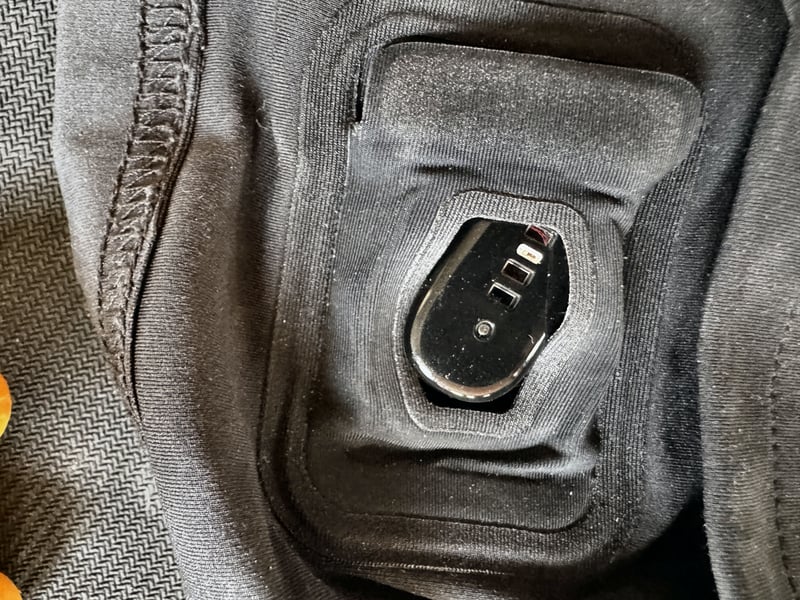
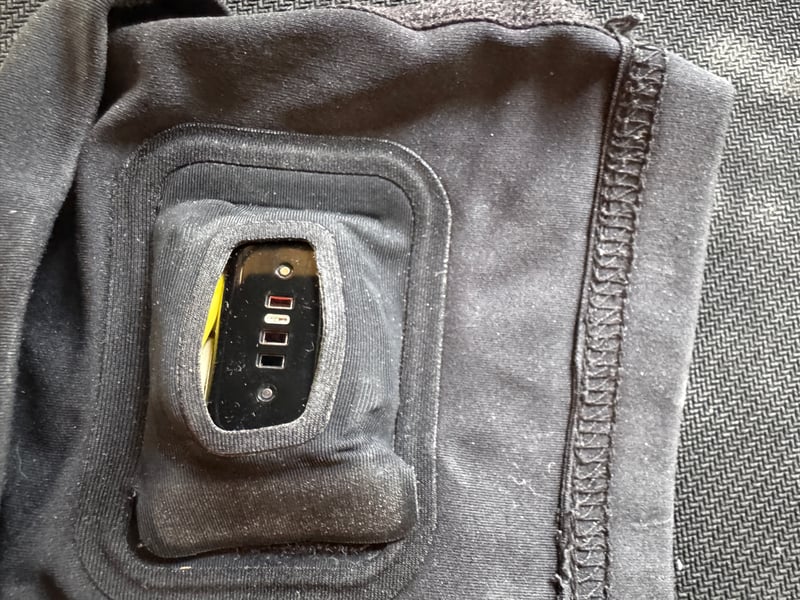
The reason nothing exists yet is the newness of the Air and its snap-in mechanism. The pebble locks into its band from below and releases from above with a firm push, and that mechanism requires a rubber-like, notched mount to engage correctly. The easier manufacturing route, and the one I expect to appear on Amazon fairly soon now that the specs are public, is a simple open-pouch bicep sleeve: a snug compression sleeve with a correctly-sized fabric pocket that does not need to replicate the snap-in mechanism at all. That is essentially what I have built with a Whoop sleeve and an old washing-up glove. (For readers of a certain age in the UK, this is definitely a Blue Peter Badge standard fix akin to using some of Val’s old garment cast-offs).
The Air pebble is small and light, and a narrow wristband is all that is on offer from Fitbit so far. What pushed me to try the upper arm was a series of odd heart rate readings during treadmill runs. The numbers were suspiciously close to my running cadence, pointing to cadence lock — the well-known optical HR failure in which the sensor latches onto foot-strike rhythm rather than true heart rate. Fitbit’s standard Performance Loop band is not easy to get tight. A loose fit lets ambient light into the sensor with every foot strike, making cadence lock and other motion-related effects likely. A compression sleeve on the upper arm removes that variable entirely.
I had two official Whoop Any-Wear arm sleeves. The sleeve is a compression fabric piece with a pouch on the inner surface, sized for the Whoop sensor, with a window cut-out that aligns the sensor against the skin at the bicep. Whoop’s own research confirms the upper arm as a strong optical pulse point, which aligns with every reviewer’s finding, including this site (Whoop MG Accuracy Review). The question was whether the Air pebble would fit.
Mostly, it didn’t. Length and thickness: fine. Width: not fine.
The Air pebble is narrower than the Whoop sensor and sits with a fair amount of side-to-side play inside the pocket. Because the pod sits on the underside of the sleeve against your arm, falling out is not the issue. Rotation is the problem. The pebble can twist in the pocket, and when it does, the fabric edge around the sensor window partially covers one of the LEDs. That will corrupt the HR reading.
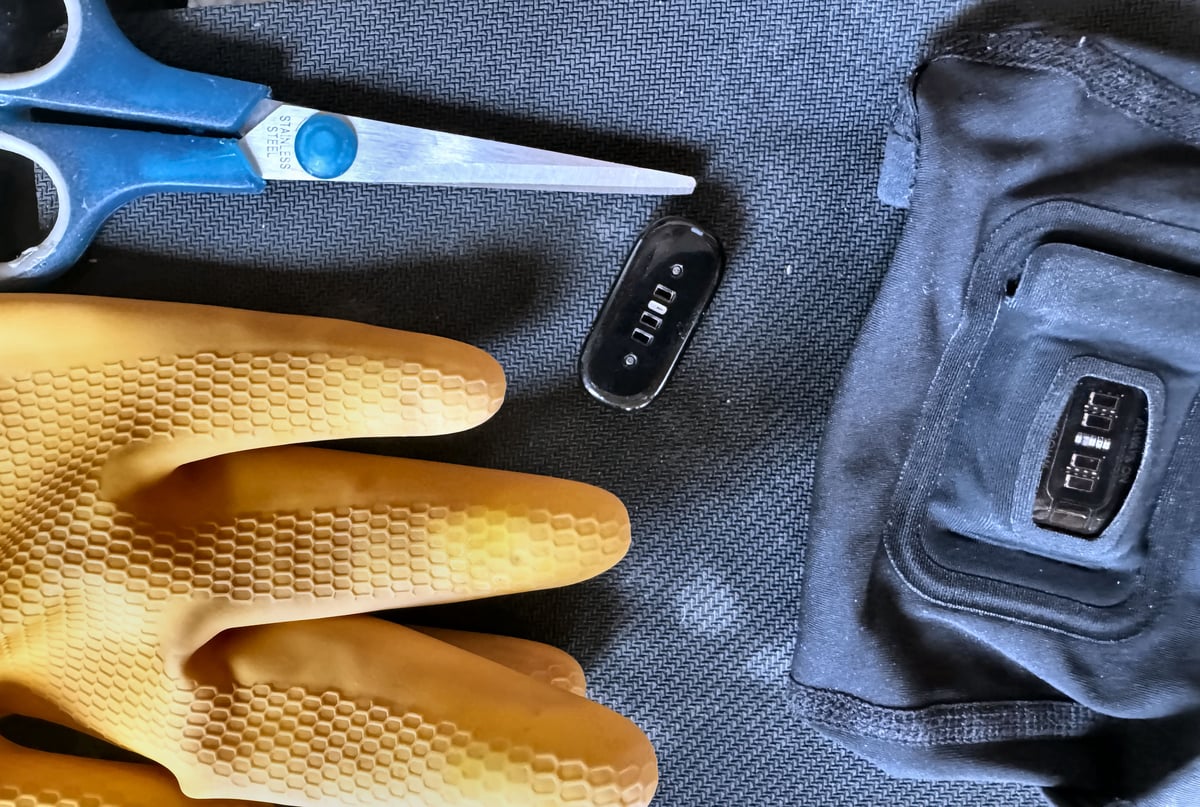
My fix: offcuts of rubber cut from an old washing-up glove, pushed down each side of the pebble inside the pocket. Two small pieces, one per side, enough to centralise the pebble and stop it twisting. Crude, cheap, and it works. Cut a 1 cm circular band from the end of the glove, cut that in half, and use one half for each side of the pod.
The Air reads from the bicep, and the rubber shims keep the pebble central. I have now done a back-to-back accuracy comparison with a chest strap and can confirm a near-perfect reading.
The other open question for any kind of bicep wear is sports auto-detection. The Air recognises workouts by matching accelerometer patterns to known movement signatures calibrated for wrist wear. The upper arm produces a different motion profile. In testing, auto-detection worked correctly for running. That may not hold for every activity type.
Google Has Now Published the Official Specifications
On 3 June 2026, Google published the official Fitbit Air band design guidelines, including a PDF of the CAD drawings showing the pebble dimensions from multiple angles. Google has explicitly invited third-party manufacturers to produce bands and accessories, with guidance covering design principles, branding rules, dimensional tolerances, sensor clearance requirements, and materials restrictions.
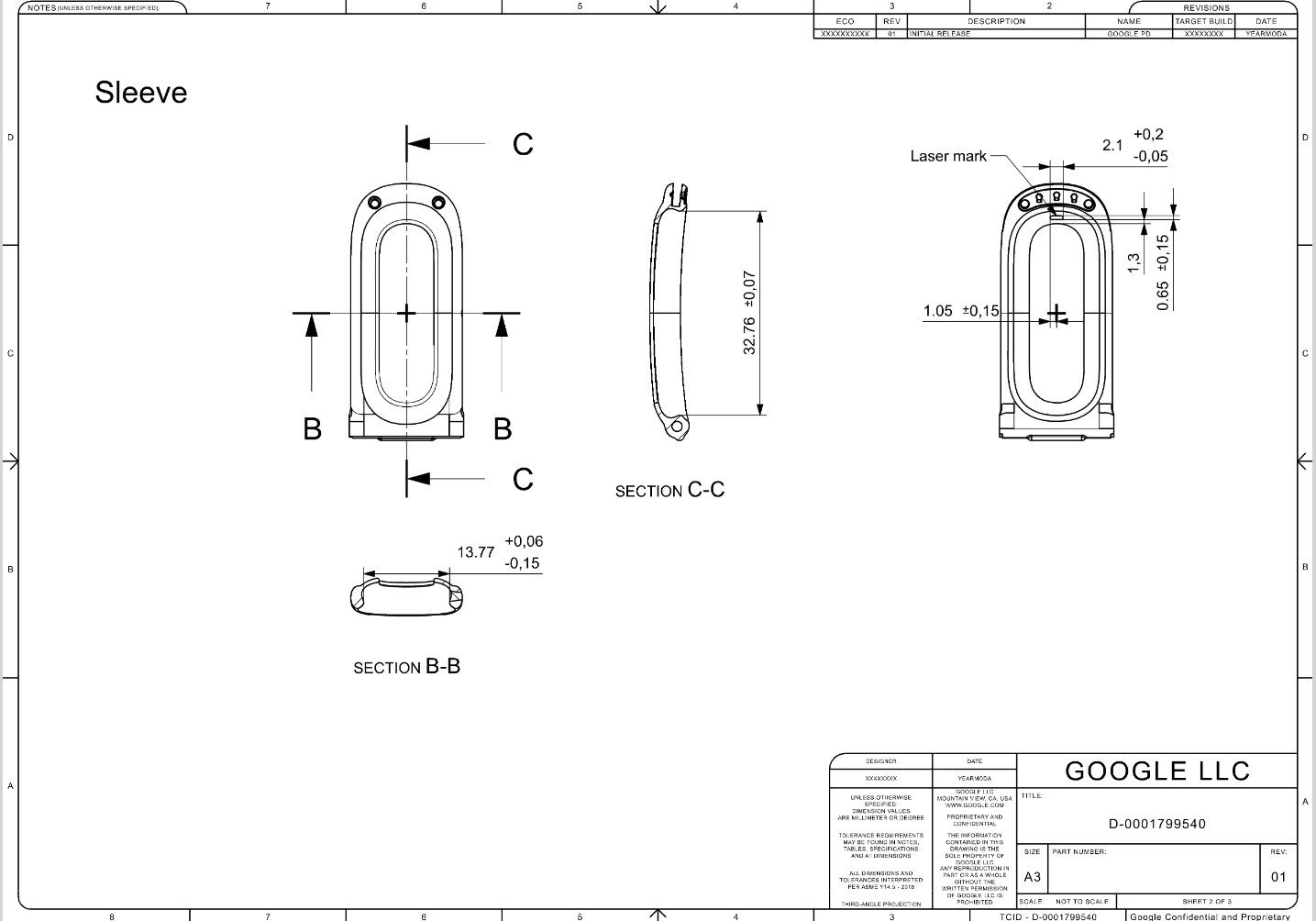
The practical implication: a simple open-pouch bicep sleeve requires no replication of the snap-in mechanism and no licensing agreement. Any manufacturer with a sewing machine and the PDF can produce one. Expect options on Amazon within weeks, not months.
Test Results
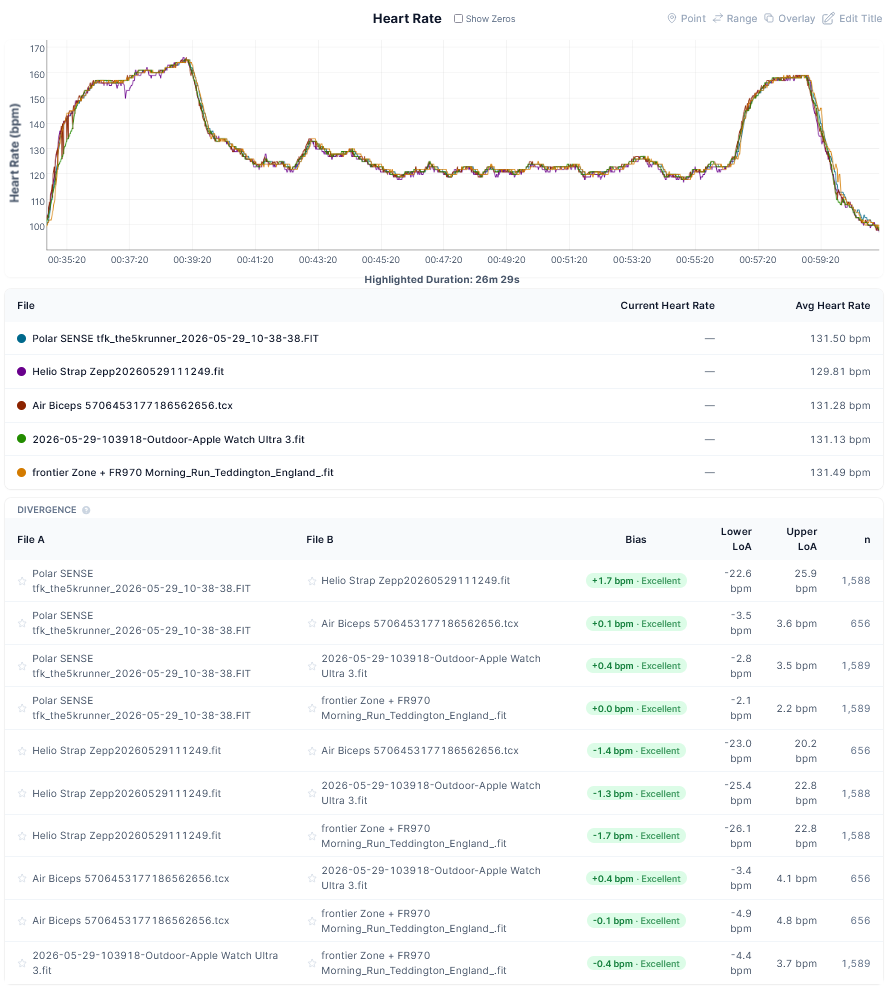
I decided to answer the auto-detection question with a proper run test, and yes, when worn on the bicep, the Air auto-detected running correctly. It also delivered very accurate results. Two hard efforts in what was otherwise a recovery run. The chart shows near-perfect heart rate tracking compared to Frontier ZONE, Polar SENSE, Apple Watch Ultra 3 and Amazfit Helio Strap (wrist), with a trivial wobble on the Helio at the start.
- Accuracy test result: Fitbit Air on the bicep is highly accurate.
- Avg HR 131.28 bpm. Bias near zero versus Polar SENSE (+0.1 bpm), Apple Watch Ultra 3 (+0.4 bpm), and FR970 (-0.1 bpm). All Excellent with tight LoA (~±3-5 bpm).
Quick answers
Is there a Fitbit Air arm band or bicep sleeve?
Not yet. Google has not released one, and no third-party arm sleeve or bicep band for the Fitbit Air is currently available. However, Google published the official CAD drawings and band design specifications on 3 June 2026, explicitly inviting third-party manufacturers to produce accessories. The open-pouch compression sleeve approach requires no replication of the snap-in mechanism, making it straightforward to produce. The workaround above is the only workable option right now.
When will a Fitbit Air arm sleeve be available?
Sooner than originally expected. Google’s publication of the official dimensional specifications removes the main barrier for third-party manufacturers. An open-pouch compression sleeve is a simple sewing project that does not require licensing or replicating the Air’s band mechanism. Expect options on Amazon within weeks. The official Google band guidelines page includes the CAD drawings and all technical requirements.
Can you wear the Fitbit Air on your upper arm or bicep?
Yes. The upper arm is a well-established site for optical heart rate measurement. With a suitable sleeve and the rotation fix described above, the Air reads from the bicep without modification to the device. Accuracy testing confirms near-zero bias against a chest strap reference with tight limits of agreement.
Will wearing the Fitbit Air on the upper arm affect sport auto-detection?
Possibly, though in testing, auto-detection worked correctly for running. The Air’s automatic activity recognition is trained on wrist motion patterns. Moving the device to the upper arm changes the accelerometer signature, potentially reducing detection accuracy for some activities. You can log activities manually in the Google Health app if needed.
What are the dimensions of the Fitbit Air pebble?
The pebble weighs 5.2 grams and is pill-shaped. The full wrist setup, pebble plus band, weighs 12 grams. The official CAD drawings with precise dimensions are available in Google’s band design specification PDF.
Last Updated on 3 October 2026 by tfk the5krunner
Small things I always use
- Garmin 90-degree charging adapter: Charges your Garmin from any USB-C cable. Essential when travelling. I use one.
- Body Glide: The blue anti-chafe stick swimmers and runners carry. I use it.
- Speedo earplugs: Fewer ear infections and no cold-water dizziness. I use them.
- Dryrobe Advance: My winter changing robe for open-water swims. I use one. A cheaper option is the AONYIYI changing robe.
- Maurten: Race fuel that stays easy on the stomach. I use them.
- Garmin charging puck: The quickest way to top up before a session. I use one.
- Injinji: Toe socks that stop rubbing, so you run more. I use them.
- Ultimate toe protectors: Stop black toenails on long runs. They work. I use them.
- Compressport R2 v2 calf sleeves: My calf sleeves of choice. I use them.
- Cellucor C4: My pre-workout before hard sessions.
- TPU tubes: Schwalbe Aerothan, Tubolito and Pirelli SmarTube. Light, tiny spares. I use all three.
- G8 insoles: Adjustable insoles that are good. I use them.
- Cycplus Cube: A 97g electric pump that gets a road tyre rideable in two minutes. I carry one. 5% off with code THE5KRUNNER.
Watches and sensors
- Polar H10: My daily driver for waking HRV.
- Polar Verity Sense: My backup arm-worn HR sensor.
- Nomad bedside charger: Charges my iPhone and Apple Watch overnight. I use it, and many of their bands.
- Train.Red: The best muscle oxygen sensor I’ve used.
- Tymewear: Accurate heart rate and reliable ventilatory zones. I use it to pace endurance rides over an hour.
- Garmin Forerunner 970: A pro-grade triathlon watch. I use this.
- Apple Watch Ultra 4: My daily smartwatch. No phone needed on rides.
- Garmin Fenix 9 Pro: I’ve just bought one.
On the bike
- Continental GP5000 for everyday riding, and Aero 111 on the front for special occasions.
- Helmets: Specialized S-Works Evade 3 for road riding, and Rudy Project Wing for TT-style races. I use both.
- Ravemen FR300: A front light that mounts under your Garmin or Wahoo. I use one.
- Wahoo TRACKR Radar: I use it on one bike and Varia on the other. They perform the same.
- Garmin Varia RTL515: Radar that warns you of cars from behind. I use this model.
- Wahoo ELEMNT Roam 3: The bike computer that’s easy to use. I use mine on most rides.
- Favero Assioma Pro RS2: Accurate power pedals that swap easily between bikes. I use this model.
Home and indoor training
- NPE Runn: Makes my basic treadmill smart, sending more accurate speed and distance to my watch and Zwift. I use it.
- Google Wifi: Keeps Zwift connected in my pain cave. I use it.
- Apple TV 4K: Zwift on the big screen. I use two.
- Google Nest Doorbell (wired, 2nd gen): My video doorbell, running in both Google Home and Apple Home. I use it.
Health, recovery and sleep
- FreeStyle Libre 3 Plus: Shows how my blood sugar responds to diet.
- hDrop: Measures my sweat loss in summer and indoors.
- Fourth Frontier Zone: Checks my heart under load in hard sessions.
- Oura Ring 5: My partner’s recovery tracker of choice.
- Kineon MOVE+: Red light therapy for niggles. It works.
- Eight Sleep: A cooling mattress cover my partner and I use nightly.
Reader-Powered Content

This content is not sponsored. It’s mostly me behind the labour of love, which is this site, and I appreciate everyone who supports it.
Support the site: Follow (free, fewer ads) · Subscribe (paid, ad-free) · Buy Me A Coffee ❤️
Written by real people, with AI assistance. Fact-checked and verified for originality. See the Editorial Policy. FTC: Affiliate Disclosure — some links pay commission. As an Amazon Associate, I earn from qualifying purchases.

tfk is the founder and author of the5krunner, an independent endurance sports technology publication. With 20 years of hands-on testing of GPS watches and wearables, and competing in triathlons at an international age-group level, tfk provides in-depth expert analysis of fitness technology for serious athletes and endurance sport competitors. ID

On fitting there are already STL files available to fit standard watch bands so pick your own.
Like – https://makerworld.com/en/models/2840498-fitbit-air-pebble-clip-for-normal-watch-band#profileId-3169780
The rubber glove hack sounds brilliant, but I’m not clear on your instructions. Are you using the cut off glove cuff for your arm?
no im just shovinga bit of glove inside the whoop pouch
A wrist band is excellent for securing the FitBit Air on your biceps. I am using an elastic 5 inch band which is wide enough to keep the pod in place and from slipping out. I removed the pod from the watch band, which is not needed. I wear the pod under the wrist band 7×24 and get excellent HR accuracy. Added benefit: wrist bands are much cheaper than watch bands.
I forgot to mention these other benefits over watch bands: the wrist band is breathable and easily washable in a machine.