Most recovery apps come with a trade-off: either buy into a proprietary band and subscription, or accept a black-box score with little visibility into what drives it. Vero is an iOS app that takes a different approach. It reads recovery and training signals from the watch a person already wears, computes everything on the device, and exposes the underlying physiology alongside the daily score.
Vero is built around the Apple Health ecosystem. Any device that writes to HealthKit can feed it data, but an Apple Watch is the natural fit. Garmin owners can also use Vero by enabling Garmin Connect’s HealthKit sync.
How It Works
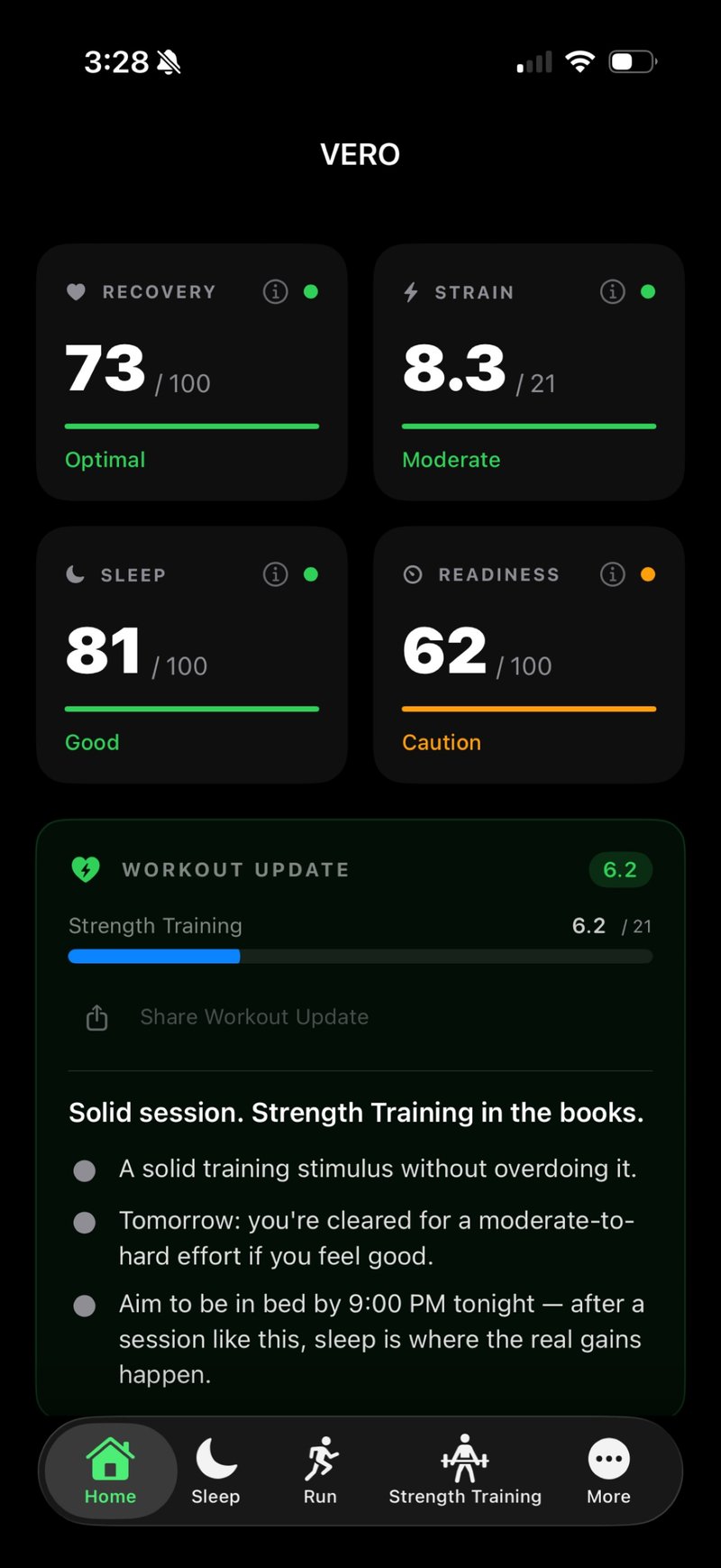
Each morning, Vero reads three streams of data from HealthKit and turns them into four scores.
- Recovery (0–100): A weighted composite of overnight HRV (40%), resting heart rate (25%), sleep quality (25%), and blood oxygen (10%), each compared against the user’s 21-day rolling baseline rather than a population norm.
- Sleep (0–100): Combines duration, deep and REM stages, efficiency, and bedtime consistency into a single restorative-quality measure.
- Strain (0–21): Calculated using Bannister’s 1991 TRIMP (Training Impulse), which weights every workout by heart-rate reserve and duration, so a long easy run and a short hard interval session are measured on their actual physiological cost rather than time alone.
- Readiness (0–100): A daily go-or-recover signal built from a morning capacity score (sleep efficiency, deep sleep, duration), an HRV Z-score multiplier against the user’s baseline, and a drain from the day’s accumulated training strain. It is the single number Vero surfaces at the top of the morning screen.
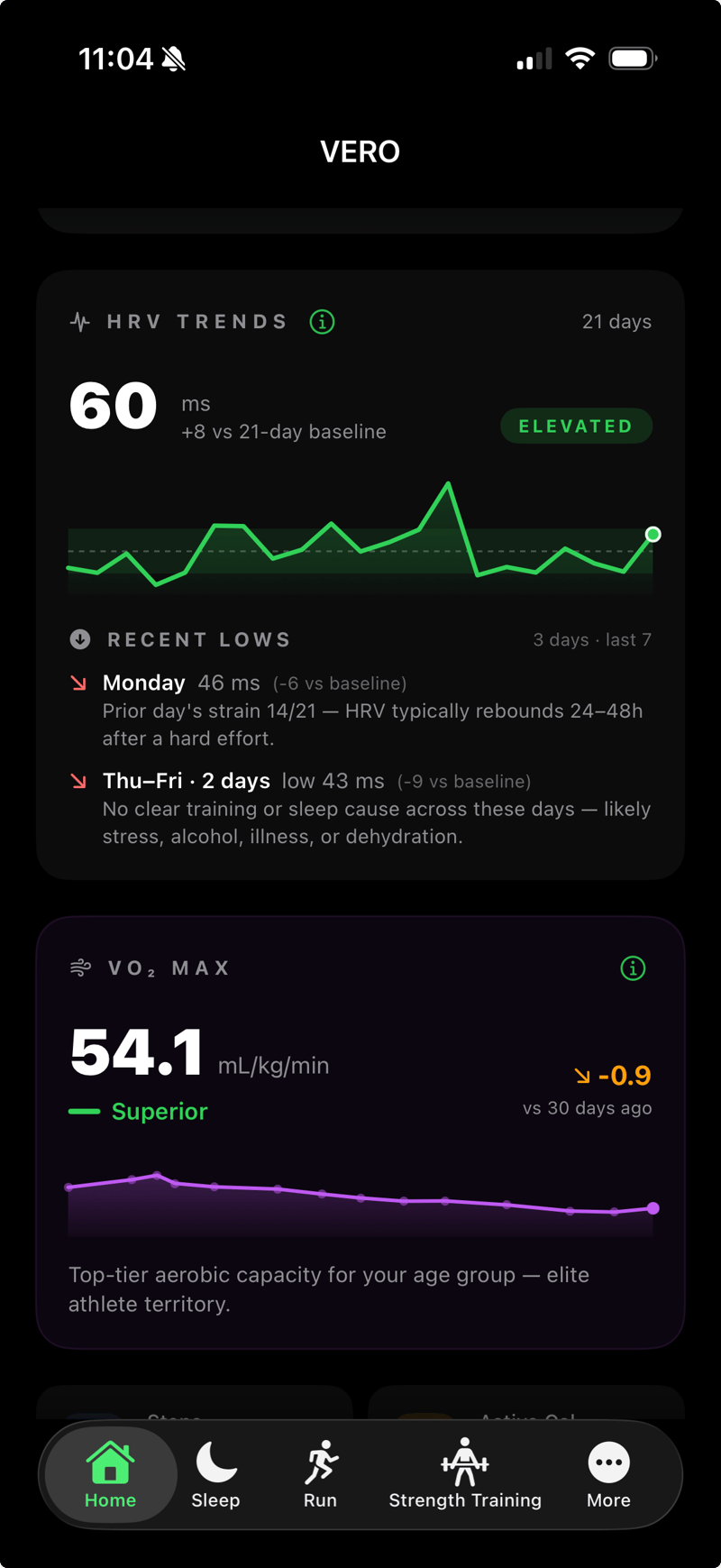
Underneath each score, Vero shows the raw inputs. HRV trend, sleep stages, and load are all visible, so the score can be cross-checked against the data it came from rather than taken on faith.
Personal Baselines from Day One
On first launch, Vero ingests up to 90 days of existing Apple Health data and builds personal baselines locally. The Recovery score uses a 21-day rolling baseline, and the backfill seeds that window, so it is fully populated immediately rather than after a calibration period of guesswork.
Baselines continue to refine as new data accumulates. Vero compares each user only against themselves, so a runner with a habitually low HRV is not flagged for it, and a steady upward HRV trend over weeks shows up as improved recovery rather than being averaged out.
Activity Intelligence by Sport
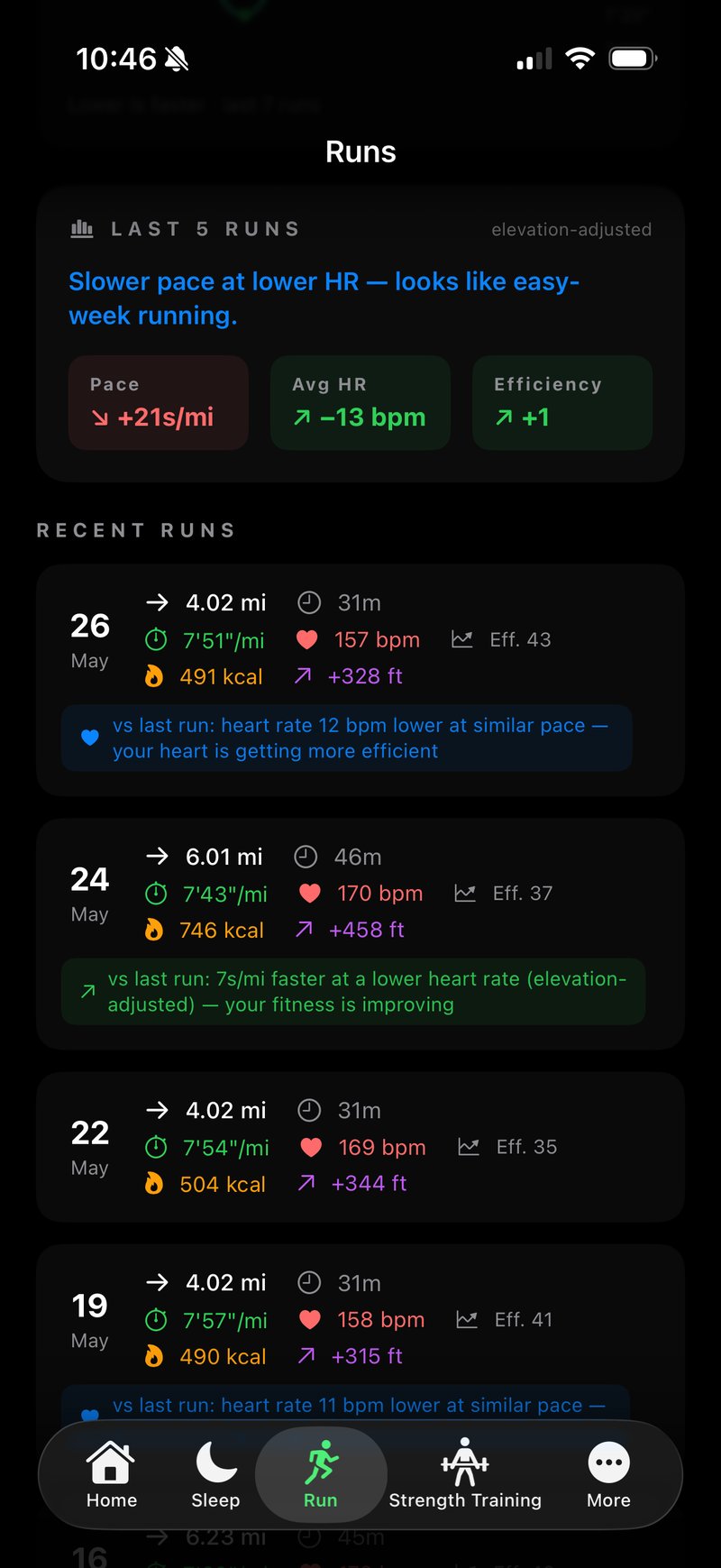
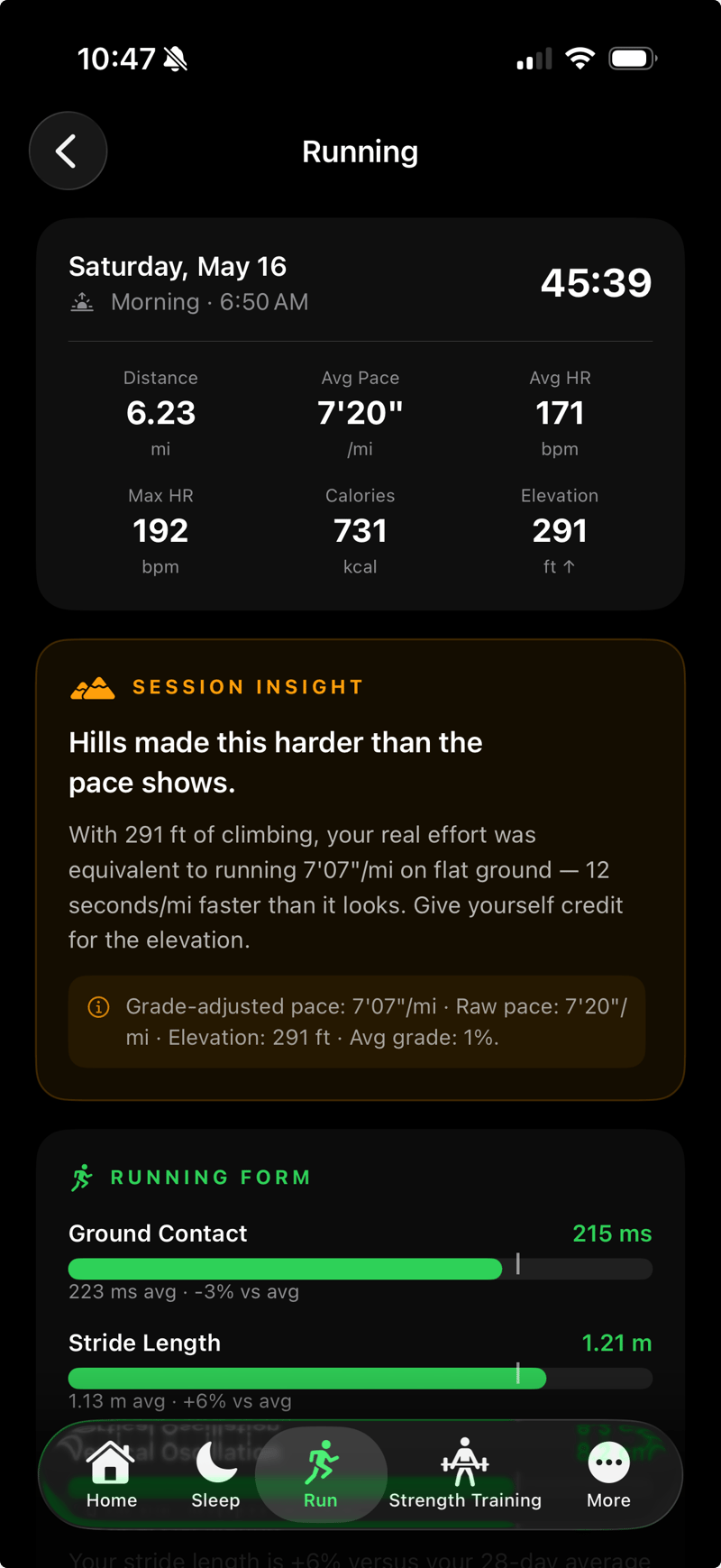
Rather than collapsing every session into a single number, Vero provides dedicated pages for each modality with metrics chosen for that activity:
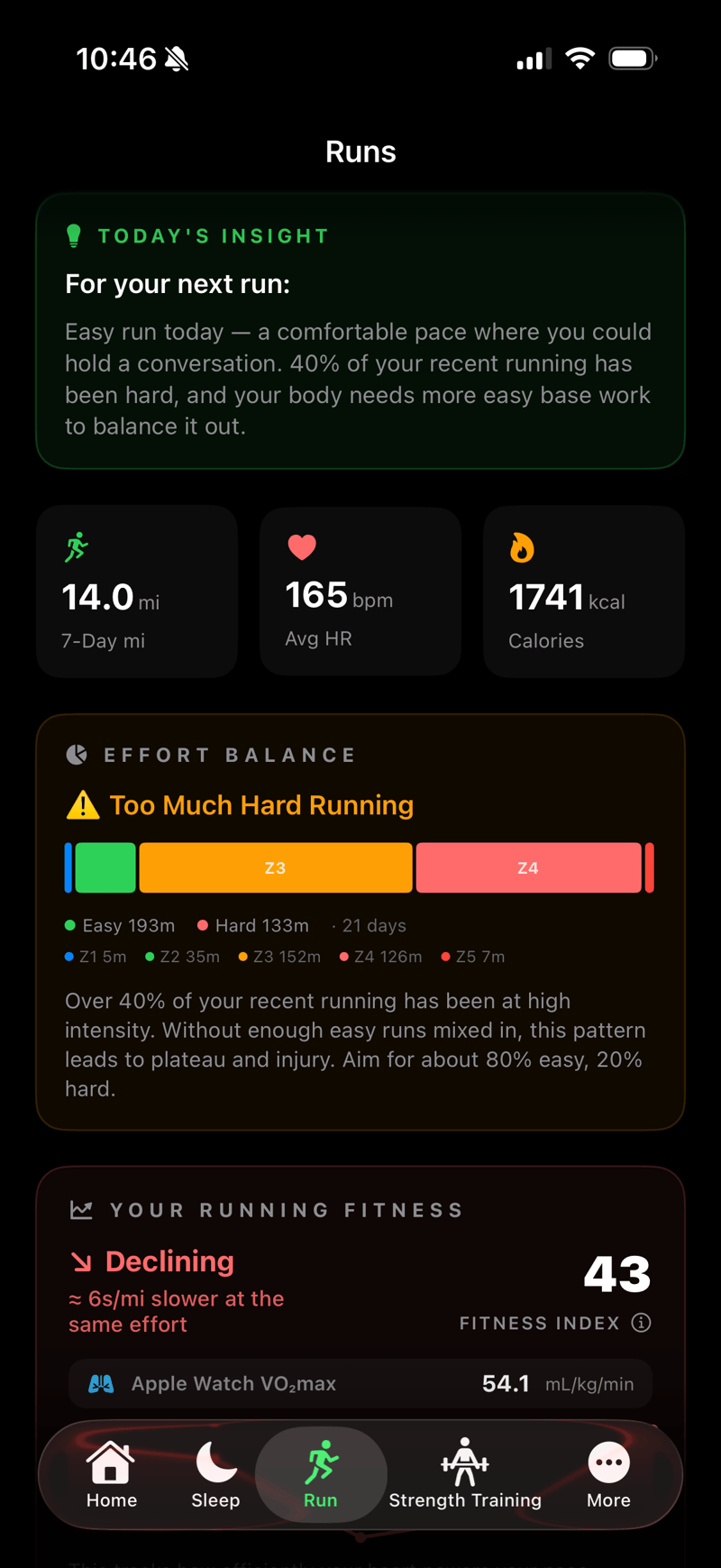
- Running: pace, grade-adjusted pace, cardio fitness (VO₂ max), cardiac drift, and a five-run trend summary.
- HIIT: interval count, hard-minute density, and latest heart-rate recovery (HRR).
- Cycling: weekly climbing, heart-rate zone distribution, and training stress.
- Strength: effort percentage and recovery impact.
- Hiking: grade-adjusted pace, climbing trends, and a 10% ramp-rule warning when weekly load is increasing too quickly.
- Walking: walking speed and step length against clinical thresholds, with streak tracking.
- Studio (yoga, Pilates, barre): per-session next-day HRV, so users can see which practices actually support recovery.
The aim is to surface metrics that matter for the activity in question. A cyclist’s training stress and a runner’s cardiac drift answer different questions, and Vero treats them separately rather than averaging them into a generic dashboard.
Weekly Insights and Trends
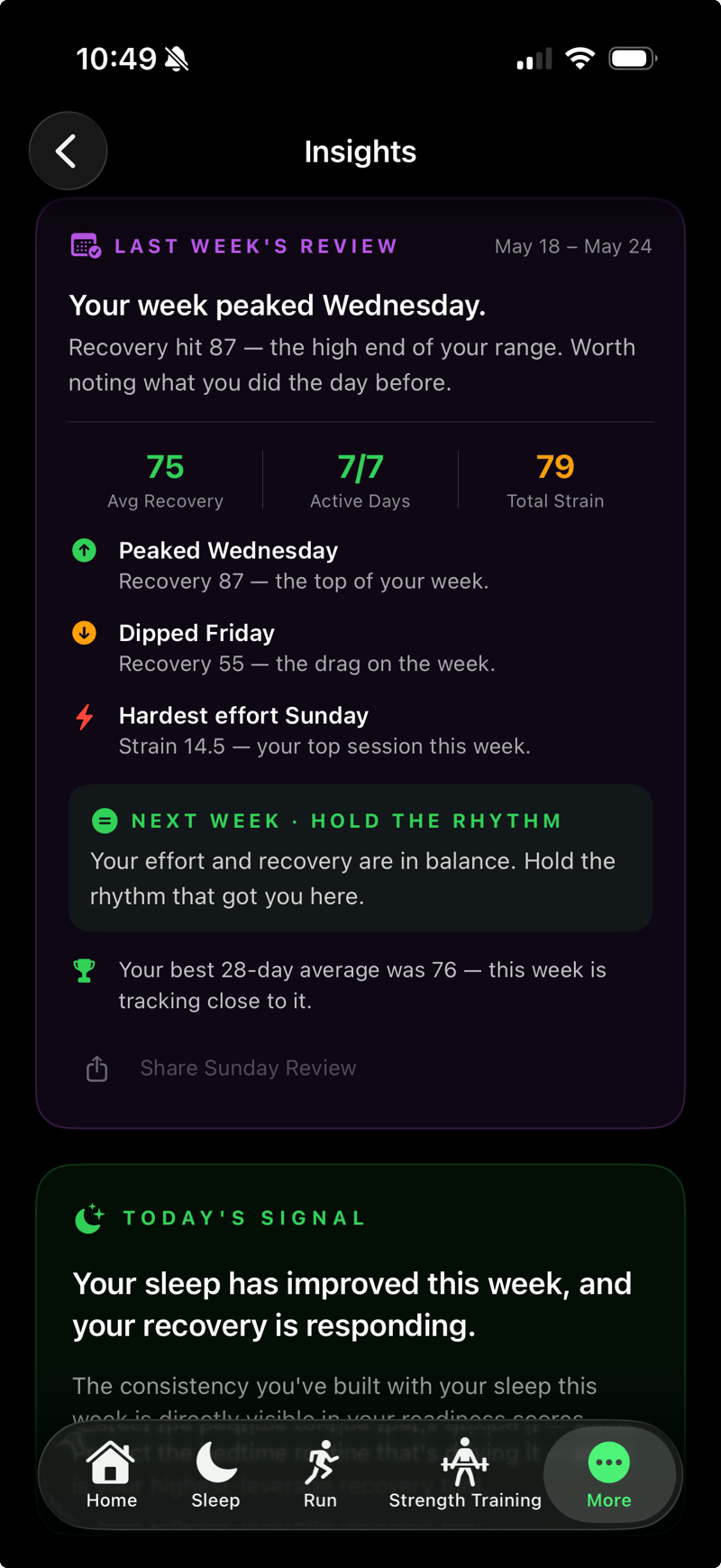
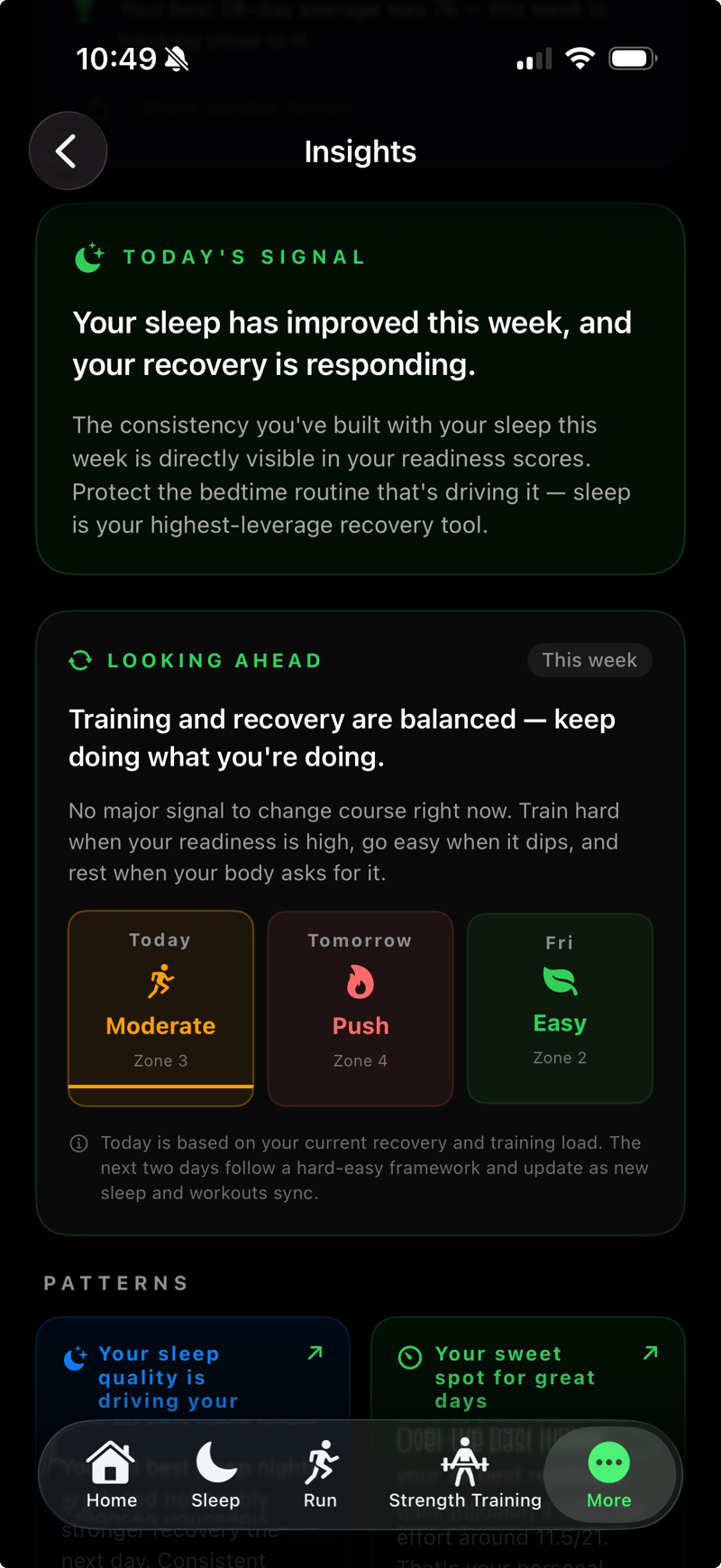
Vero synthesises the underlying data into plain-language insights. It flags when training load is building too quickly, when sleep quality is slowing recovery, or when a genuine fitness peak has been reached. Each Sunday, it produces a review of HRV, sleep efficiency, and load, along with a short shareable summary.
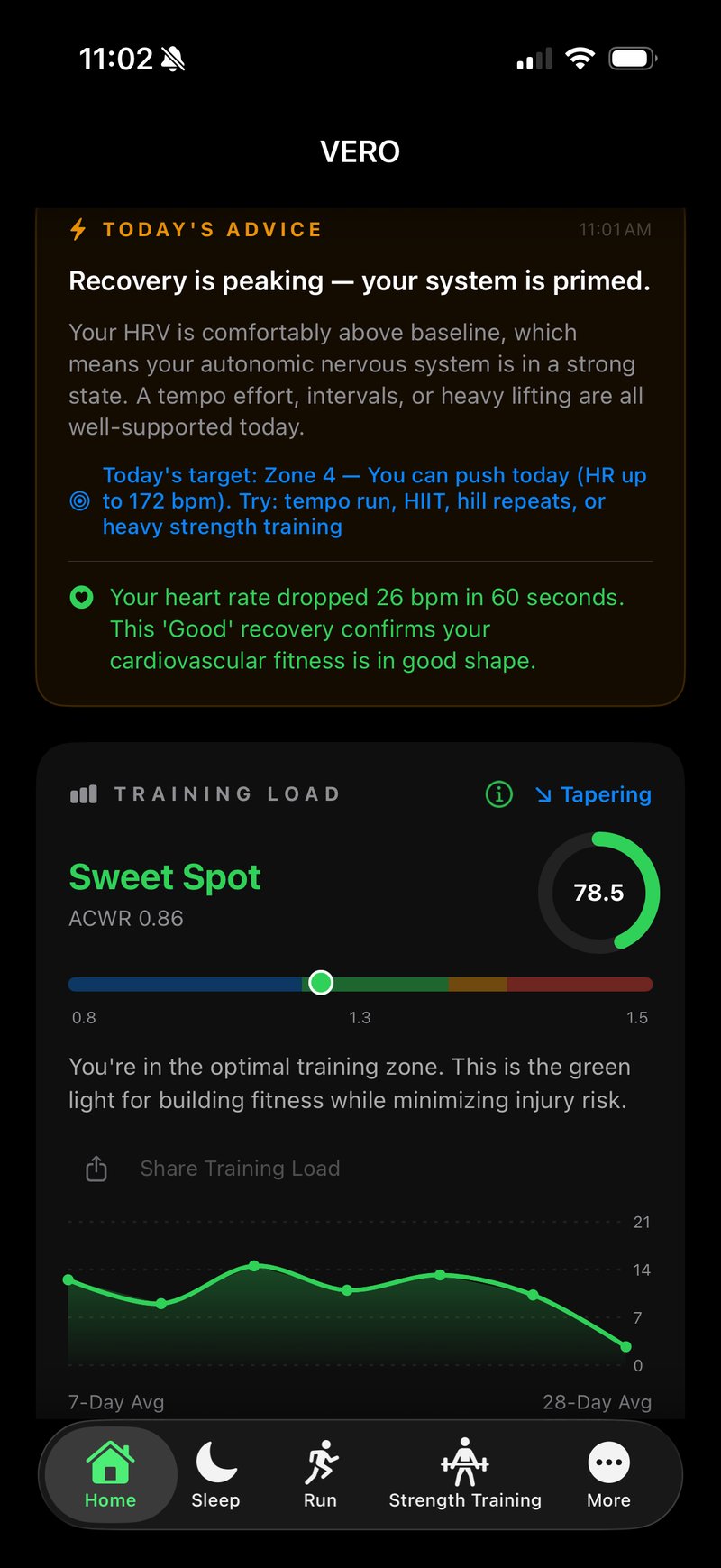
A forward-looking view uses the user’s current acute-to-chronic workload ratio (ACWR), calculated as a 7-day acute window against a 28-day chronic window, alongside the recovery trend to suggest whether to push, maintain, or back off in the days ahead. The point is not prescription but visibility: surfacing patterns the user can act on rather than rules they must follow.
When the Watch Comes Off at Night
Sleep tracking is optional, but Vero doesn’t simply produce a less-accurate score when the watch is off overnight. It switches to a different scoring pipeline.
In this HRV-only mode, the Recovery score reweights its inputs: the 25% normally assigned to sleep quality is redistributed to HRV (55%) and resting heart rate (35%), so the score leans more heavily on autonomic markers rather than being penalised for missing data. Readiness is rebuilt from an HRV-versus-baseline ratio rather than the sleep-based morning capacity calculation, and the insights drop sleep references that would otherwise be confusing. Strain is unaffected, since TRIMP doesn’t depend on sleep input.
Wearing the watch overnight gives the most complete picture. Without it, Vero still produces personalised scores, calculated from the data available rather than estimated around the gaps.
Data Handling and Privacy
All calculations happen on the iPhone. HealthKit data, personal baselines, and usage patterns never leave the device. Vero does not use accounts, sign-ups, or cloud storage. There are no analytics or advertising frameworks integrated, and no data is shared with third parties.
Access to Apple Health is read-only. Vero reads the metrics it needs to produce scores and does not write to or modify HealthKit data.
Supported Devices and Data Sources
Vero runs on iPhone (iOS 26 or later) and reads from Apple HealthKit. Any device that writes to HealthKit can provide data. Still, the experience is built around the Apple Watch, which continuously captures HRV, sleep, and workouts and feeds them directly into HealthKit.
Garmin users can also use Vero by enabling Garmin Connect’s HealthKit sync, which writes workouts, heart rate data, and sleep data to HealthKit, where Vero can read them. The fidelity depends on what Garmin Connect chooses to share, but for people who prefer Garmin hardware, this route works well.
watchOS 27 introduces a new HealthKit workout zones API exposing heart rate and cycling power zones to third-party apps.
Things to Note
- Apple Watch gives the best signal. Garmin via Garmin Connect works, but Apple Watch’s direct HealthKit integration provides the most continuous and granular data.
- iPhone-only, English-only for now. There is no iPad-optimised view or additional localisation at present.
- Scores are interpretive, not diagnostic. Vero is a training tool, not a medical device. Athletes managing health conditions should treat the scores as one signal among several.
Pricing
Vero is free to download and use, including the four daily scores and per-sport activity pages. Premium adds personalised coaching insights and costs $ 5.99/£5.99 monthly or $ 39.99/£39.99 annually. New users get a 7-day Premium trial on first launch.
What’s Next
Planned additions include support for swimming as a dedicated activity and customised workout-session comparison analysis, allowing users to compare a specific workout against past sessions of the same type rather than against general baselines.
Summary
For Apple Watch owners (and Garmin owners who route data through HealthKit) who want HRV-driven recovery and readiness scoring without buying into another hardware ecosystem, Vero offers a credible alternative. It computes everything on-device, exposes the underlying physiology alongside the daily score, and provides dedicated per-sport pages rather than a single, flattened metric.
Vero is available on the Apple App Store with a free tier and an optional paid subscription for personalised insights.
- More: Vero Health AI
- Author: @RonW, edited by the5krunner
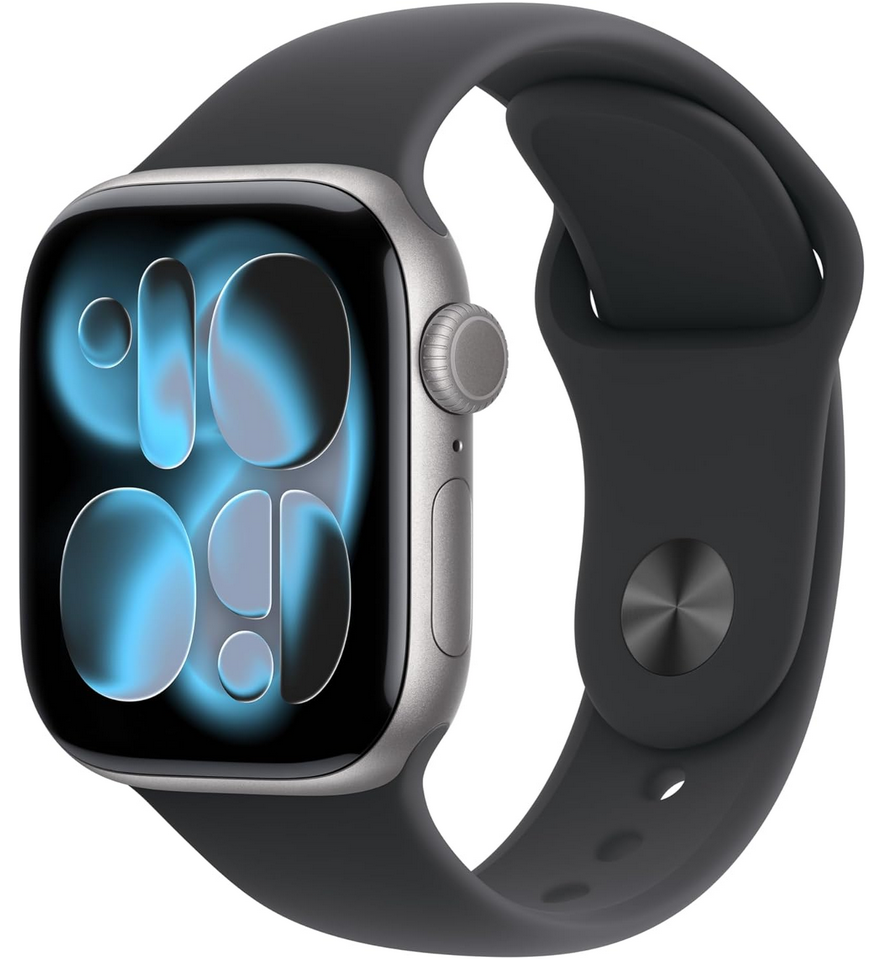

This post is part of the Apple Watch guide for endurance sport on this site, which covers the full lineup, watchOS, accuracy data, the medical roadmap, and the complete set of articles.
If you enjoyed reading this, here is another in the Indie Spotlight series: HyCoach: What HYROX Race Data Reveals About Your Performance.
Last Updated on 12 October 2026 by tfk the5krunner
Small things I always use
- Garmin 90-degree charging adapter: Charges your Garmin from any USB-C cable. Essential when travelling. I use one.
- Body Glide: The blue anti-chafe stick swimmers and runners carry. I use it.
- Speedo earplugs: Fewer ear infections and no cold-water dizziness. I use them.
- Dryrobe Advance: My winter changing robe for open-water swims. I use one. A cheaper option is the AONYIYI changing robe.
- Maurten: Race fuel that stays easy on the stomach. I use them.
- Garmin charging puck: The quickest way to top up before a session. I use one.
- Injinji: Toe socks that stop rubbing, so you run more. I use them.
- Ultimate toe protectors: Stop black toenails on long runs. They work. I use them.
- Compressport R2 v2 calf sleeves: My calf sleeves of choice. I use them.
- Cellucor C4: My pre-workout before hard sessions.
- TPU tubes: Schwalbe Aerothan, Tubolito and Pirelli SmarTube. Light, tiny spares. I use all three.
- G8 insoles: Adjustable insoles that are good. I use them.
- Cycplus Cube: A 97g electric pump that gets a road tyre rideable in two minutes. I carry one. 5% off with code THE5KRUNNER.
Watches and sensors
- Polar H10: My daily driver for waking HRV.
- Polar Verity Sense: My backup arm-worn HR sensor.
- Nomad bedside charger: Charges my iPhone and Apple Watch overnight. I use it, and many of their bands.
- Train.Red: The best muscle oxygen sensor I’ve used.
- Tymewear: Accurate heart rate and reliable ventilatory zones. I use it to pace endurance rides over an hour.
- Garmin Forerunner 970: A pro-grade triathlon watch. I use this.
- Apple Watch Ultra 4: My daily smartwatch. No phone needed on rides.
- Garmin Fenix 9 Pro: I’ve just bought one.
On the bike
- Continental GP5000 for everyday riding, and Aero 111 on the front for special occasions.
- Helmets: Specialized S-Works Evade 3 for road riding, and Rudy Project Wing for TT-style races. I use both.
- Ravemen FR300: A front light that mounts under your Garmin or Wahoo. I use one.
- Wahoo TRACKR Radar: I use it on one bike and Varia on the other. They perform the same.
- Garmin Varia RTL515: Radar that warns you of cars from behind. I use this model.
- Wahoo ELEMNT Roam 3: The bike computer that’s easy to use. I use mine on most rides.
- Favero Assioma Pro RS2: Accurate power pedals that swap easily between bikes. I use this model.
Home and indoor training
- NPE Runn: Makes my basic treadmill smart, sending more accurate speed and distance to my watch and Zwift. I use it.
- Google Wifi: Keeps Zwift connected in my pain cave. I use it.
- Apple TV 4K: Zwift on the big screen. I use two.
- Google Nest Doorbell (wired, 2nd gen): My video doorbell, running in both Google Home and Apple Home. I use it.
Health, recovery and sleep
- FreeStyle Libre 3 Plus: Shows how my blood sugar responds to diet.
- hDrop: Measures my sweat loss in summer and indoors.
- Fourth Frontier Zone: Checks my heart under load in hard sessions.
- Oura Ring 5: My partner’s recovery tracker of choice.
- Kineon MOVE+: Red light therapy for niggles. It works.
- Eight Sleep: A cooling mattress cover my partner and I use nightly.
Reader-Powered Content

This content is not sponsored. It’s mostly me behind the labour of love, which is this site, and I appreciate everyone who supports it.
Support the site: Follow (free, fewer ads) · Subscribe (paid, ad-free) · Buy Me A Coffee ❤️
Written by real people, with AI assistance. Fact-checked and verified for originality. See the Editorial Policy. FTC: Affiliate Disclosure — some links pay commission. As an Amazon Associate, I earn from qualifying purchases.

tfk is the founder and author of the5krunner, an independent endurance sports technology publication. With 20 years of hands-on testing of GPS watches and wearables, and competing in triathlons at an international age-group level, tfk provides in-depth expert analysis of fitness technology for serious athletes and endurance sport competitors. ID

Seems, at first glance, a copycat of Athlytic. Sorry if I am missing something.
In terms of design, it looks very similar to Athlytic, but Wellhero is still better when it comes to metric analysis.
Guess it’s region locked since it doesnt show in Europe when try to go to their app store page
Yes. And if I use a direct link it says it’s not available in my country (Portugal).
I downloaded and used it after I read your review….and it sucks totally for me. I have my Garmin Connect connected to Apple Health but most of the time Vero tells me to wait for a data download. So the problem originates probably from Garmin-Apple not talking properly…but the results on Vero are useless. I give it the trial period but I think I am going to delete it right afterwards.
Thanks for the honest feedback. I’m sorry Vero let you down, and that’s on me to fix.
You’ve diagnosed this exactly right, and it’s a real gap on our end, not your setup. An update that fixes exactly this issue is in review with Apple and should be rolling out this week.
I’d really like to get this working for you. Please email me at [email protected] and I’ll make sure you’re set up, and I’ll let you know the moment the update goes live. Thanks for giving the trial a chance. Ron
Hi everyone,
Thanks for your patience.
A new version of Vero has just been released to the App Store and is now available for download. This update is available across all of Europe and should resolve the issue reported by the user above.
Thank you for your support of Vero. Please reach out if you have any questions.
Ron