athletedata: AI Coaching Based On All Your Data That Messages You First
The Problem With Self-Coaching Multi-Sport Data
Most serious triathletes are already collecting good data. Garmin handles the training load. WHOOP or Oura handles recovery. Strava handles the social layer and ride history. Wahoo adds power to rides. The problem is that these platforms operate in isolation, and the gap between them leaves the athlete without an actionable coaching output.
The practical result: you open three or four apps every morning, mentally cross-reference recovery scores against your planned session, and make a judgment call. On a good day, you get it right. On a bad day, after a travel block, a disrupted sleep week, or a late TSB crash before a key race, you either train through it or you miss the signal entirely.
Pasting screenshots into ChatGPT and asking for coaching advice is a real workaround that real athletes use. It works, occasionally. It does not scale, and it puts the burden of synthesis entirely on the athlete.
athletedata.health is built around a different premise: your coach should already have the data, and it should come to you.
How athletedata Works
TL;DR: Connects your training and recovery data, runs it through an AI coaching layer, and sends coaching via Telegram or WhatsApp.
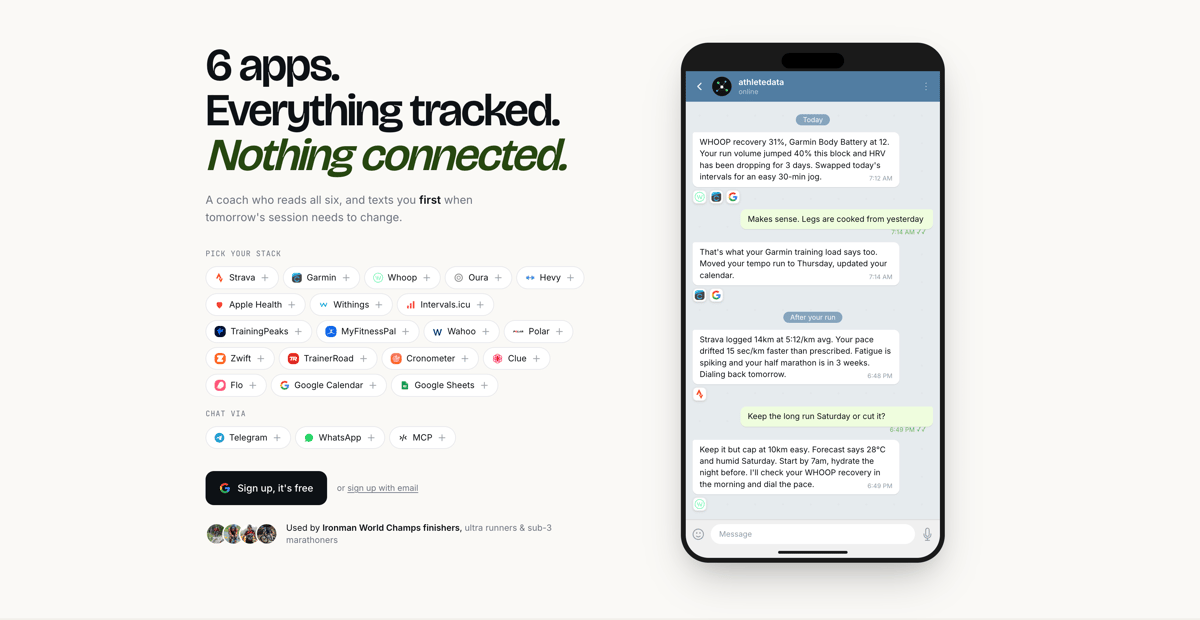
athletedata pulls live data from your connected devices and platforms, synthesises it across all inputs simultaneously, and delivers coaching proactively. It messages you before you ask, when something in the data warrants attention.
The core logic works like this:
- Recovery data (WHOOP, Oura, Garmin Body Battery) is read each morning
- It is cross-referenced against your planned training session for the day
- Training stress balance (TSB), acute and chronic training load, and HRV trends are factored in
- If the combination is suboptimal, for example, low recovery against high planned intensity, or deteriorating TSB ahead of a race, the session is automatically adjusted and you receive an explanation
Setup
Setup is straightforward. The connection flow for each platform takes under one minute and uses standard OAuth where available:
- Go to athletedata.health
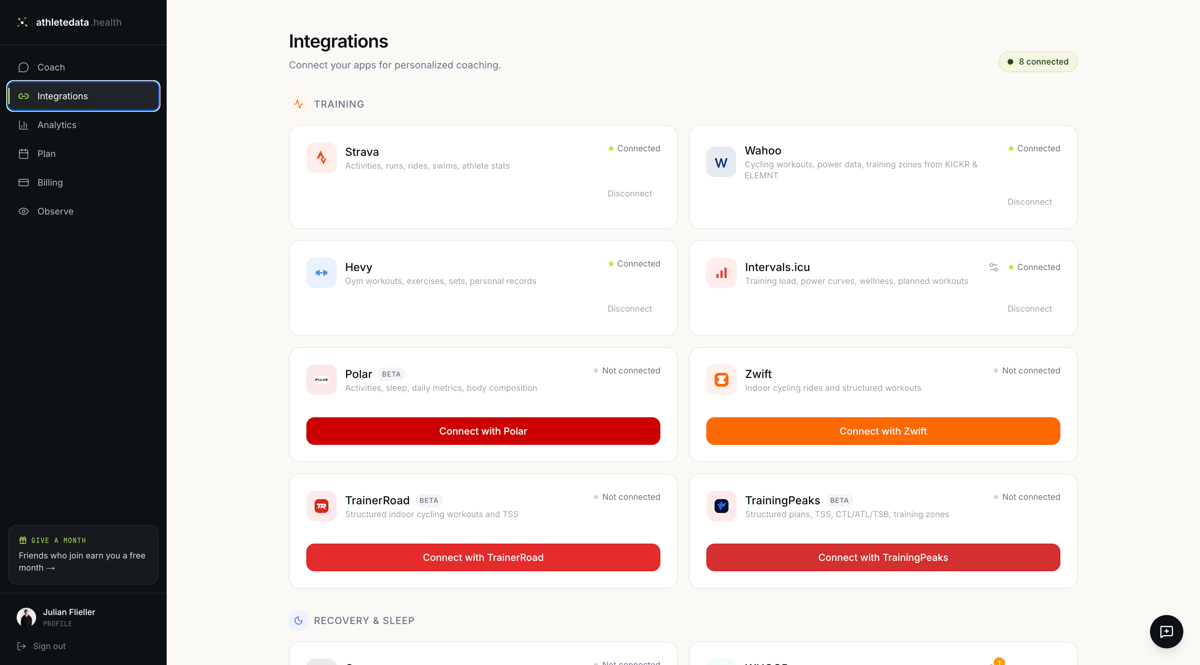
- Connect your integrations: Garmin, WHOOP, Strava, TrainingPeaks, Oura, Wahoo, and Withings are all supported (detailed list below)
- Connect your Telegram or WhatsApp account
- Get to know your coach
There is no configuration of coaching rules, no threshold-setting, and no manual input required after initial setup. The AI coaching layer reads your historical data on the first connection to establish baselines before it starts making recommendations.
What the Coaching Actually Looks Like
A few concrete examples of what athletedata surfaces, based on real usage:
Morning session swap. WHOOP recovery at 31%, Garmin Body Battery at 12, scheduled threshold run. athletedata messages at 7 am: threshold session swapped for zone 2 with the rationale that HRV is suppressed, resting HR is elevated, and sleep quality score is below your 7-day average. It is not asking you to decide. It has already been decided, and it explains why.
Post-ride breakdown. After a long bike session, it cross-references your power data against your heart rate zones and flags whether cardiac drift suggests aerobic decoupling, an early indicator that aerobic base is eroding under fatigue. The flag comes with a note on what to watch for in the next session.
TSB management ahead of race week. If your training stress balance drops too far into negative territory in the final 10 to 14 days before a target race, athletedata catches it and suggests load reduction before it becomes a taper problem. This is the kind of thing a human coach with access to TrainingPeaks would flag, but most self-coached athletes only see it in hindsight.
Multi-sport load context. For triathletes specifically, the AI accounts for cumulative load across swim, bike, and run rather than treating each discipline in isolation. A high-TSS bike day combined with a hard swim earlier in the week reads differently than either session would in isolation.
Integrations
Current platform support:
- Garmin Connect: activities, daily summaries, sleep, Body Battery, stress, body composition, training load, HRV
- TrainingPeaks: structured plans, TSS, CTL/ATL/TSB, training zones
- WHOOP: recovery score, HRV, resting HR, sleep performance
- Oura: readiness score, HRV, sleep stages
- Strava: activity history, route data
- Wahoo: power and cycling data
- Withings: body composition and weight trends
- Intervals.icu: TSS, CTL, ATL, TSB (for athletes already using it for load management)
- Hevy: gym workouts, exercises, sets, personal records
- Polar: activities, sleep, daily metrics, body composition
- Zwift: indoor cycling rides and structured workouts
- TrainerRoad: structured indoor cycling workouts and TSS
- Apple Health: workouts, sleep, HRV, resting HR, weight, VO2max
- Cronometer: detailed nutrition tracking with full micronutrient data
- MyFitnessPal: daily food logs, macros, water intake
- Clue: cycle, symptoms, mood, phase-aware coaching
- Flo: cycle, ovulation, BBT, symptoms
- Google Calendar: schedule-aware coaching, workout planning, race reminders
- Google Sheets: connect any spreadsheet you track for nutrition, blood work, custom metrics, and more
Your Dashboard
Alongside the Telegram and WhatsApp coaching, athletedata includes a web dashboard for athletes who want to see the full picture.
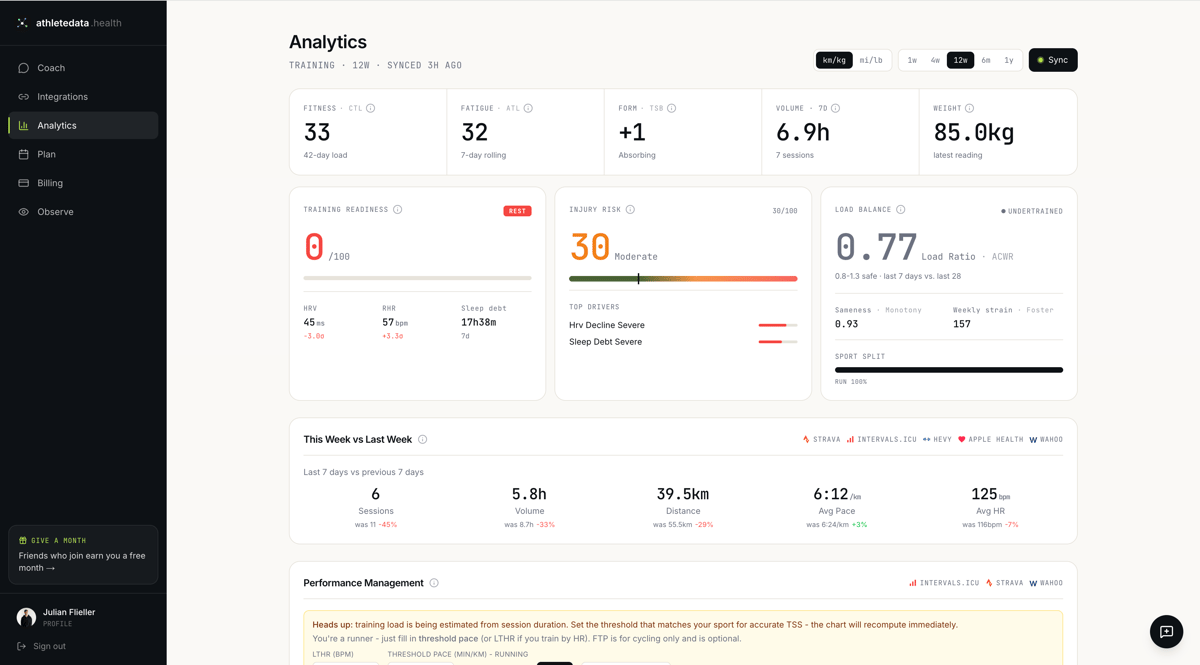
The dashboard shows fitness (CTL), fatigue (ATL), form (TSB), weekly volume, and weight, alongside a Training Readiness score (HRV, resting HR, and sleep debt, scored 0 to 100), an Injury Risk indicator (ACWR-based, with top drivers listed), and Load Balance (ACWR ratio with monotony and weekly strain).
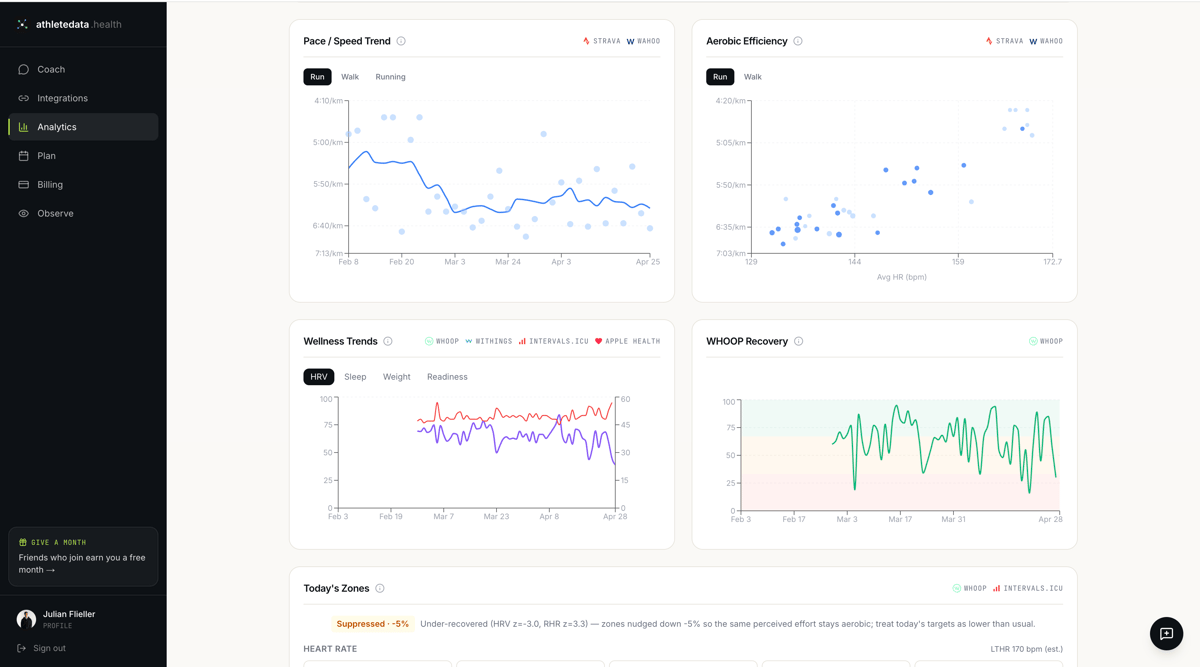
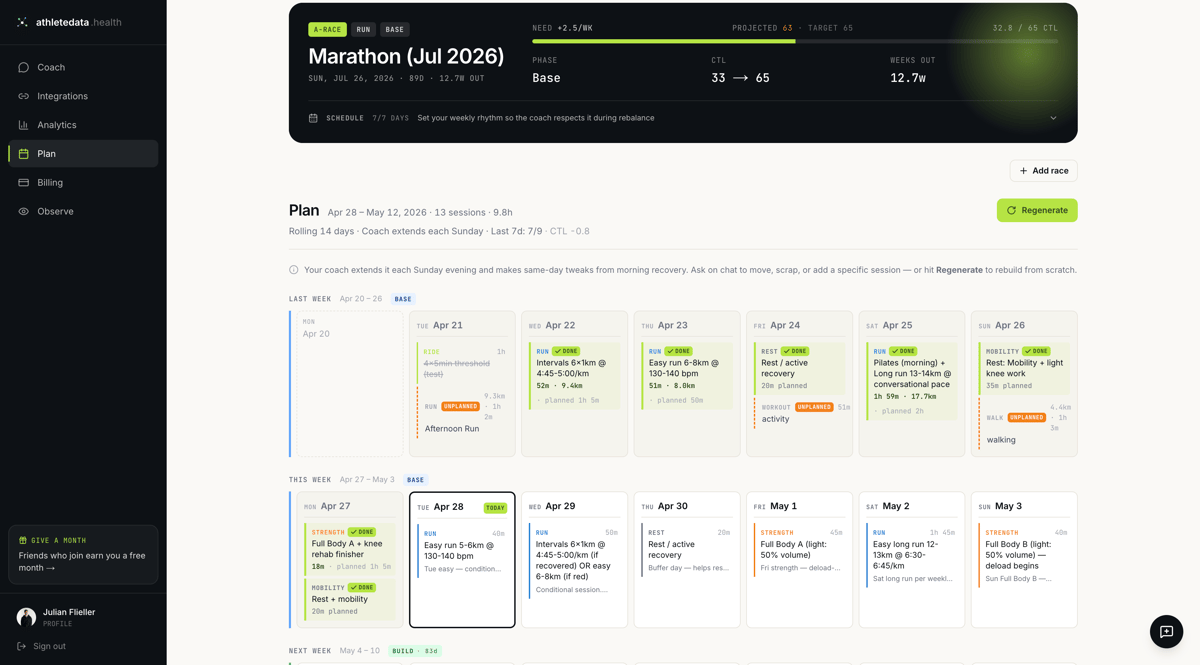
Beyond analytics, the dashboard includes a rolling 14-day training plan that the coach builds and maintains for you. You set your A-race (date, type, weekly availability) and athletedata works backwards from your current CTL to a target CTL on race day, projecting the weekly load progression needed to get there.
Each session in the plan has a specific prescription (pace, duration, intensity zone) and the plan extends itself every Sunday evening, with same-day tweaks pulled from your morning recovery data. If a session is missed or modified, the coach rebalances the rest of the week automatically rather than leaving the plan stale.
Background
athletedata.health was built by Julian Flieller, an AI engineer and triathlete who got tired of manually cross-referencing his own training and recovery data every morning. The problem he was solving was personal before it was a product: how do you produce a genuinely useful coaching signal from data that already exists across five different platforms, without spending 30 minutes on it before every session?
It is actively used by 500+ athletes, including Ironman world championship finishers, with the majority being runners, cyclists, and triathletes.
Summary
For self-coached athletes managing their own data across Garmin, WHOOP, Oura, and Strava, athletedata closes the gap between having data and doing something useful with it. The coaching is proactive rather than reactive, delivered via Telegram or WhatsApp, and accounts for multi-sport load in a way that single-sport tools do not.
Quick answers
What is athletedata and how does it work?
athletedata is an AI coaching app that connects to your training and recovery platforms (Garmin, WHOOP, Oura, TrainingPeaks, Strava, Wahoo and others), reads the data each day, and sends coaching messages via Telegram or WhatsApp. It will swap or adjust planned sessions when recovery, HRV or training load suggest the original plan no longer fits.
Which devices and platforms does athletedata connect to?
At launch athletedata supports Garmin Connect, TrainingPeaks, WHOOP, Oura, Strava, Wahoo, Withings, Intervals.icu, Polar, Zwift, TrainerRoad, Apple Health, Hevy, Cronometer, MyFitnessPal, Clue, Flo, Google Calendar and Google Sheets. Connection uses standard OAuth and takes about a minute per platform.
Does athletedata replace a human coach?
For self-coached athletes who already work across multiple data sources, athletedata replaces the manual cross-referencing step and adds proactive intervention: it catches things like a TSB crash before race week or aerobic decoupling on long rides without waiting to be asked. It does not replace the relationship, judgment, and race-day strategy a human coach provides.
Author: JulianF from athletedata, edited by the5krunner
Free trial at athletedata.health
Last Updated on 29 June 2026 by the5krunner
My favourite kit and nutrition
- Garmin Fenix 9 Pro — I’ve just bought one.
- Injinji – Runners protect your toes. Avoid discomfort and minor injury. Run more. Run faster. I use them.
- Garmin 90-degree charging adapter — A small keyring adapter you can use anywhere. Essential when away. I use one.
- Garmin charging puck — the fastest and most reliable way to top up your Garmin before a session. I use one.
- Ravemen FR300 — Front light that mounts directly under your Garmin or Wahoo head unit. Keeps your bars clean and your beam pointed where it matters. I use one.
- Body Glide – The blue anti-chafe stick that all swimmers and many runners use. I use it.
- Maurten — The race nutrition trusted by elite athletes. Gels and drink mixes engineered to be easy on the stomach. I use them.
- Garmin Varia RTL515 — A radar rear light that alerts you to vehicles approaching from behind. Pairs with your Edge or Wahoo. I use this model.
- Favero Assioma Pro RS2 — The power-meter pedals most serious cyclists choose. Accurate, easy to move between bikes. I use this model.
- Garmin Forerunner 970 — A serious choice for a pro-grade triathlon watch. I use this.
- Polar H10 — My daily driver for accurate, waking HRV readings.
- Wahoo ELEMNT Roam 3 — The bike computer that has the feature Garmin lacks: usability. I use mine on most rides.
Reader-Powered Content

This content is not sponsored. It’s mostly me behind the labour of love, which is this site, and I appreciate everyone who supports it.
Support the site: Follow (free, fewer ads) · Subscribe (paid, ad-free) · Buy Me A Coffee ❤️
All articles are written by real people, fact-checked, and verified for originality. See the Editorial Policy. FTC: Affiliate Disclosure — some links pay commission. As an Amazon Associate, I earn from qualifying purchases.

tfk is the founder and author of the5krunner, an independent endurance sports technology publication. With 20 years of hands-on testing of GPS watches and wearables, and competing in triathlons at an international age-group level, tfk provides in-depth expert analysis of fitness technology for serious athletes and endurance sport competitors. ID
